Search Forums For:
 HOME  DISCUSSIONS  PHOTOS  REVIEWS  CLASSIFIEDS  DEALERS  STORE
 

Go Back   TractorByNet.com > John Deere > John Deere Owning/Operating
Show Recent Threads:
24 Hours
Since My Last Visit

Reply
 
Thread Tools Display Modes
Old 11-27-2008, 04:15 PM   #31 (permalink)
Silver Member
 
Join Date: Nov 2008
Location: Maine-Canada Border
Posts: 231
Default Re: How To Put Cab / Flasher Lights ON Designated Switch

Quote:
Originally Posted by nmu98 View Post
Karl,
In post 7 & 13, I describe how we would put the hazards in a separate switch and how the factory switch would work. This is how I think you want it.:

The red power on the beacon would go to a switch, from the switch you would run a wire up to the headlight switch. You would remove the purple wire from the connector one the back of the headlight switch and plug it in to the switch wire. That would give you worklights whenever you want.

Without doing anything else, you would have a factory switch that was:
off
hazards
hazards/headlights
headlights

I would think that would work well for you as there might be some time you would want to work without flashers. But, if you want flashers on whenever lights are on, you would have to run two wires with doides on them from the worklights and the headlights, to the flasher wire. Then you would always have flashers.
I'm encountering an unexpected issue with this job. Unlike yours seem to be in mine the wires that branch off from the main wire sleeve to the light switch are very short and the connector can't be pulled from under the upper dashboard far enough to be workable, so I need to remove the lower panel as well. Well, after removing all the screws and the park brake pully and nut the dang panel still won't come off.

There's something inside holding it back but try as I might I can't figure out what it is. It seems to be somewhere in the middle near the two screws at the base of the panel. The panel is very loose and if I could only see what's so stubbornly gripping it... any ideas?
__________________
4720 Cabbie /400X loader /72" snowblower on tail
Karl2 is offline   Reply With Quote
Old 11-29-2008, 07:43 PM   #32 (permalink)
Platinum Member
 
nmu98's Avatar
 
Join Date: Jun 2007
Posts: 891
Default Re: How To Put Cab / Flasher Lights ON Designated Switch

I did not get my switch yet, but I have to job wired up and ready to go.


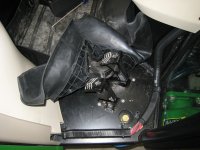
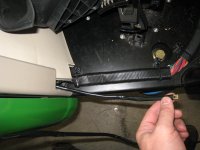
I removed the cover over the rear scv lever, mid pto, and 3 point. Once oyou release the front clips on it, it flips up and out. There are 3 more screws that hold the rest of the cover down. Once removed, I pulled the rubber boot off the joystick and lifted off the cover.

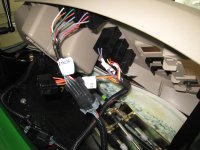
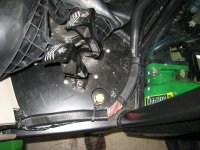
The beacon connector is sitting right there. My spade connectors were a little large to go into the red wire on the becon switch so I used a large fuse tap that fit in very tight. I connected the wire with protected connectors since this is hot at all times. Then I had some wire that was inside a protective sleeve. Seemed like a goods place to use it, but was not needed.

The wire from the switch to the dash switch is very easy to route. There is plent of room just to drop the wire down and push it up the dash without fishing or using a hanger. I followed the factory harness and slipped mine into the zip ties holding it.


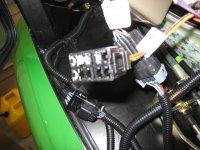
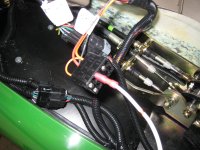
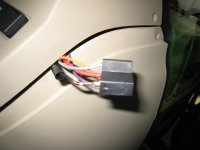
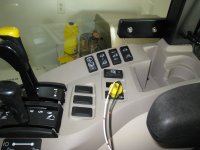
Once I got it wired, I had to make the decision of what I wanted. I was going to remove the hazards and put them on a separate switch. The sky is the limit here. The wires are very simple to remove from the switch and rearange. You just slip a small screw driver, or paper clip into the top of the connector and gently pull the wire back. After removing the orange wire(hazards) and putting the purple wire (work lights) in its place, and thinking about other people using the tracotr, and 100 other thoughts, I ended up going to a simple and more factory idea. As kenny suggested, I just piggy backed the work lights in the switch. The switch works as it says it does on the dash, but I can put my work lights on at any point. I can use the switch on the dash, or I can use the switch on the console to the right to turn them on.

This is easily changed, so I thought I would try it. Many posts before explain how to do this differenntly. The picture shows my connector in there on another fuse tap. Including my time wondering how I wanted this, testing all options, and deciding, I had less than 20 minutes into this. Putting the switch in will take less than 5 minutes. The hardest part of the job is decing what variant you want to control, and or remove from the factory switch, or not..

I ended up moving my rear wipre up by the cruise controls. I dont know if this is the best place, but I have bumped it by the PTO before... So.... Move stuff around how you like it. All of these have clips on the back that you sqeeze with your fingers to get them out.
Attached Thumbnails
how-put-cab-flasher-lights-img_1001.jpg  how-put-cab-flasher-lights-img_1002.jpg  how-put-cab-flasher-lights-img_1003.jpg  how-put-cab-flasher-lights-img_1004.jpg  how-put-cab-flasher-lights-img_1005.jpg  

how-put-cab-flasher-lights-img_1006.jpg  how-put-cab-flasher-lights-img_1007.jpg  how-put-cab-flasher-lights-img_1008.jpg  
__________________
JD 5203 2wd, JD 3720 cab, JD 4110, JD 445, IH 1586, IH 886, IH 404......
nmu98 is offline   Reply With Quote
Old 11-29-2008, 11:29 PM   #33 (permalink)
Silver Member
 
Join Date: Nov 2008
Location: Maine-Canada Border
Posts: 231
Default Re: How To Put Cab / Flasher Lights ON Designated Switch

Quote:
Originally Posted by nmu98 View Post
I did not get my switch yet, but I have to job wired up and ready to go.
Fantastic, this is almost exactly what I had planned for tomorrow and was wondering if removing the side panel would be an easy task or turn into a 5-hour doozie but thanks to you all I have to do is print your post and look at your pics and voila. Thanks for sharing the experience

I decided I would rearrange the switch bank so that it matches factory layout but also add a switch in one of the two remaining sockets for the headlights, just can't stand that reflection anymore so I want to be able to turn headlights off for work areas and then back on for road transit since I have no choice in this regard. For this I'm using the rear work lights switch and rerouting the rear work lights wire to the front work lights (top of main light switch) since I always use them both anyway.

As for the beacon switch that's already there it will finally be used for the beacon that I was strongly advised to install by just about everyone I know that does commercial snow removal. Apparently the signal it sends to the outside world is that vehicle is actually at work while hazards only indicate vehicle is slow. I think.
__________________
4720 Cabbie /400X loader /72" snowblower on tail
Karl2 is offline   Reply With Quote
Old 11-30-2008, 08:33 AM   #34 (permalink)
Platinum Member
 
nmu98's Avatar
 
Join Date: Jun 2007
Posts: 891
Default Re: How To Put Cab / Flasher Lights ON Designated Switch

If I underdstand you correctly, you want the rear work lights to be on all the time with the front work lights. If that is the case, and you never want to be able to turn them off when the front ones are on, then you just need to connect the two wires that are on that switch. There is no need to run them up to the dash switch.
__________________
JD 5203 2wd, JD 3720 cab, JD 4110, JD 445, IH 1586, IH 886, IH 404......
nmu98 is offline   Reply With Quote
Old 11-30-2008, 11:02 PM   #35 (permalink)
Elite Member
 
Join Date: Dec 2001
Posts: 2,645
Default Re: How To Put Cab / Flasher Lights ON Designated Switch

Yeah, running those two wire sets (Front work lights and rear work lights) to the switch for the rear lights would do that, right?
__________________
Nuru
JD 3520

Nuru is offline   Reply With Quote
Old 12-01-2008, 08:15 AM   #36 (permalink)
Platinum Member
 
nmu98's Avatar
 
Join Date: Jun 2007
Posts: 891
Default Re: How To Put Cab / Flasher Lights ON Designated Switch

Quote:
Originally Posted by Nuru View Post
Yeah, running those two wire sets (Front work lights and rear work lights) to the switch for the rear lights would do that, right?
I am unsure of the question Nuru. I think you mean switching your worklights and having them both on?

The rear work lights are switchable, but only work when the front work lights are on. There is no need to run any of those wires anywhere. Hooking it up like i did allows you to turn on the worklights whenever you want and use the switch to control the rears.

IF you want the rears on whenever the fronts are on, you need to remove the 2 wires from the rear work light switch, and connect them.
__________________
JD 5203 2wd, JD 3720 cab, JD 4110, JD 445, IH 1586, IH 886, IH 404......
nmu98 is offline   Reply With Quote
Old 12-02-2008, 08:09 AM   #37 (permalink)
Platinum Member
 
nmu98's Avatar
 
Join Date: Jun 2007
Posts: 891
Default Re: How To Put Cab / Flasher Lights ON Designated Switch

I finished putting the switch in. It was lighted so I had to grab a ground from the beacon wiring (the black wire). I have tested out moving around all the wires on the factory switch and had no issues at all. It is normal, but odd that the dash lights do not come on with the worklights (with the key off).

I will try to grab some pictures, but I was in a hurry to get this done as I think I have some hydro issues....
__________________
JD 5203 2wd, JD 3720 cab, JD 4110, JD 445, IH 1586, IH 886, IH 404......
nmu98 is offline   Reply With Quote
Old 12-02-2008, 02:40 PM   #38 (permalink)
Silver Member
 
Join Date: Nov 2008
Location: Maine-Canada Border
Posts: 231
Default Re: How To Put Cab / Flasher Lights ON Designated Switch

Quote:
Originally Posted by nmu98 View Post
If I underdstand you correctly, you want the rear work lights to be on all the time with the front work lights. If that is the case, and you never want to be able to turn them off when the front ones are on, then you just need to connect the two wires that are on that switch. There is no need to run them up to the dash switch.
Lol where's my brain, it should have occurred to me that the rear work lights were already connected to the main switch since they won't turn on unless front work lights are already on. Fortunately with the in-laws visiting I haven't had time for the switch project yet so nothing's been compromised so far.

Indeed I want both sets of work lights to be on anytime the main switch is set to work lights since this is the light configuration required for snow removal (main task) and I can't think of any other job I'm using this tractor for that would require front work lights only.
__________________
4720 Cabbie /400X loader /72" snowblower on tail
Karl2 is offline   Reply With Quote
Old 12-07-2008, 08:35 PM   #39 (permalink)
Elite Member
 
Join Date: Dec 2001
Posts: 2,645
Default Re: How To Put Cab / Flasher Lights ON Designated Switch

Quote:
Originally Posted by nmu98 View Post
I am unsure of the question Nuru. I think you mean switching your worklights and having them both on?

The rear work lights are switchable, but only work when the front work lights are on. There is no need to run any of those wires anywhere. Hooking it up like i did allows you to turn on the worklights whenever you want and use the switch to control the rears.

IF you want the rears on whenever the fronts are on, you need to remove the 2 wires from the rear work light switch, and connect them.
Thanks nmu98. you did answer my question.
__________________
Nuru
JD 3520

Nuru is offline   Reply With Quote
Old 12-07-2008, 08:37 PM   #40 (permalink)
Elite Member
 
Join Date: Dec 2001
Posts: 2,645
Default Re: How To Put Cab / Flasher Lights ON Designated Switch

Quote:
Originally Posted by Karl2 View Post

Indeed I want both sets of work lights to be on anytime the main switch is set to work lights since this is the light configuration required for snow removal (main task) and I can't think of any other job I'm using this tractor for that would require front work lights only.
Karl2, Same here, and I agree with you on the usage.
__________________
Nuru
JD 3520

Nuru is offline   Reply With Quote
Reply

Thread Tools
Display Modes

Posting Rules
You may not post new threads
You may not post replies
You may not post attachments
You may not edit your posts

BB code is On
Smilies are On
[IMG] code is On
HTML code is Off
Trackbacks are Off
Pingbacks are Off
Refbacks are Off
Forum Jump


All times are GMT -4. The time now is 10:02 PM.


HOME DISCUSSIONS PHOTOS REVIEWS CLASSIFIEDS DEALERS STORE
Terms of Use | Privacy Policy | Advertise | © 2009 TractorByNet.com
 

Safety Warning: TractorByNet.com does not review discussion forum posts for accuracy or safety. Please refer to manufacturer operator and safety manuals before operating tractors or equipment. Additionally, use caution and common sense when applying any advice you receive on TractorByNet.com, and seek professional advice before attempting professional tasks.
Page generated in 0.35311 seconds with 9 queries