Photo Posting How To

   / Photo Posting How To #41  
Jake,
I don't know if/what the limit is? I just keep adding photos.
I looked at the bulk uploader too. Looks cool but I haven't tried it yet.
Does it ask you to re-size the photos?
Does it allow you to put into a new folder in Photobucket?
Or do you have to create one first?

Ok, I see now, I just tried it. You have to be in the folder you want to upload to...duh, just like always.:)

But I didn't see anything about re-sizing? Is that what that small to large sliding scale thing is? Or is that just for viewing your uploads? How do you know what size the picture is going to be?

Oh Ok, found that too now.
Below the up load tray are the image size options. Pretty cool indeed. Thanks for letting me find my own answers. :)
 
   / Photo Posting How To #42  
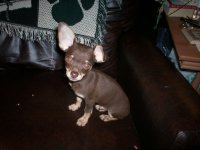
Here is the latest added to our collection of 4 legged critters
 

Attachments

  • dog pics 002.jpg
    dog pics 002.jpg
    317.1 KB · Views: 237
   / Photo Posting How To #43  
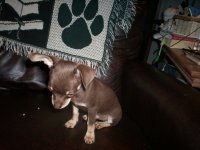
Well, I thought it was going to be a thumbnail pic:mad: . Oh, well, here's another
 

Attachments

  • dog pics 003.jpg
    dog pics 003.jpg
    268.3 KB · Views: 228
   / Photo Posting How To #44  
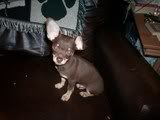
:mad: :mad: :mad: Trying again.
 

Attachments

  • dog pics 001.jpg
    dog pics 001.jpg
    285.7 KB · Views: 221
   / Photo Posting How To #45  
Oh, well, that is a teacup chihuahua that my wife wanted for Christmas. She got it early, as if you couldn't tell.
 
   / Photo Posting How To
  • Thread Starter
#46  
What were you trying to do with that photo? Did you want it to come up as a thumbnail?

If you wanted to do it as a thumbnail you need a Photobucket account.
 
   / Photo Posting How To #47  
Ok, I'm going to try this again

dogpics004.jpg


I think pic showed up, but don't know if it is clickable or not.

dogpics002.jpg


And one more

dogpics001.jpg
 
   / Photo Posting How To #48  
Abracadabra....clickable thumbnails.....POOF!!!


   / Photo Posting How To #49  
Well, that's enough for now. I probably won't be able to remember how I did that tomorrow.
 
   / Photo Posting How To
  • Thread Starter
#50  
Yep, thats the one :D

All a clickable thumbnail really is is just a link that is disguised as a picture pointing towards a bigger version of the same picture.

Photobucket just makes it easy :)
 
   / Photo Posting How To #51  
Grrrr said:
You have now finished the uploading part of the pictures. You now need to go back to TBN and write out your message.
Once you have finished writing out the message you need to go back to Photobucket and find the pictures you uploaded earlier.
Once you have the image you want to put in the post, look under it for the box that says IMG Code.
Click on this and it will automatically copy to your clipboard.
Then go to the message at TBN again and click in where you type the message out. Click roughly where you want the photo to appear.
Then right click and click paste.
The code is telling TBN where the photo is located. It does not look like a photo at the moment but if you click on Preview Message you will see it will appear as a photo.
I did this but as you can see the picture is to big .
How do i make the picture smaller so you don't have to scoll up and down & side to side to see all of the picture.
photos030.jpg
 
   / Photo Posting How To #52  
OK, great info, and I have tried to use it, but I appear to be doing something wrong. I use PhotoBucket and create the thumbnails, they show up in my post, but when I click on them, instead of getting just the picture, my Photobucket album opens up, at least for me. Do any of you get the same result, or does just the picture open?
Any help will be greatly appreciated. TIA.
Here is an example post:

http://www.tractorbynet.com/forums/1565737-post8.html

Open that post, then click one of the thumbnails, what do you get?
 
   / Photo Posting How To
  • Thread Starter
#53  
OK, great info, and I have tried to use it, but I appear to be doing something wrong. I use PhotoBucket and create the thumbnails, they show up in my post, but when I click on them, instead of getting just the picture, my Photobucket album opens up, at least for me. Do any of you get the same result, or does just the picture open?
Any help will be greatly appreciated. TIA.
Here is an example post:

http://www.tractorbynet.com/forums/1565737-post8.html

Open that post, then click one of the thumbnails, what do you get?

Did you follow the steps as described in this post:
http://www.tractorbynet.com/forums/1220156-post6.html

Specifically:
  1. Find the picture(s) you want to show and click the little tick box underneath them on the left.
  2. Then go down to the bottom of the page where it says Generate HTML and IMG Code.
  3. This will generate a load of different codes. You are looking for the one that says IMG clickable thumbnails for message boards recommended
 
   / Photo Posting How To #54  
OK, great info, and I have tried to use it, but I appear to be doing something wrong. I use PhotoBucket and create the thumbnails, they show up in my post, but when I click on them, instead of getting just the picture, my Photobucket album opens up, at least for me. Do any of you get the same result, or does just the picture open?
Any help will be greatly appreciated.

I was having the same problem with photobucket directing clicks to my album instead of the picture only. There is a new check box under your photobucket "account options" that needs to be un-checked. Here's the instruction from a photobucket forum

Quote:
Hi everyone,

We're pleased to announce today that there has been a change made to the way the thumbnail codes work.

If you go into your 'account options' inside your account, you will see a tickbox option titled, 'Images Link Back To Album'.

If the option is selected, your thumbnails, when clicked on, will open to the album page view.

If the option is NOT selected, your thumbnails when clicked on will open to the full size image. This is what thumbnails used to work like.
 
   / Photo Posting How To #55  
I was having the same problem with photobucket directing clicks to my album instead of the picture only. There is a new check box under your photobucket "account options" that needs to be un-checked. Here's the instruction from a photobucket forum

OK, thanks, I found that check box and un-checked it. This is a test photo... or two. From the "Preview Post" I can see that it worked.

I tried to edit the post I linked to in my original question post, but the "Edit Post" button is gone. Is there a time limit on when you can edit a post?

 
   / Photo Posting How To #56  
Did you follow the steps as described in this post:
http://www.tractorbynet.com/forums/1220156-post6.html

Specifically:

1. Find the picture(s) you want to show and click the little tick box underneath them on the left.
2. Then go down to the bottom of the page where it says Generate HTML and IMG Code.
3. This will generate a load of different codes. You are looking for the one that says IMG clickable thumbnails for message boards recommended


Yes I did, but the correction to the problem is in the post above from jk96. My question now is, are those steps necessary? I used those instructions for the first pic in the above post, but for the second pic I just copied the IMG code from the drop down box that opens up when I point to the picture on Photobucket. Seems to be the same code either way, or am I missing something?
Thanks again for your help, this is the most useful non-tractor thread on TBN.
 
   / Photo Posting How To
  • Thread Starter
#57  
1. Find the picture(s) you want to show and click the little tick box underneath them on the left.
2. Then go down to the bottom of the page where it says Generate HTML and IMG Code.
3. This will generate a load of different codes. You are looking for the one that says IMG clickable thumbnails for message boards recommended


Yes I did, but the correction to the problem is in the post above from jk96. My question now is, are those steps necessary? I used those instructions for the first pic in the above post, but for the second pic I just copied the IMG code from the drop down box that opens up when I point to the picture on Photobucket. Seems to be the same code either way, or am I missing something?
Thanks again for your help, this is the most useful non-tractor thread on TBN.

I think when you just click on the IMG code, you get a full size image appear in the post, rather than a clickable thumbnail. But I could be wrong, I haven't been on PhotoBucket for a while.

I will get around to updating this thread one day.... :) I think more people would find it useful if it was stickied at the top of this sub forum.
 
   / Photo Posting How To #58  
I will get around to updating this thread one day.... :) I think more people would find it useful if it was stickied at the top of this sub forum.

Mods... another vote (mine) for sticky!!

Meanwhile, I am going to refer people to it anytime I see someone having trouble posting pics.

Thanks again for all the time you put into helping others.
jp
 
   / Photo Posting How To #59  
Great information and I know it will help many. Anyone have an easy tutorial for Mac users who get lost on a computer after you get past the on/off button?:mad:

MarkV
 
   / Photo Posting How To
  • Thread Starter
#60  
Great information and I know it will help many. Anyone have an easy tutorial for Mac users who get lost on a computer after you get past the on/off button?:mad:

MarkV

You mean for posting photos?

It is a very similar process, as after all the internet is the internet, Mac or PC.

I will get them updated, but I have a busy schedule. I don't even have enough time to regularly post on TBN anymore.
 

Tractor & Equipment Auctions

Kubota M4700 (A60462)
2012 Dixie Chopper Magnum 2460 60in Zero Turn Commercial Mower (A59228)
2012 Dixie Chopper...
2002 Ford Thunderbird Convertible (A59231)
2002 Ford...
2022 KOMATSU PC360LC-11 EXCAVATOR (A60429)
2022 KOMATSU...
19008 (A56859)
19008 (A56859)
2004 EAGER BEAVER 50GSL/3 DETACH TRAILER (A52707)
2004 EAGER BEAVER...
 
Top