can't upload pix

   / can't upload pix #31  
cleared cache, cookies, browsing history, logged out reboot, logged in.


no worky worky

lets try going advanced and adding a an image file that way:

View attachment IMG_20190117_230933842.jpg

Looks like that worked... I guess that is the "new normal"...
 
   / can't upload pix #32  
"Manage Attachments" posted the picture as an Attached Thumnail. Now I remember why I don't use it.
 
   / can't upload pix #34  
On my computer I double click "Reply" or double click "+Reply to Thread", then put the cursor where I want the picture and click the "Insert Image" icon.

Double clicking the picture before posting opens the size option.
 
   / can't upload pix #35  
On my computer I double click "Reply" or double click "+Reply to Thread", then put the cursor where I want the picture and click the "Insert Image" icon.

Double clicking the picture before posting opens the size option.

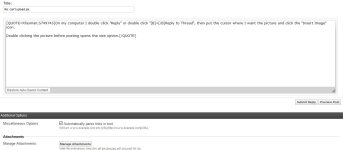
You must be using a different version of TBN than I am. When I double click reply to thread it brings me to a page (see attached) that only has a manage attachments option. I have no Insert Image option.
 

Attachments

  • page I get.JPG
    page I get.JPG
    68.1 KB · Views: 103
   / can't upload pix #36  
You must be using a different version of TBN than I am. When I double click reply to thread it brings me to a page (see attached) that only has a manage attachments option. I have no Insert Image option.
This is double clicked "Reply to Thread":

rtt.JPG


And double clicked "Reply With Quote"

rwq.JPG
 
   / can't upload pix #37  
Insert Image is the tree in a picture frame icon.

rtt.JPG
 
   / can't upload pix #39  
Insert Image is the tree in a picture frame icon.

View attachment 658207

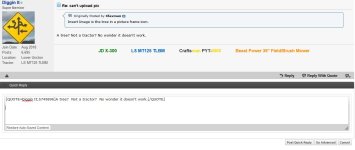
I remember TBN changed its format a while ago and I stayed with the original old format. When I click reply to thread it does not look like what you posted. I do not have any of the functions shown in your screenshot. No emojis, can't change font size, underline, etc. When I click reply or reply to thread I get the quick reply box with go advanced in the lower right corner.
 

Attachments

  • reply to thread.JPG
    reply to thread.JPG
    81.4 KB · Views: 107
   / can't upload pix #40  
This is what I am using:

screenshot-www.tractorbynet.com-2018.05.16  07-53.jpeg

-------------------------------------------------------------------------------------------
It is in "General Settings":

my home.PNG
 
Last edited:

Tractor & Equipment Auctions

2014 Chevrolet Silverado 4x4 Crew Cab Pickup Truck (A56858)
2014 Chevrolet...
New/Unused CFG Industrial H12R Mini Excavator (A57453)
New/Unused CFG...
500 BBL FRAC TANK (A58214)
500 BBL FRAC TANK...
2015 Freightliner M2 106 AWD Altec AT37G 37ft. Insulated Bucket Truck (A55973)
2015 Freightliner...
John Deere 5103 (A53317)
John Deere 5103...
2016 Ford Explorer AWD SUV (A56859)
2016 Ford Explorer...
 
Top