Photo advice for posting

   / Photo advice for posting #1  

Richard

Super Member
Joined
Apr 6, 2000
Messages
5,057
Location
Knoxville, TN
Tractor
International 1066 Full sized JCB Loader/Backhoe and a John Deere 430 to mow with
Have a couple of photos I'm trying to post. When attached they are evidently too large. I can deal with that. I don't have any software to speak of, but our scanner came with the viewer and I can evidently change the picture size hence, the file size. What I find though is to do that, I start to get a pixilated (sp?) image. Certainly nothing to fret over, but my photos are clear as a bell and I'd like to get a clear view of not only Brutus, but the brush pile/fire I had this past weekend. All pyromaniacs would have LOVED to have been there!!!

Any thoughts on how to reduce size but keep sharpness?

Richard
 
   / Photo advice for posting #2  
Richard
I'm the last guy who should offer this type of advice/w3tcompact/icons/wink.gif but in Win98 there is a imaging option in the menu that does a nice job of changing picture sizes without additional software.
regards
Mutt
 
   / Photo advice for posting #3  
<font color=blue>in Win98 there is a imaging option</font color=blue>

I only found that, quite by accident, myself a couple of months ago./w3tcompact/icons/shocked.gif

Bird
 
   / Photo advice for posting #4  
Richard,

First I'll assume that you are using Win98, or one of its brethren. If that's the case, read on, if not, let us know what you've got, & we'll start over.

If you open the Start->Programs->Accessories->Imaging, you'll get the little Imaging application provided to Microsoft from Kodak.

Use this to open your picture. Once the picture is opened, you can then modify it to suit your needs. The first thing I would do is convert the image to "JPEG" or JPG format. This format retains a fair amount of quality and does an excellent job of compression. However, it is "lossy" compression, so don't get too agressive.

Once you have the picture in JPEG format, Select the Page->Properties from the top menu bar. The dialog box that comes up will have four "tabs" to select how you want to modify the picture: Color, Compression, Resolution, & Size.
All of these can reduce the "file size" of the picture. Probably the easiest to use is the "Resolution". Try different settings, and save the photo. After each save, go to the menu File->Properties to check to see how big the file is. If you're not happy with that, try reducing the number of colors, or just changing the size...

Let us know how it all goes! /w3tcompact/icons/smile.gif


The GlueGuy
 
   / Photo advice for posting #5  
Hey, thanks for the info, guys! /w3tcompact/icons/smile.gif

Having been a Macintosh geek since 1984, I barely know how to use Windows. I broke down and purchased a PC last year for testing purposes, but I don't really spend enough time on it to learn the ins and outs of Win98.

Now I know how to do one more thing. /w3tcompact/icons/wink.gif

HarvSig.gif
 
   / Photo advice for posting
  • Thread Starter
#6  
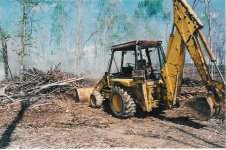
Ok, let's see if this works. Remember my past comments that Brutus is "Fugly". I'll presume all to know what I mean by that. Though Fugly, Brutus is only 1900 hours old and runs smoother than my mechanical watch (anyone remember those!!!)

As you may see, the hoe portion does seem to be a significant portion of Brutus. SURE has come in handy and been fun.

The loader bucket is an 8 footer, the hoe bucket I think is a two footer.
Richard
 

Attachments

  • 35-41812-Brutusoriginal.jpg
    35-41812-Brutusoriginal.jpg
    172.1 KB · Views: 159
   / Photo advice for posting
  • Thread Starter
#7  
Wahoooooooooooooooo

Ok, so I have done something right! Thanks for help, I'm scanning in pyromaniac photos now.
 
   / Photo advice for posting #8  
Looks like Brutus could stand to borrow my air compressor,sand blaster, paint spray guns and a couple gallons of paint!
By the way, did you ever get it repainted? I know your wife had a different color scheme in mind than you did, at your last update on that subject.
Brutus looks like it could definately put a dent in that pile of debris that you are burning.
 
   / Photo advice for posting #9  
Richard,

Picture came through 5X5! I think I know what you mean about "fugly", but I won't spread it around! /w3tcompact/icons/smile.gif

My eyes (or something) may be deceiving me, but it looks like that left-front tire is ready for a retread?

BTW - I've already seent he pyro photos. You do know how to do a <font color=red>BURN</font color=red>. /w3tcompact/icons/smile.gif

The GlueGuy
 
   / Photo advice for posting
  • Thread Starter
#10  
Scruffy, you are indeed, a person of discretion if THAT is all you have to say about Brutus's condition!! /w3tcompact/icons/wink.gif

This is a photo taken just this past Friday so it's about as fresh as can be. Fortunately, the color scheme will either stay the same, or be freshened up a bit with color of same pigmentation.

This thing has yet to meet a (already fallen) pine tree that it can't pick up. In fact, I was dragging up to three at a time when I had them close enough to collect. The hoe will rather easily scoop under one (entire tree) and allow me to lift it up and swing it around to place on a "to burn" pile.

Have all this and looks like I might have to RENT a Ditch Witch for my drainage!!! Brutus is a bit too big to take as close to house that I need. Just my luck.
 
   / Photo advice for posting
  • Thread Starter
#11  
Yea, both front tires are like doughnuts and have about as much traction as oil on slick ice (could they be "R-0" tires?? /w3tcompact/icons/wink.gif). IN fact, I was driving up hill one rainy day and turned to go sideways...the front end just slid totally uncontrolled until the front was facing downhill /w3tcompact/icons/shocked.gif

The burn was indeed, very impressive. It's interesting to me how the photos turned out. They tended to flatten it and lose the scale. I was glad I happened to accidently have Brutus in backround to give SOME sense of proportion.

Richard
 
   / Photo advice for posting #12  
Richard
Nice pic! I was wrestling with a similar pile like yours. Did you know there's about $300. worth of sheet metal, plastic, and headlights in the front end of a L4610 when one of those long ones gets away from the bucket, clears the guard, and encounters the front end?
regards
Mutt
 
   / Photo advice for posting
  • Thread Starter
#13  
No, Mutt I didn't know that. I DO know however, that when the transmission filter is (hypothetically of course /w3tcompact/icons/wink.gif) impaled from a broken off sapling sticking out of the ground roughly 4 feet that transmission fluid sprays everywhere and Brutus goes nowhere /w3tcompact/icons/laugh.gif
 
   / Photo advice for posting #14  
Richard, I learned years ago to never judge a book by its cover. That same analogy applies to equipment, people, and darn near everything as you know. Just because ugly is, don't mean ugly does, Brutus is a fine looking speciman of a 'work-horse'! He also appears to know what work is all about!
 

Tractor & Equipment Auctions

2021 CATERPILLAR D3 LGP CRAWLER DOZER (A60429)
2021 CATERPILLAR...
500 BBL FRAC TANK (A58214)
500 BBL FRAC TANK...
Kubota L4701 (A53317)
2014 Chevrolet Impala Sedan (A59231)
2014 Chevrolet...
2013 Ram 1500 Crew Cab Pickup Truck (A59230)
2013 Ram 1500 Crew...
2012 Ford F-550 4x4 Chipper Truck (A55973)
2012 Ford F-550...
 
Top