just practicing

/ just practicing #1  

Jeff Lary

Platinum Member
Joined
Jan 7, 2011
Messages
514
Location
Hartland Maine
Tractor
Kubota L2950
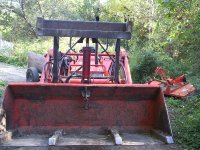
Trying to up load a photo ,Hey it worked this is just a random photo and not part of any thread. Just a front view of my 1995 L2950. Now if i could just add a photo to my profile i tried last night but so far no luck .I have asked the site for help sitll waiting for a how to. I went to -my home-edit my profile photo- chose a picture-hit save-submit- and it tells me something like,...not able to use file?
 

Attachments
  • P4210076.JPG
    P4210076.JPG
    425.8 KB · Views: 329
Last edited:
/ just practicing #3  
Now if i could just add a photo to my profile i tried last night but so far no luck .I have asked the site for help sitll waiting for a how to. I went to -my home-edit my profile photo- chose a picture-hit save-submit- and it tells me something like,...not able to use file?

Jeff,

No expert here, but there is a note on the referenced page regarding the size of the photo. Could that be the problem?

Steve
 
/ just practicing
  • Thread Starter
#4  
Thanks Steve
Yea it is very handy when i was cutting logs for my addition i was piling them according to size. You know 16' then 14' 12' 8' and some 6' it makes it eaiser for the portable saw mill to just pull infront of each pile ,saw then move foward .and is a huge help in keeping track of what i had already twitched to the yard.I needed a carrying timber 8x8 20' long so i went with a Hack ( tammerack to some) it measured 22' and 18" on the stump. I carried it to the mill set up with this thumb very strong .I move many 16' spruce 20" plus on the stump not sure what they weighed but i moved them.
 
/ just practicing
  • Thread Starter
#5  
Oh yea anything is possible i will have to try it again i am ok but not really savy with this stuff ya know?
 
/ just practicing
  • Thread Starter
#6  
"up load of file failed" is the message i get?
 
/ just practicing
  • Thread Starter
#7  
I guess i dont understand what do you want me to try?
 
/ just practicing #8  
I guess i dont understand what do you want me to try?

he reduced your picture for you. if you right click and save his reduced picture, you should be able to use that one for your signature picture. if you have any kind of photo processing program on your computer, just use the resize function to resize the picture you want to use to 120 x 120 pixels.
 
/ just practicing #9  
R u trying to upload under the avatar or your profile pic I tried under the avatar at first and got the same mess. i then did it under my profile pic and it worked.
 
/ just practicing
  • Thread Starter
#10  
Ok i guess i get it but that is not the photo i wanted to use i will try to place it here and maybe you can help me with it. here goes
 

Attachments

  • 100_0861.JPG
    100_0861.JPG
    948.6 KB · Views: 180
/ just practicing
  • Thread Starter
#11  
I was trying under profile i just posted the one i would like to use ? Man some of this stuff escapes me big time
 
/ just practicing #12  
Jeff,

Your photo is now showing up in your profile. Now try adding the photo as you avatar.

Steve

BTW, that nice looking buck is giving us the evil eye.:)
 
/ just practicing #13  
Try these... First one is 120 x 120 ...second was 120 wide x ??? showing more of the deer.

"http://www.tractorbynet.com/forums/attachments/kubota-owning-operating/199397d1297189371-just-practicing-100_0861a.jpg"

Copy what's Inside the "quotes" above, and paste it using from a URL
 
Last edited:
/ just practicing
  • Thread Starter
#14  
Thanks for all the help but i guess i'll have to give up i copied and pasted under url and it said invalid url?
 
/ just practicing #16  
You can use something like Photoshop to cut down on the resolution/size of file, but I just use the Outlook "send" function which will ask if you want to re size for mailing and then just copy that and use it.
 
/ just practicing #18  
Jeff, by any chance are you using Vista?
 
/ just practicing
  • Thread Starter
#19  
nope dont think so i have just sent it to myself in a email i will try to get it fro there to my profile see if that helps?
 
/ just practicing
  • Thread Starter
#20  
Guys thanks for all the help but patience has slipped by me so i guess i give up Thanks again
 
 
Top