
your Directv was calling home all the time.Got a 20gb home broadband plan. Had the same issues. Got direct tv or other things attached to wifi... can't prove it but I believe it was part of the problem. Best thing you can do is change the password... And only use the password on your pc. I end the connection every time i stopped using the pc. My usage problems got under control doing that.
You are using an out of date browser. It may not display this or other websites correctly.
You should upgrade or use an alternative browser.
You should upgrade or use an alternative browser.
Verizon WiFi issues
- Thread starter EddieWalker
- Start date
- Views: 11012
More options
Who Replied?
/ Verizon WiFi issues
#41
OP

EddieWalker
Epic Contributor
I changed the password and then after turning it off, Karen noticed that it had come back on again when she got on her Ipad. This is getting to be one of those conspiracy things for me. I know it turns itself back on. I'm guessing one of our Apple products is sending it a signal that it responds to and turns itself on to receive or send data on its own. We have two Ipads and an Iphone 6 in the house. Then there is my Samsung 6, the TV, which I don't think is doing anything, but who knows, and my Lenovo desktop computer. But for all I know, it could be the dishwasher!!!  Something is turning on the MiFi router after I turn it off and sending data through it. I have now gone to the next level and I'm unplugging it and removing the battery. This is the only way that I'm sure it's not going to send any data through it when I'm not around and not using it.
Eddie
Something is turning on the MiFi router after I turn it off and sending data through it. I have now gone to the next level and I'm unplugging it and removing the battery. This is the only way that I'm sure it's not going to send any data through it when I'm not around and not using it. Eddie

MossRoad
Super Moderator
- Joined
- Aug 31, 2001
- Messages
- 66,140
- Location
- South Bend, Indiana (near)
- Tractor
- Power Trac PT425 2001 Model Year
Your iPad has wifi and sends out requests looking for wifi networks pretty much anytime you do anything with it. Your hot spot sits there listening for devices that are asking if wifi is available. Kind of like, "Hey, are your there?" and "Yep, I'm here."I changed the password and then after turning it off, Karen noticed that it had come back on again when she got on her Ipad. This is getting to be one of those conspiracy things for me. I know it turns itself back on. I'm guessing one of our Apple products is sending it a signal that it responds to and turns itself on to receive or send data on its own. We have two Ipads and an Iphone 6 in the house. Then there is my Samsung 6, the TV, which I don't think is doing anything, but who knows, and my Lenovo desktop computer. But for all I know, it could be the dishwasher!!!
Eddie
You're old enough to remember TVs that took a while to warm up, right? So they made them with warming circuits that kept the tubes warm, so when you hit the power switch, they seemed to come on instantly. They were never really turned off all the way.
Well, hot spots take a while to boot up, get their IP adresses set up, etc... just like booting up a computer. That would annoy people. They don't want to wait for 30 seconds for the thing to boot up, let alone walk over and turn it on. So, the vendor programs the hot spot to never really turn off. It kind of sleeps, but is sitting there waiting for any network activity and pops to "awake" ASAP.
Any computer, laptop, phone, tablet, smart TV, etc... with wifi enabled will wake it up. And you can pretty much guarantee that the vendor wants it awake as often as possible to run up your data usage any time that is possible.
As you have discovered, the only way to make it stop is to unplug it when not in use.

buckeyefarmer
Epic Contributor
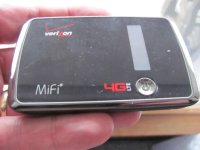 my mifi runs on a battery. unplugging it just keeps it from charging. Mine also can be turned off by holding the button down a few seconds. Mine shows green light for 4G service, Purple light for 3G service, yellow light if off and charging, no light if off and not connected to power.
lostcreekranch
Super Member
- Joined
- Dec 14, 2012
- Messages
- 8,078
- Location
- Austin County, Texas
- Tractor
- NH TL-100A with Bush Hog 5045 FEL, WR Long 3rd function, LS XR4155HC w/FEL, WR Long 3rd Function.
Eddie;
Feel your pain. Came back up to the house from feeding horses on Xmas day and found four family members, sitting side by side at kitchen island, all with iPads running and two also had smart phones in their hands texting (probably to each other?).
Got email on 12/26 that we had already used 100% of data for the month (20 gB).
Sent from my iPad using TractorByNet
Feel your pain. Came back up to the house from feeding horses on Xmas day and found four family members, sitting side by side at kitchen island, all with iPads running and two also had smart phones in their hands texting (probably to each other?).
Got email on 12/26 that we had already used 100% of data for the month (20 gB).
Sent from my iPad using TractorByNet
buckeyefarmer
Epic Contributor
LOL, yea, when my family gets together and I bring my mifi, my family mooches internet off of me.Eddie;
Feel your pain. Came back up to the house from feeding horses on Xmas day and found four family members, sitting side by side at kitchen island, all with iPads running and two also had smart phones in their hands texting (probably to each other?).
Got email on 12/26 that we had already used 100% of data for the month (20 gB).
Sent from my iPad using TractorByNet
MikePA
Super Moderator
I changed the password and then after turning it off, Karen noticed that it had come back on again when she got on her Ipad. This is getting to be one of those conspiracy things for me. I know it turns itself back on. I'm guessing one of our Apple products is sending it a signal that it responds to and turns itself on to receive or send data on its own. We have two Ipads and an Iphone 6 in the house. Then there is my Samsung 6, the TV, which I don't think is doing anything, but who knows, and my Lenovo desktop computer. But for all I know, it could be the dishwasher!!!
Just to be clear, and nitpicky
, having it come on automatically is OK, it's the sending of data. Perhaps I have lost track, but I thought you were trying to determine who or what is using up all the bandwidth?
1. Ensure the MiFi device requires a password to connect to it. My access point can support 2 types of connections; Password protected gives the device access to my home network which includes other devices, e.g., the printer, NAS storage, etc. The Guest network only provides access to the Internet. Great for, well, Guests, so I don't have to tell them my password.
2. You changed the password to connect to it.
3. Only change one device at a time to use this new password.
4. Monitor usage.
OP
EddieWalker
Epic Contributor
I changed the password and nobody else had it. Only Karen is here and she didn't change it on any of her devices. When she turns on her Ipad, it shows that there is wifi available. When I changed the email, and turned off the MiFi device, she saw it go offline on her Ipad just like I saw it go offline on my desktop. She wasn't using her Ipad to be online, she was reading an ebook. When she went to read her ebook later on in the afternoon, she said the MiFi was back on again. I didn't turn it on, I wasn't anywhere near it.
So far we have not changed access codes to use it on anything but the desktop. My goal is to see how much the usage changes by disconnecting the charging cord and removing the battery.
Eddie
So far we have not changed access codes to use it on anything but the desktop. My goal is to see how much the usage changes by disconnecting the charging cord and removing the battery.
Eddie

Professor Marvel
Platinum Member
- Joined
- Oct 16, 2010
- Messages
- 855
- Location
- Virginia near Culpeper
- Tractor
- Ford 5000, Kubota 2150 HST, NH TC45 D, JD 375 Baby Skid Steer --- STUFF THAT GOES ON EM, Schwinn Stingray
My Verizon account reset last night. I see that at 8:49 my account pulled in 3.4 gig of data. I was on my laptop at the time but did nothing different that should cause this usage. I guess something is updating or something but it seems to happen the first day of reset for the last 3 months. I won't waste my time looking to Verizon for help. Seems awfully coincidental.
MikePA
Super Moderator
Windows and OS X can be configured to auto update. Windows, and the number of patches that come out on Patch Tuesday plus anti-virus updates (not needed with OS X), will generate traffic.My Verizon account reset last night. I see that at 8:49 my account pulled in 3.4 gig of data. I was on my laptop at the time but did nothing different that should cause this usage. I guess something is updating or something but it seems to happen the first day of reset for the last 3 months. I won't waste my time looking to Verizon for help. Seems awfully coincidental.

downsizingnow48
Elite Member
I use a verizon USB727 modem plugged into Cradlepoint wireless router. About five years. On all the time. Knock on wood no unexplained data usage. Functionally I think this is similar to the newer personal hotspots.
jix
Platinum Member
- Joined
- Sep 16, 2014
- Messages
- 611
- Location
- Fredericton, New Brunswick. CANADA
- Tractor
- 2015 Kioti CK2510HST/CAB?loader/bush hog,front blower
Eddie.. I had this problem with my Wi Fi too...It turned out to be that a neighbor was using it without knowing it..I installed a password and the problem was ended.
jcummins
Veteran Member
- Joined
- Jan 14, 2007
- Messages
- 1,640
- Location
- Creal Springs, IL
- Tractor
- Kubota M7040, F3680, Mule Pro Fxt
Password it no need to unplug. Not sure.... Maybe an apple can turn it on but without the password it will not use it.
MossRoad
Super Moderator
- Joined
- Aug 31, 2001
- Messages
- 66,140
- Location
- South Bend, Indiana (near)
- Tractor
- Power Trac PT425 2001 Model Year
Eddie.. I had this problem with my Wi Fi too...It turned out to be that a neighbor was using it without knowing it..I installed a password and the problem was ended.
I think he's already mentioned neighbors aren't an issue in his location.
riptides
Super Star Member
I changed the password and nobody else had it. Only Karen is here and she didn't change it on any of her devices. When she turns on her Ipad, it shows that there is wifi available. When I changed the email, and turned off the MiFi device, she saw it go offline on her Ipad just like I saw it go offline on my desktop. She wasn't using her Ipad to be online, she was reading an ebook. When she went to read her ebook later on in the afternoon, she said the MiFi was back on again. I didn't turn it on, I wasn't anywhere near it.
So far we have not changed access codes to use it on anything but the desktop. My goal is to see how much the usage changes by disconnecting the charging cord and removing the battery.
Eddie
This will not provide a meanigfull test. When the devices that are connected to it, sense it is available they will resume their bandwidth assault.
The devices may be looking for location services, apps that need updating, security patches, o/s patches and even backups.
You have to find out what device is sending what data. That means inspecting each device for what it is running and what data it is sending, down to each application and each version of the o/s.

J_J
Super Star Member
- Joined
- Sep 6, 2003
- Messages
- 18,973
- Location
- JACKSONVILLE, FL
- Tractor
- Power-Trac 1445, KUBOTA B-9200HST
You might try these recommendations.
5 Tips for Keeping Your Cell Phone Data Usage In Check [Infographic]
Go to data usage and you will see what is using data and how much.
5 Tips for Keeping Your Cell Phone Data Usage In Check [Infographic]
Go to data usage and you will see what is using data and how much.
riptides
Super Star Member
You might try these recommendations.
5 Tips for Keeping Your Cell Phone Data Usage In Check [Infographic]
Go to data usage and you will see what is using data and how much.
The issue is, using wifi on a verizon mifi uses data. He is trying to figure out what device in his network and what apps are eating up his data plan.
J_J
Super Star Member
- Joined
- Sep 6, 2003
- Messages
- 18,973
- Location
- JACKSONVILLE, FL
- Tractor
- Power-Trac 1445, KUBOTA B-9200HST
If he goes to data usage, it will tell him exactly what apps/programs uses how much data.
I just looked at my usage data, and just a couple of you tube videos used the most data in the search period.
Here is a trick you might not know about.
Insert your phone in a foil lined bag like potato chip bag, and no sell signal can get to your phone. Tinfoil also works. Sort of like a Faraday cage if you know what I mean.
As soon as you take the phone out of the bag, you might have auto updating and messages data coming in.
I had about 15 items that also used data during that time frame.
Of course your friends can not get hold of you with phone in the bag, but then that might be good.
If your kids know about this, you can not track them either.
If you don't believe this, have your other phone call your phone in the bag. NO ring, no signal, no GPS, no data usage.
Works with any wireless device, wireless mics, wireless bugs, wireless tracking device , ankle bracelets, etc.
Why Does Aluminum Foil Block Cell Phone Signals? | Science - Opposing Views
You can try putting the MiFi in a silver bag, but the cord might be the antenna.
I just looked at my usage data, and just a couple of you tube videos used the most data in the search period.
Here is a trick you might not know about.
Insert your phone in a foil lined bag like potato chip bag, and no sell signal can get to your phone. Tinfoil also works. Sort of like a Faraday cage if you know what I mean.
As soon as you take the phone out of the bag, you might have auto updating and messages data coming in.
I had about 15 items that also used data during that time frame.
Of course your friends can not get hold of you with phone in the bag, but then that might be good.
If your kids know about this, you can not track them either.
If you don't believe this, have your other phone call your phone in the bag. NO ring, no signal, no GPS, no data usage.
Works with any wireless device, wireless mics, wireless bugs, wireless tracking device , ankle bracelets, etc.
Why Does Aluminum Foil Block Cell Phone Signals? | Science - Opposing Views
You can try putting the MiFi in a silver bag, but the cord might be the antenna.
Last edited:
Western
Super Member
Eddie,didnt read the whole thread, so this may have been mentioned already. You can download this to check if your WIFI is being highjacked. I have it and it takes little resources.
http://download.cnet.com/NetWatcher/3000-2085_4-10205205.html
I also have the Verizon Jetpack, have for around 5-6 years. Initially had the same problem you have, last year we upgraded to the 20g plan and on occasion go over. Biggest culprit I found was auto updates on programs.
I am considering something like Millenicom, you may want to look into it.
http://download.cnet.com/NetWatcher/3000-2085_4-10205205.html
I also have the Verizon Jetpack, have for around 5-6 years. Initially had the same problem you have, last year we upgraded to the 20g plan and on occasion go over. Biggest culprit I found was auto updates on programs.
I am considering something like Millenicom, you may want to look into it.

tractorshopper
Veteran Member
I had MiFi, but signal wasn't always great, so they put the box on the side of my house. It and my wife and 2 daughters' cell phones all share 12G / month. We rarely go over, but a lot of times, I shut devices off like iPads and the computer, because as others have stated, updates will occur seemingly whether you want them to or not. I have a complicated password on the Verizon box, so I know the only items using it are ours. We don't watch movies or stream videos very much. 20G sounds like pretty heavy usage. Video streaming really puts a hurting on usage, so I'd wonder if some of your homepages are constantly updating and streaming some video or audio.



