Ways of sketching out new ideas, CAD, Paint, Pencil / Paper

   / Ways of sketching out new ideas, CAD, Paint, Pencil / Paper #21  
I have used AutoCAD and CorelDRAW and CorelTRACE for many years. The Corel products are much easier to learn than AutoCAD.

I watched the video of SketchUP...and think i may download it and play with it. looks like a fun tool.
 
   / Ways of sketching out new ideas, CAD, Paint, Pencil / Paper
  • Thread Starter
#22  
Thanks everyone I have lots to explore.
Tom
 
   / Ways of sketching out new ideas, CAD, Paint, Pencil / Paper #23  
Yea, I may be to slow for DraftSight too!!!:(
I can't get the hang of tring to see how long/what size the lines and shapes I am making are, unless I make the line and then go back to the linear tool and then change the font size in order to be able to see what it reads then go back and resize my drawing to the appropriate size. Don't know if I am doin it all wrong because trying to set up grid isn't working right(or what I think should be right;)) either.
Maybe I should just stick to drawing it by hand and/or just winging it since I have never used a CAD program before.(Really would like to learn though:confused:)
 
   / Ways of sketching out new ideas, CAD, Paint, Pencil / Paper #24  
I started playing with that SketchUp.. I designed one heck of a building.. lots of window and doors,, but after awhile I realized it was structurally unsound and I had no money to build it,, plus it could fall at anytime with my equipment and animal inside,, did I mention that it is very large over 100 thousand sq. ft.. so guess I will go back with pencil, paper, calculator and a lot of thought..I would never think that big with a pencil.:). that is a nice program tho,,Lou
 
   / Ways of sketching out new ideas, CAD, Paint, Pencil / Paper #25  
Keep at it with Sketchup, however, go to youtube and search for Sketchup Tutorials. Once you figure out how to make and use "components" it is one heck of a program.
I started using sketchup and going through the tutorials, I would go through on tutorial, then practice that function, then move on to the next when I was proficient. It does take practice, but it's more like an investment in time, once you get proficient with it, it is 10 times faster and more accurate than any pencil and paper.
 
   / Ways of sketching out new ideas, CAD, Paint, Pencil / Paper #26  
I use VECTORWORKS. I need to see things in 3D. Really helps finding the problems before I tackle anything
 
   / Ways of sketching out new ideas, CAD, Paint, Pencil / Paper #27  
I have used AutoCAD and CorelDRAW and CorelTRACE for many years. The Corel products are much easier to learn than AutoCAD.

It's all that we get used too. I've tried CorelDraw and found it a pain to use and inaccurate as it's more of an illustration tool than a drafting/engineering design tool. I do use Corel's Paint Shop Pro as I find it does all that I need and then some for a bitmap paint program; but Corel bought PSP from the now defunct Jasc Software company.
 
   / Ways of sketching out new ideas, CAD, Paint, Pencil / Paper #28  
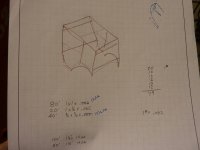
Here's the plan for the cab I'm building.

1 Small.jpg
 
   / Ways of sketching out new ideas, CAD, Paint, Pencil / Paper #29  
pencil and paper...creating iso drawing of potential project. but my projects have been simple.

have spent some time with solid modeling...but never spent the time to get good at it. I may try this Google sketch-up thing. I'm looking at building a car and they did it in sketch up...here is the link...pretty cool for a free program. https://sites.google.com/site/car9buildit/home
 
   / Ways of sketching out new ideas, CAD, Paint, Pencil / Paper #30  
this is a extremely old thread i created for "paint" for tips and tricks in how to use it.
using microsoft paint

current thread of mine here on TBN that gives examples of "paint" in the first few pages, and then later pages of "autodesk inventor"
new tractor idea possibly....

3D programs like autodesk inventor, or google sketchup, have a very steep learning curve. and it takes time to set down and go through a bunch of tutorials, and youtube videos to learn the program. and that in itself can take a good amount of time. once you learned how to use a given 3D software on other hand, it is quick and easy for most part. and gives you a bunch more freedom. it is that initial learning curve that kicks ya in the pants.

=====================
with above paper and pencil works good enough. it will most likely look like chicken scratches from a 2 year old. but honestly, but who cares? as long as you understand it. and if showing to someone else, they get the basic idea of things. that is all that maters. professionally is one thing, but random projects around the house. what ever is quick and easy is what gets used.
 
   / Ways of sketching out new ideas, CAD, Paint, Pencil / Paper #31  
I also use AutoCAD at work, so that is how I normally do things. Pencil and paper still get used from time-to-time, but CAD is nice if there are moving parts. You can use the software to simulate the motions to check for interferences.
 
   / Ways of sketching out new ideas, CAD, Paint, Pencil / Paper #32  
By the time I become proficiency with these I will be too old to remember why I started it.. :laughing:,, Lou
 
   / Ways of sketching out new ideas, CAD, Paint, Pencil / Paper #33  
I have dabbeled in Autocad, Correl, Rhino, Sketch-up and a bunch of other programs. I cant seem to grasp the concept. Most of my projects are drawn up inside my head. I will think about the project for a pretty long time before I actually do the work. Somecases, even years. Once I get it all worked out in my head, I start the project working on the fly. Once I know what I want, and how I want it to look, just give me some wood or metal, a tape measure and something to hold it all together and get out of the way.
 
   / Ways of sketching out new ideas, CAD, Paint, Pencil / Paper #34  
I finally got comfortable using sketch up. I like it because it works well as far as printing isometric drawings that I can orint out and carry over to the workshop.
 
   / Ways of sketching out new ideas, CAD, Paint, Pencil / Paper #35  
I actually find CorelDraw to be very accurate.... i even made some gears with it.

heres the coral drawing for my front gate


and the actual gate.


i make lots of intricate items for other people. i used to make alot of one piece log brackets for timber frame and log homes.....items that locked the logs in place with elk head shapes, etc. the economy sure crushed that side job.
 

Attachments

  • Teton gate C.png
    Teton gate C.png
    64.8 KB · Views: 278
  • gate 1.jpg
    gate 1.jpg
    581.5 KB · Views: 251
   / Ways of sketching out new ideas, CAD, Paint, Pencil / Paper
  • Thread Starter
#36  
Here's the plan for the cab I'm building.

View attachment 295724

A person with an artistic mind doesn't always need the help of a drawing.
It can be fun to to just start working and see how things go.
what I like about steel is the fact you can add to it, change it, move it ,twist it, punch holes....
Very nice progress on your cab.
 
   / Ways of sketching out new ideas, CAD, Paint, Pencil / Paper #37  
I actually find CorelDraw to be very accurate.... i even made some gears with it.

heres the coral drawing for my front gate


and the actual gate.


i make lots of intricate items for other people. i used to make alot of one piece log brackets for timber frame and log homes.....items that locked the logs in place with elk head shapes, etc. the economy sure crushed that side job.

CorelDraw is great for things like your gates, which turned out very nicely; but CorelDraw is only good to 1/1000" and the cumulative error piles up quickly if one regularly works with 16th's, 32nd's, and 64th's.
 
   / Ways of sketching out new ideas, CAD, Paint, Pencil / Paper #38  
Short and most accurate answer: Whatever works for you. :)
 
   / Ways of sketching out new ideas, CAD, Paint, Pencil / Paper #39  
A person with an artistic mind doesn't always need the help of a drawing.
It can be fun to to just start working and see how things go.
what I like about steel is the fact you can add to it, change it, move it ,twist it, punch holes....
Very nice progress on your cab.

Thanks. I do enjoy going with the flow on some projects. It may be that since there's no real drawing to follow, anything that works out is OK. With the cab, there were many details that worked themselves out when they became issues with the build. I didn't have the knowledge/experience to realize what I'd run into as it progressed but was confident there were solutions to any problems that were to arise.

Exterior of the cab is finished. Now it needs glass installed and some interior touches.
 
   / Ways of sketching out new ideas, CAD, Paint, Pencil / Paper #40  
It all depends...

Most things are done in my head as I work with available materials (much of which is pre-used). Sometimes AutoBIC (BIC = Pen manufacturer in the UK). Or if it requires some accuracy I do sections with AutoCAD proper.

If I'm getting stuff made or cut by outside shops, I send it out as AutoCAD files via email as it makes it easier to draw accurately and some shops have estimating programmes that work with AutoCAD to give reasonably quick accurate quotes, plus if they need extra dimensions they have the original drawing on AutoCAD to get dimensions from.
 

Marketplace Items

SCAN TO RECEIVE TEXT UPDATES (A60432)
SCAN TO RECEIVE...
Wacker Neuson VP1550AW Vibratory Plate Compactor (A59228)
Wacker Neuson...
1997 WESTERN DUMP TRUCK (A60430)
1997 WESTERN DUMP...
UNUSED SDLANCH SDLE20 EXCAVATOR (A60430)
UNUSED SDLANCH...
UNUSED FUTURE PG72-72" HYD PLATE GRABBER (A60432)
UNUSED FUTURE...
2018 VOLVO L180H WHEEL LOADER (A60429)
2018 VOLVO L180H...
 
Top