Photo Editing Software recommendations

   / Photo Editing Software recommendations #1  

EddieWalker

Epic Contributor
Joined
May 26, 2003
Messages
27,616
Location
Tyler, Texas
Tractor
Several, all used and abused.
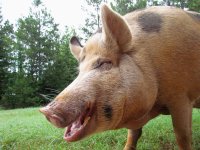
I want to play around with some pictures of Oscar and then put them on a t shirt before I go on my cruise. I don't have anything that will do this and was looking online for a program, but haven't found anything that I feel will be simple and easy to use. I'm a little nervous about downloading something for free because of getting a virus or something else that seems to take over and cause me troubles.

What do you use?

Thanks,
Eddie

033 (4).jpg
 
   / Photo Editing Software recommendations #3  
I normally use Photoshop, but have used GIMP. It's not as intuitive as Photoshop and some of the expensive alternatives, but you can do simple things pretty well, and there are some online help blogs and such where you can learn more. It has a help system and tutorial that can also help. It has some drawbacks, but works well. And it's free. It's been around a while and a download does not bring any viruses or such - although your firewall should block most anyway.
Try - Get Gimp - Like Photoshop, Only 100% FREE
 
   / Photo Editing Software recommendations #4  
By far one of the best and useful image editing programs is 'Irfanview'....not only that it is 100% free...

The developer of this software has refused offers of millions of dollars to make it a commercial app...he insists on keeping it free...

Download and install all the plug-ins and it is even more powerful

IrfanView - Official Homepage - one of the most popular viewers worldwide
 
   / Photo Editing Software recommendations #5  
I normally use Photoshop, but have used GIMP. It's not as intuitive as Photoshop and some of the expensive alternatives, but you can do simple things pretty well, and there are some online help blogs and such where you can learn more. It has a help system and tutorial that can also help. It has some drawbacks, but works well. And it's free. It's been around a while and a download does not bring any viruses or such - although your firewall should block most anyway.
Try - Get Gimp - Like Photoshop, Only 100% FREE

Warning....Warning Wil Robinson - Have you read the user agreement on Gimp....no way I would agree to that...they want to track all the web sites you visit....read it very carefully...Eddie is right to be very cautious with these free programs....think about it...Nothing is free....follow the money always....;)
 
   / Photo Editing Software recommendations #6  
I want to play around with some pictures of Oscar and then put them on a t shirt before I go on my cruise. I don't have anything that will do this and was looking online for a program, but haven't found anything that I feel will be simple and easy to use. I'm a little nervous about downloading something for free because of getting a virus or something else that seems to take over and cause me troubles.

What do you use?

Thanks,
Eddie

View attachment 306963

Eddie - I have used Google Picassa, a free photo editing and organizing program from Google...I have used it for years and it is great and easy to use...virus free...Picasa
 
   / Photo Editing Software recommendations #7  
Warning....Warning Wil Robinson - Have you read the user agreement on Gimp....no way I would agree to that...they want to track all the web sites you visit....read it very carefully...Eddie is right to be very cautious with these free programs....think about it...Nothing is free....follow the money always....;)

Actually there is some very good software that is 100% free... not all developers are as greedy/devious as some think... Irfanview is one of them...

As for tracking/spying/phoning home etc...almost all commercial software uses some sort of reporting/phoning home application....FYI...every time you open most commercial software applications they "phone home" and send data from your computer to the (home) company...including Microsoft, Adobe etc. etc....
it is very easy to prevent any program/application from connecting (outbound) to the net...just a use a good leak-proof firewall...it's simple....


IF you don't believe this....install a firewall and set it to report all outbound connections...then open just about any commercial software app....you will get a pop-up saying something like "Adobe is trying to connect to the Internet" allow/disallow...most firewalls will remember your selection...

In the same respect...if you want to see what scripts are running on web pages you visit...use Firefox and install the 'NoScript" add-on....then visit a web page and it will list all the scripts (spying/tracking etc) running on the page...

If you want a real scare...with NOScript running open a Facebook etc. page...it is unbelievable how many tracking/spying scripts are running...

GIMP is a great image editing/manipulation program...to use it without any tracking just set your firewall to block outbound connections for the program...
 
   / Photo Editing Software recommendations #8  
Eddie - I have used Google Picassa, a free photo editing and organizing program from Google...I have used it for years and it is great and easy to use...virus free...Picasa

Just curious...have you read all the Google application user agreements?....talk about scary....!
 
   / Photo Editing Software recommendations #9  
that's why I scan for cookies every now and then.
 
   / Photo Editing Software recommendations #10  
Just curious...have you read all the Google application user agreements?....talk about scary....!

Yikes....I downloaded it years ago when it first came out...I think I was naive then, more naive than now maybe and I don't recall checking...So what am I in for....? I guess I better log into their user agreement and read what I signed....geez I hate this....So what you said in your previous post ...is there is basically nothing we can do except see who is tracking us...but we can't really stop them...right ?
 
   / Photo Editing Software recommendations #11  
Actually there is some very good software that is 100% free... not all developers are as greedy/devious as some think... Irfanview is one of them...

As for tracking/spying/phoning home etc...almost all commercial software uses some sort of reporting/phoning home application....FYI...every time you open most commercial software applications they "phone home" and send data from your computer to the (home) company...including Microsoft, Adobe etc. etc....
it is very easy to prevent any program/application from connecting (outbound) to the net...just a use a good leak-proof firewall...it's simple....


IF you don't believe this....install a firewall and set it to report all outbound connections...then open just about any commercial software app....you will get a pop-up saying something like "Adobe is trying to connect to the Internet" allow/disallow...most firewalls will remember your selection...

In the same respect...if you want to see what scripts are running on web pages you visit...use Firefox and install the 'NoScript" add-on....then visit a web page and it will list all the scripts (spying/tracking etc) running on the page...

If you want a real scare...with NOScript running open a Facebook etc. page...it is unbelievable how many tracking/spying scripts are running...

GIMP is a great image editing/manipulation program...to use it without any tracking just set your firewall to block outbound connections for the program...

Thanks , I just downloaded " No Script " for my Firefox....I appreciate the advice...
 
   / Photo Editing Software recommendations #12  
Eddie, I use an old version of Photoshop to crop, resize and enhance my photos. PS has a one-click auto level button that adjusts brightness, contrast, color and focus. You can also click one button and go in and adjust them manually. PS can be pretty intimidating to use, but its only as complicated as you want to make it...as long as you stay away from the advanced options. I've loaded the CD on probably ten of my computers over the years and have used it a bunch of times to make up my own website banners, merge before and after photos, design truck signs, business cards and stuff.
 
   / Photo Editing Software recommendations #13  
Yikes....I downloaded it years ago when it first came out...I think I was naive then, more naive than now maybe and I don't recall checking...So what am I in for....? I guess I better log into their user agreement and read what I signed....geez I hate this....So what you said in your previous post ...is there is basically nothing we can do except see who is tracking us...but we can't really stop them...right ?

Well (deep subject)...there has to be a little compromise...but yes you can stop "them" completely...a firewall will let you control EVERYTHING that gets sent upstream from your computer...but the compromise is with browsers...in order to be able to send a request (every time you click a link etc. you are sending a request)...so browsers MUST be able to send information upstream...and unless you monitor/control cookies...you send whatever a cookie is programmed to collect and report...IMO ALL "third party" cookies should be blocked...first party cookies are what allows a site/page to remember who you are etc...i.e., keeps you from having to log in to sites like TBN etc. etc...

Personally I use "Comodo" personal firewall...

Firewall - Personal Free Internet Firewall Software


Back to the topic of the thread...

There is a difference between "image editing" and "image manipulation" programs...

IMO...there is no better basic editor available anywhere for any price than 'Irfanview'...download it and check it out....it's amazing how easy it is to learn to use...some distributors of the program try to add a (browser) toolbar so be sure to un-check the box during installation...

Image manipulation requires a more sophisticated program like Photoshop or GIMP etc...both of which have fairly steep learning curves...BUT... if you search you can find online tutorials for both PS and GIMP that explain step by step instructions for a plethora of different manipulation techniques...i.e., adding sunglasses on a picture of your pet etc, putting a different face on a portrait etc..etc....
These tutorials greatly help with the learning curve...but please be advised all tutorials out there are not necessarily up to date with the latest versions of the program they are using...so some of the controls may not be in the same menus between versions...

BTW...IMO most of the image editing software that comes with digital cameras etc. is junk...(not to mention that many change the image extension association on your computer without even asking)
 
   / Photo Editing Software recommendations
  • Thread Starter
#14  
Thanks for the links and information. I tried Gimp and Irfanview, but neither do what I'm looking for. I'm hoping to find a program that I can upload a picture to it, like the one of Oscar, and convert it from a photograph to a cartoon, or a drawing or a picture with one, two or three colors. Something that seems pretty common on a smart phone, but I'm not able to figure out how to do it on my computer.

I don't even know what to call what I want to do :)

Eddie
 
   / Photo Editing Software recommendations #15  
Adding or removing colors should be simple using layers...

Here is one (GIMP) tutorial for turning an image into Caricatures....(blog list on the right has more tuts)
All Things GIMP: GIMP Tutorial: How To Make Caricatures Using GIMP *UPDATED*

Here is one (more advanced) to turn an image into a sketch etc.
GIMP - Photo to sketch

if you have the time and want to learn to use the software...I suggest finding a graphics tech forum...you can find help using the software similar to the way TBN works for tractor etc. related subjects...

Good Luck...
 
   / Photo Editing Software recommendations #16  
For anyone not familiar with the power of programs like GIMP, Photoshop and others...I suggest taking a look at some of the art created by one of the best artists in the genre...

His name is 'Bert Monroy'

Check out some of his work here: Fine Art 1
All these works were created on a computer screen...you might think they are photographs...!

For some of Bert's (Photoshop) tutorials navigate to this site: Photoshop Tutorials - BERT MONROY | PhotoshopSupport.com
 
   / Photo Editing Software recommendations #17  
Thanks for the links and information. I tried Gimp and Irfanview, but neither do what I'm looking for. I'm hoping to find a program that I can upload a picture to it, like the one of Oscar, and convert it from a photograph to a cartoon, or a drawing or a picture with one, two or three colors. Something that seems pretty common on a smart phone, but I'm not able to figure out how to do it on my computer.

I don't even know what to call what I want to do :)

Eddie

Eddie, I use Corel Paint Shop Pro X5 you can go to download.com and download it and evaluate it for 30 days. I bought the software three years ago and I have done exactly what your wanting to do. You buy this special paper you print to. Then you iron it to whatever. PSP allows you do reverse the image so it prints exactly as it looks on the screen. I made what looked like an oil painting of our Dachshund and it put in on a shopping bag for my wife. I took a picture of one of my past Mustangs and did the same thing. It's worth every dime. No spyware. No cookies. Best part it was only $69. There are free add-0ns all over the net. It's a very popular editor. Try it for thirty days. Nothing to lose. I think I bought mine at. Walmart some time ago which came with manual. Happy hunting. - robert
 
Last edited:
   / Photo Editing Software recommendations #18  
I have used Photoshop, elements and Lightroom. Elements is very much like photoshop only its on a smaller scale and less intuitive. Photoshop is one of those programs that can do anything you ever want to do to a photograph or piece of art work, but its also one you need to constantly work with to remember many of the tools, or readily have books nearby for quick reference. Photoshop was not originally developed for photos, but instead graphic artist, so many of the tools are intended for graphics, however there are more than enough for photo's, however, it still requires time to process images in PS, but there are automated processes you can set up, but each photo still requires one on one processing as each is different
With that being said, photoshop recognized this issue about 5 years ago and made a specific photo processing program called Lightroom. Lightroom will not perform the cartoon images you mention though as it really falls under coverting a photo to a cartoon which is more of a graphic process..hence photshop. However, if you advance into the photographic end further, consider Lightroom 4 as it is well past PS in photo processing and also has an additional catalog feature,(Eddie you mentioned a cruise as well). which enables you to store, backup, and find any image in you inventory using metadata ( A digital tag applied with the latest DGSLR"S, Lightroom enables you to apply even more data for library reference). I have used it since 06 or so, and find myself using it more than any program, although there still are time when I need to do some strong editing which only PS can do. Lightroom fits the bill 99% of the time and I find it invaluable in processing and selling my work as an outdoor phtographer.
~Tol
 
   / Photo Editing Software recommendations #20  
Thanks for the links and information. I tried Gimp and Irfanview, but neither do what I'm looking for. I'm hoping to find a program that I can upload a picture to it, like the one of Oscar, and convert it from a photograph to a cartoon, or a drawing or a picture with one, two or three colors. Something that seems pretty common on a smart phone, but I'm not able to figure out how to do it on my computer.

I don't even know what to call what I want to do :)

Eddie

You will probably want to eliminate the background if you are going to have it printed on a T-shirt. The trial version of Paint Shop Pro 15 or Photoshop Elements 11 will both do what you describe and the possibilities are endless.

Take the picture at the highest resolution possible in your camera and get in close as you did in your sample or even closer if all you want is a head shot. Anything you have to crop is just a waste of pixels that could be better used in the subject.
Since you plan to change the image to a cartoon or pencil drawing you might even want to experiment with soft focus rather than extreme sharpness. You can do that with the software as well. The printing material cloth texture and the color of the cloth will effect the final look of your pig, so experimenting on a background the color of the shirt you plan to use is important after you make your pig background transparent. Just makes layers of various colors, put them below your pig layer and turn them on and off to see which you like.

I think most of the "pick up in an hour" services have offers to print on about any surface you can imagine.
Ron
 

Marketplace Items

UNUSED RAYTREE RMLL60-60" HYD LAND LEVELER (A60432)
UNUSED RAYTREE...
2006 Magnolia Dry Fertilizer Tender Trailer - Dual Stainless Compartments, Hydraulic Doors (A61307)
2006 Magnolia Dry...
(2) UNUSED 31" X 8 MM EXCAVATOR TRACKS W/ PINS (A60432)
(2) UNUSED 31" X 8...
2022 Ford F-150 Pickup Truck (A59230)
2022 Ford F-150...
2025 40ft 10-Door Shipping Container (A59228)
2025 40ft 10-Door...
UNUSED RAYTREE RMBD50-50" HYD DRUM MULCHER (A60432)
UNUSED RAYTREE...
 
Top