Forum appearance

   / Forum appearance #1  

MChalkley

Elite Member
Joined
Mar 27, 2000
Messages
3,198
Location
Eastern Virginia
Tractor
EarthForce EF-5 mini-TLB (2001)
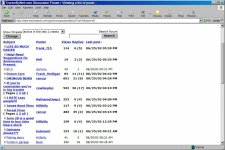
My old computer just died and I had to replace it. The new one has XP Pro and a 15" LCD with 1600 x 1200 resolution. Now, for some reason, TBN's appearance is all screwed up. The count of new messages doesn't display in red anymore, text formatted with colors, <font color=blue>like this</font color=blue>, shows up black, and the screens appear to be about 1/3 less wide than they used to. For example, in a forum, about 90% of the subjects wrap to a second line, and I've got several inches of empty space down the right side of the IE window. Any ideas?
 
   / Forum appearance #2  
Can you get a screen shot? (Press "Print Screen" and paste into an imaging program)
 
   / Forum appearance
  • Thread Starter
#3  
Muhammad - Here's print screen. It's at 75% actual size, to get it under 200k. Thanks.
 

Attachments

  • 18-164973-TBNforum2.jpg
    18-164973-TBNforum2.jpg
    110.1 KB · Views: 101
   / Forum appearance #4  
Mark, make sure you're set up to accept cookies. When I changed to XP, I had the same problem.
 
   / Forum appearance #5  
Mark, it wasn't on the screen shot so I'll ask...Are you sure you're logged into TBN?
 
   / Forum appearance #6  
If that's 75%, the text looks really big ... and the styles aren't showing, it doesn't seem ... Any browser settings that would prevent a CSS from loading?
 
   / Forum appearance #7  
Not that it helps any, but I'm using XP Pro at home w/ my resolution at 1600x1200 and it looks normal. I'm not on an LCD though, but I can't see where that would matter.
 
   / Forum appearance
  • Thread Starter
#8  
Yes, the text is quite big and I've gone to View>Text Size and selected "Smallest", but it doesn't help. To my knowledge, all the browser settings are still the defaults. I'm using ZoneAlarm Pro, but I don't have it set to block TBN cookies or ads - in fact, the program and settings are the same they were on my old laptop. I don't get it...

(And, yes, I'm logged in. At least, it says "Welcome, MChalkley" on the main page...)
 
   / Forum appearance #9  
Well, you've got a big tractor and now you've got big fonts! /w3tcompact/icons/laugh.gif
 
   / Forum appearance #10  
Mark,
Have you tried this? Go to your Windows desktop and right click on an open area of the desktop. Then left click on Properties. On the menu tabs in the window that comes up, left click on Settings and check to see what your screen area is set to. Mine is currently at 800 X 600 and all appears fine. Only thing I can think of.

Hoss
 
   / Forum appearance #11  
Mark,

A 15 inch LCD usually has a "native resolution" of 1024x768 and using anotther setting can cause fuzzy text and low image quality. You might want to check this out first and then adjust the font settings.

The text color settings are a function of the browser settings not the monitor.

Jack
 
   / Forum appearance
  • Thread Starter
#12  
Thanks for all the suggestions, guys...

So far, nothing has worked. Part of the problem may be that the new Dell Laptops with 15" LCDs don't have standard native resolution - they're 1600 x 1200, and if you change them to a lower resolution, they don't look nearly as good. Plus, it didn't help the problem anyway.

So at this point, I'm not sure what the problem really is, but I've tried about everything I can think of, and it hasn't made any difference.
 
   / Forum appearance #13  
Hi Mark,

Which Dell laptop did you just buy...? That's funny... because I was ready to order one about 3 weeks ago myself. (I'm replacing my Compaq laptop and it may be another couple weeks...)

I would try loading another browser and see it the problem goes away (this can help isolate whether its a browser problem or video display driver or even a WinXP system dll problem)... or you can reinstall your current video driver with something updated off Dell's site or off the restore cd (not from your current HD...)

18-35196-JDMFWDSigJFM.JPG
 
   / Forum appearance #14  
Look under the "tools" menu.
Select "Internet Options"
Click the "accessibility" button at the lower right corner.
Are the three "ignore" boxes checked or unchecked?
 
   / Forum appearance
  • Thread Starter
#15  
MossRoad - All unchecked...
 
   / Forum appearance
  • Thread Starter
#16  
JMIII - I've already tried reloading the browser and updating the video drivers. Strange thing, though, nothing else is looking strange - just TBN. But, I haven't tried any other sites similar to TBN...

I got a C840 P4 1.8GHz, 40GB HP HD, 512MB, 64MB GeoForce Video, UXGA LCD, DVD/CD-RW - I hate to change computers, so I'm hoping this one will last me another 4 years or so, like the last one.
 
   / Forum appearance #17  
Bummer /w3tcompact/icons/sad.gif. I can make mine look similar to yours by checking those boxes.

Next batter!
 
   / Forum appearance #18  
For whatever it might be worth, I've had over half a dozen Dell notebooks I've bought over the last year and they've all been used but still under warranty. I've found the Dell support staff to be absolutely incredible at solving problems from the difficult to the innane.

For my two cent's worth, I'd suggest you call them and let them walk you through it. I'd be amazed if they didn't have you up and running in one call.

Like JM3, I bought a Dell to replace an antique notebook I had. It wasn't brand loyalty or anything. I'd never owned a Dell but this one had about what I wanted at a fair price so I bought it. Fortunately, I had a problem with it.

I say "fortunately" because it gave me the opportunity to deal with their customer service people and warranty service. Each and both were outstanding! As a result, I've bought at least half a dozen more since then. I can not imagine what it would take to get me to even consider a notebook other than Dell. Give their tech support a call and you'll soon see why.
 
   / Forum appearance #19  
<font color=blue>"I say "fortunately" because it gave me the opportunity to deal with their customer service people and warranty service. Each and both were outstanding! As a result, I've bought at least half a dozen more since then. I can not imagine what it would take to get me to even consider a notebook other than Dell."</font color=blue>

Hmmmm/w3tcompact/icons/hmm.gif? Seems to me that JD should give Dell a call and learn a little something about customer service and support! /w3tcompact/icons/wink.gif
 
   / Forum appearance #20  
<font color=blue>"Seems to me that JD should give Dell a call and learn a little something about customer service and support!"</font color=blue>

Garry,

I've gotten response forms to fill out and even follow up calls asking about their service/support, etc., and they all end with "What would/could we do better/"

My response has always been the same. "Go forth and teach other companies with whom I'm forced to deal how to do customer service and support." And I mean it! These people are outstanding.
 

Tractor & Equipment Auctions

2017 FORD F-450 XL BUCKET TRUCK (A58375)
2017 FORD F-450 XL...
2013 Godwin Dri-Prime CD103M Towable Trash Pump (A59228)
2013 Godwin...
2022 Ligchine Spiderscreed Concrete Screed (A59228)
2022 Ligchine...
2014 Lincoln MKX SUV (A59231)
2014 Lincoln MKX...
Kubota U55-4 (A57148)
Toyota 8BPU15 3,000 LB Stand-On Electric Forklift (A59228)
Toyota 8BPU15...
 
Top