How to: Columnar Information

/ How to: Columnar Information #1  

kemartin3

Bronze Member
Joined
Jun 8, 2002
Messages
59
Location
Bedfrod, VA
Tractor
1999 Kubota L3710GST
There was a short discussion of this back in '01, and maybe nothing has changed.

I've collected some information about adjusting slip clutches that I'd like to share. It seems to be a recurring subject in the attachments forum. The information needs to be presented in table format. I've tried using the "code" tags (supposedly really the [pre], [/pre] tags behind the scenes). But nothing I've stumbled across will let me post information using a fixed (monospace) font so the columns will line up.

I'm using IE v6.0

Suggestions?

Thanks,
Kevin
 
/ How to: Columnar Information #2  
Would the table lend itself to being presented as an attached image (screen shot) of a table (word processor or perhaps spreadsheet-based) from your system? Or is it too many columns/rows for that?
 
/ How to: Columnar Information
  • Thread Starter
#3  
Tim,

I could probably get it done that way, with enough effort. My understanding is that images have to come from a web location, which I don't have. So I would have to go sign up for one of the free web locations, then, then.... Just seems to me that there has got to be some way to make a fixed font capability available for this kind of stuff. Personally, I think I'd rather see these kind of discussions all be fixed, and eliminate the alignment "issues" from the get-go.
 
/ How to: Columnar Information #4  
Do a screen shot in Excel (or whatever spread sheet) using Alt-Print Screen. Open Paint and paste this in there. Save as a JPEG (.JPG) and send this to TBN in a new message as an attachement.
 
/ How to: Columnar Information #5  
Kevin,

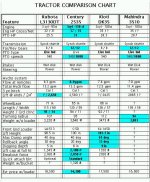
You can save a snapshot of your screen to the clipboard by hitting the PrintScreen button. Then open it in Paint, Irfanview, etc., crop and save to your desktop as a <100kb jpg file. Then you can attach it to one of your messages (see attached).

On the preview screen (2nd step, before posting), there is a box where you can attach a file. Just browse on your computer for the saved screen shot and select it. Then post the message.

<font color="red"> edit - at the risk of being chastized for posting incorrect information, I changed the attachment to a chart that shows some comparative specs on 30-35hp tractors. It's a better example of using this method to achieve what the original poster was trying for. Please forgive me (or better yet - correct me) if any of the specs are incorrect. </font>
 

Attachments

  • 472071-Clipboard01.jpg
    472071-Clipboard01.jpg
    89 KB · Views: 157
/ How to: Columnar Information #6  
<font color="blue">Then you can attach it to one of your messages (see attached).

On the preview screen (2nd step, before posting), there is a box where you can attach a file. Just browse on your computer for the saved screen shot and select it. Then post the message. </font>
Then you can put it in the text by using image and referencing the web address that shows up when you view the attachment (http://www.tractorbynet.com/forumfiles/472071-screenshot.JPG)

472072-screenshot.jpg
 

Attachments

  • 472072-screenshot.jpg
    472072-screenshot.jpg
    54 KB · Views: 139
/ How to: Columnar Information #7  
<font color="blue"> Then you can put it in the text by using image </font>
1. Most TBNers who connect via dialin don't appreciate inline images.
2. When using inline images, please resize to 640 x 480 so people do not have to scroll left and right.
 
/ How to: Columnar Information #8  
Although it's not mentioned in the FAQ that I could find, it probably does annoy some to have to scroll or wait for the download of the image.
In the situation where he's trying to display a table with tabular data it would probably be more appropriate to attach the file rather than display within the text. That way he could leave it at a size that was readable and not annoy those who are more sensitive.
 
/ How to: Columnar Information #9  
<font color="blue">1. Most TBNers who connect via dialin don't appreciate inline images.
2. When using inline images, please resize to 640 x 480 so people do not have to scroll left and right. </font>


Sorry /forums/images/graemlins/blush.gif /forums/images/graemlins/blush.gif /forums/images/graemlins/blush.gif I get spoiled at work on the T1 line and 21" monitor.
 
/ How to: Columnar Information
  • Thread Starter
#10  
Thanks all. I'll putz with it (technical term used by someone--me--incompetent is that particular area of technology) and see what I can do. /forums/images/graemlins/crazy.gif

Kevin
 
/ How to: Columnar Information #11  
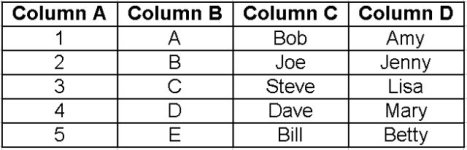
I made the attached image this way:

<ul type="square"> [*]Create the table in your spreadsheet application [*]Zoom to 200% in the spreadsheet [*]Press "Print Screen" on your keyboard [*]Launch Microsoft Paint program [*]Press "Ctl-V" to paste the screen image into paint [*]Save image as a .bmp [*]Open image in a better editor (IrfanView for me) [*]Crop image to only the table [*]Resize image to 640 wide [*]Save image a .jpg [*]Post to TBN /forums/images/graemlins/smile.gif [/list]

472815-tabular.jpg


Dave
 

Attachments

  • 472815-tabular.jpg
    472815-tabular.jpg
    24.3 KB · Views: 99
/ How to: Columnar Information #12  
<font color="blue">Launch Microsoft Paint program
Press "Ctl-V" to paste the screen image into paint
Save image as a .bmp
</font>
Dave,

You can skip those three steps, and just paste straight into IrfanView. /forums/images/graemlins/cool.gif
 

Marketplace Items

UNUSED KJ K0720-7'X20' METAL FARM DRIVEWAY GATE (A60432)
UNUSED KJ...
2005 FORD F-450XL SUPER DUTY DUMP TRUCK (A52707)
2005 FORD F-450XL...
(1) KENMORE WASHING MACHINE (A60432)
(1) KENMORE...
PALLET OF 45" BAR LOCKS (A60432)
PALLET OF 45" BAR...
2005 CATERPILLAR 345CL EXCAVATOR (A60429)
2005 CATERPILLAR...
UNUSED IRGC40 HIGH END MINI GOLF CART (A60432)
UNUSED IRGC40 HIGH...
 
Top