New Camera install

   / New Camera install #1  

ctgoldwing

Platinum Member
Joined
Jun 3, 2009
Messages
556
Location
Central Connecticut
Tractor
L3800HST
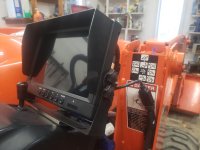
With my recent cervical fusion I'm not quite as 'head flexible' as I used to be. My current project with the tractor is regrading my driveway that is requiring a lot of swiveling in the seat. So I decided install a rear facing camera.

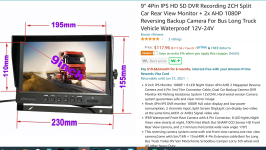
Note I don't operate the tractor in the rain. The monitor is NOT waterproof. That said I did make the install in such a way that by unplugging the 3 connectors at the monitor end I can remove it completely. Here is the unit I went with:
camera.PNG

I chose to mount the monitor on the FEL valve plastic cover using strong magnets with foam tape at the bottom. This makes removal easy. The magnets:

magnets.PNG

The two cameras the system came with I mounted on the bar supporting my toolbox. One faces down at the 3ph implement, the other pretty much straight back:
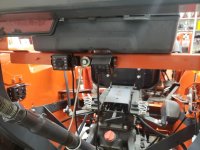
cameras_mounted.jpg

I sleeved the 3 cables (2 camera, 1 power) in split loom and ran it under the 'hump cover' next to the existing wire cable (going from fuse block area to rear of tractor). This was areal pia getting that cover off n on again.
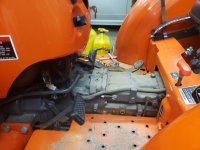
hump_with_cover_removed.jpg

I also mounted a 6 position fuse block on the inside of the rear fender to power the camera and led work lights I'm putting on later.
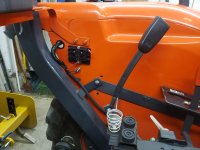
fuse_block.jpg

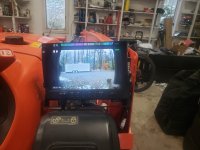
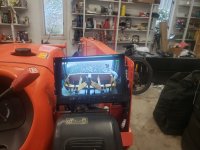
The final results
20201030_125401_resized.jpg

20201030_130225_resized.jpg

20201030_130242_resized.jpg
 
   / New Camera install #2  
Nice work!! Sure going to beat looking over your shoulder all day.

How do you find the distorted view when backing up? Do you get used to it or is it hard to judge when the box blade is too low or too high?
 
   / New Camera install #4  
How do you find the distorted view when backing up? Do you get used to it or is it hard to judge when the box blade is too low or too high?

Dang! I was all set to put my order in until you said that. :eek:

Still, that's a good looking install. :thumbsup: And I like the size of the screen with front controls.

Some days, my arthritis is worse than others. Wrenching my neck around all day will put me on the limited activity list for 3-4 days. I think something like this would help. I have a large truck mirror above my head but I cant see the three point area. If I adjust that, I loose the view toward the rear. I like the two camera setup. Great price too.
 
   / New Camera install #5  
Last edited:
   / New Camera install
  • Thread Starter
#6  
As soon as I saw the unit records, I put my order in. :dance1:

Better hurry, they're going fast.

Here's the link: Amazon.com: 9" 4Pin IPS HD SD DVR Recording 2CH Split Car Rear View Monitor + 2x AHD 18P Reversing Backup Camera For Bus Long Truck Vehicle Waterproof 12V-24V: Beauty

Added: Not only does this unit record (128GB) but also allows a split screen view. I was sold when I saw that.

In the split screen mode you can make them side by side or over one another - with appropriate cropping. I really only NEED the implement view so will probably keep it on a single camera.
 
   / New Camera install
  • Thread Starter
#7  
Nice work!! Sure going to beat looking over your shoulder all day.

How do you find the distorted view when backing up? Do you get used to it or is it hard to judge when the box blade is too low or too high?

Well my work with it is limited. I just finished it today and it was raining before it started snowing. I did make a run to the mailbox and practiced backing up a few times using the camera (btw I adjusted the angle downward a little more than what shows in the image here). I was able to raise n lower the box blade to just above the ground every time. I think with some practice it will work out well. I remember tho that a single lens has no depth perception :(
 
Last edited:
   / New Camera install #8  
Nice job... I like the idea of the removable monitor... may have to put this on my to do list.... would be nice not to have to turn around all the time when running the PTO debris blower or when grading the drive....

Yes the snow today in CT was no help.... I unfortunately still have a lot of leaves to do....
 
   / New Camera install #9  
Thanks for the tip about the unit. The recording feature made up my mind. I see a lot of "creatures" when I'm out on the tractor. Using the camera(s) for viewing to the rear is just a bonus. :D I use my Go-Pro clone for recording to the front. It's amazing what you miss while out in the fields. You can glance down at the gauges and completely miss a fox or hog. I like to review the footage even if it's on fast forward. The Great Egrets always follow me around while I'm mowing in the summer. They're after the bugs and mice I stir up, I guess. They must come up from the creeks down the road. There's not much water around here except for my air conditioning condensate pond. I used to keep fish in it until they ate them all. :rolleyes:
 
   / New Camera install #10  
how viewable is it in the daylight?
 
   / New Camera install
  • Thread Starter
#11  
how viewable is it in the daylight?


Excellent question. It's 30 degrees here but took the tractor out to get some short videos. Not sure how they will show up here but I can say the implement camera is fine for what I want.

The 1st one is just after pulling it out of the garage. Sun is at 4 O'Clock position (right rear)
Tractor camera - sun from rear right - YouTube

This second video is with the sun directly behind and in the images on the second camera (straight back view)
Sun directly behind tractor - YouTube

The last one is up on the driveway with the implement camera. Not in direct sun but very bright day.
in bright daylight but out of direct sun - YouTube
 
   / New Camera install #12  
Mine compensates for the direct sunlight. Pretty amazing how well it works.
 
   / New Camera install #13  
I got mine in yesterday. That was quick--One day. Took everything out and looked it over. The one-page instruction sheet was a shocker. I hope everything else is covered in a "Menu" or something. The 5-meter and 15-meter camera cables came in a separate box taped to the side of the camera box. Sort of like an after thought. I didn't look too closely at the cables but I wonder if they can be shortened. I'll look into that later.

I didn't power it up yet to test it. I'm wondering why all the separate power lines. It has a "battery" connection as well as two "ignition" connections. (Plus a ground.) I suspect the battery connection is to retain some memory for option selections but that's not covered in the instruction sheet. :rolleyes: It says one of the ignition lines is a "trigger line". I guess for use as a backup camera. It talks about a grid-line option. What happens if you don't use that trigger line? One camera doesn't work? The sheet says it's not required. Maybe it's used to turn on the optional grid lines. I don't know yet.

I still think it's worth the price of admission but won't know for sure until I power it up and run some tests. Can't wait to put it to use. :dance1:
 
   / New Camera install
  • Thread Starter
#14  
I got mine in yesterday. That was quick--One day. Took everything out and looked it over. The one-page instruction sheet was a shocker. I hope everything else is covered in a "Menu" or something. The 5-meter and 15-meter camera cables came in a separate box taped to the side of the camera box. Sort of like an after thought. I didn't look too closely at the cables but I wonder if they can be shortened. I'll look into that later.

I didn't power it up yet to test it. I'm wondering why all the separate power lines. It has a "battery" connection as well as two "ignition" connections. (Plus a ground.) I suspect the battery connection is to retain some memory for option selections but that's not covered in the instruction sheet. :rolleyes: It says one of the ignition lines is a "trigger line". I guess for use as a backup camera. It talks about a grid-line option. What happens if you don't use that trigger line? One camera doesn't work? The sheet says it's not required. Maybe it's used to turn on the optional grid lines. I don't know yet.

I still think it's worth the price of admission but won't know for sure until I power it up and run some tests. Can't wait to put it to use. :dance1:

I ordered 2 3m cables after - the included ones are waaay to long
Amazon.com: Hxchen 3M/1FT Car 4-Pin Aviation Video Extension Cable for CCTV Rearview Camera Truck Trailer Camper Bus Motorhome Vehicle Backup Monitor Waterproof Shockproof System

On the power cable - one is unused (I just taped it back), one is ground and the other two get wired together to +12V

I picked up power in the left fender, the work light plug. iirc its on a 10 amp fuse. I used that to power my little 6 position fuse block as the camera system draws very little and my LED rear lights I'm going to add draw only 4.5 amps.
 
   / New Camera install #15  
If this system is similar to mine the trigger lead is used to wire to a switch so that you can use the switch instead of having to fiddle with the monitor to switch between cameras when you are in full screen mode.
 
   / New Camera install #16  
I played around and tested all the features. At first I thought mine was defective. I connected all the power wires together for B+ then connected the black ground (B-). I could only get one camera to work and couldn't get into the menu. Duh. The "trigger" wire is for REVERSE. Do not connect the Green Wire unless you have backup lights (reverse switch). It forces the unit into one camera mode. And get this; For backing up! :rolleyes:

After looking around to make sure no one saw me do that, I separated the three "power" wires. I tested each with the ground connected and took note of the function.

The Red Wire should be connected to a BATTERY (B+) source. This wire provides power to the internal CLOCK. It should remain connected if you want to use date/time to keep track of videos or images. If you disconnect the red wire, the date/time reverts to a factory default. (April 18, 2020 in my case) I didn't check all the system settings but the ones I did check remained as I set them. So it does have some internal memory. Or it may record them to the SD card. (I'll have to check that to be sure.)

The Yellow Wire should be connected to an IGNITION (B+) source. This is the primary power for the unit. The unit/camera(s) will not function without this wire being energized.

The Green Wire, as mention earlier, is the B+ source to trigger the backup mode. It should be connected to a backup light circuit or switch. Power to this wire will force the unit into a camera two view with guide lines (if turned on in system settings). This view uses the entire screen and locks out camera one no matter what view option is set. This mode also locks out the menu and console settings/buttons.

The Black Wire is the unit ground (B-). This wire should remain connected as it provides ground for the CLOCK circuit as well as the display/camera system.

My unit worked great. I was able to record video in time segments as selected in the settings. This can be set to 1, 3, 5 or 10 minute segments. This is the same way my auto dash cams function. It will record continuously but the file(s) are broken into time segments. You can elect to record from either or both cameras. Or not at all. I decided to mount my console in a fixed location with power and make a weatherproof cover for it. I don't want to keep setting the date and time every time I use the tractor. It doesn't draw much power to keep the clock going.
 
   / New Camera install #17  
The back up camera on my 2011 F150 recently failed...not surprising for a Ford. A new camera is $555 and the short harness that runs from the camera to the vehicle inside the tailgate is $48. Might pick up one of these and mount it with a magnetic base for hooking up the trailer then stow it in the vehicle between uses. Maybe power it up through a cigrit lighter plug.
 

Tractor & Equipment Auctions

2022 KOMATSU PC360LC-11 EXCAVATOR (A60429)
2022 KOMATSU...
2003 PETERBUILT PB330 DUMP TRUCK (A58375)
2003 PETERBUILT...
2019 DRAGON ESP 150BBL ALUMINUM (A58214)
2019 DRAGON ESP...
2006 Mac Truck CXN613 (A56438)
2006 Mac Truck...
500 BBL FRAC TANK (A58214)
500 BBL FRAC TANK...
Sterling 9500 (A56438)
 
Top