Ultimate Burn Barrel

   / Ultimate Burn Barrel #21  
</font><font color="blue" class="small">( Sorry about the pictures. I don't have a digital but will take one with a 35 mm and post it if I can figure out how.

Harry K )</font>

Harry,

Whomever develops your film normally has various options to get digital versions.
Mrs. bczoom prefers using the 35mm to the digital but always gets a digital copy. Places like Wal-Mart give you a receipt and you download through the internet. Don't quote me but I think it's about $1.00 for a roll of 36. Others burn on to CD's and give you with your paper pics. I think this is a bit more.
 
   / Ultimate Burn Barrel #22  
Well now I am stuck. I borrowed a digital, have the pics on a 3 1/2 floppy. My only choices seem to be to save to Windows Picture and Fax viewer. From there it seems to limit me to sending it to an e-mail recipient (along with a few choices to 'save to'). Tried to save to Kodak Easy Share but can't get it there. Haven't even begun to figure out how to post to this forum after I do get it somewhere I can send it from. Any help? Needless to say I am very definitely computer challenged.

Harry K
 
   / Ultimate Burn Barrel #23  
Fred, I will not try to take away TXDON's ultimate status, but I really like my trash barrel.

It is an old steel tank, maybe 5000 gal. I layed it down & put feet to keep it from rolling. Cut off the top 1/3rd and you can put most anything in it. Burn for about a year & dip it clean with my FEL.

The only picture I have is in the background of this post hole digger stand.

It will still rust out and this is the 2nd one I have had. I recorded that I made one 11 years ago, but I don't remember if it was this one or my first one.
 

Attachments

  • 528817-P4130015.JPG
    528817-P4130015.JPG
    68.7 KB · Views: 404
   / Ultimate Burn Barrel #24  
Harry,

Using windows explorer, open to your A drive. See how big the pictures are. If under 100K, go to step 1, if over 100K go to step 2.

Step 1.
Here on the forum when you post a message, by default the "I want to preview my post and/or attach a file" is checked. Write your post, leave that checked on and click "Continue".
On the "Preview Post" page, click on the "Browse" on the line saying "You may attach a file if you like". Point to your A drive and click on a picture (one pic per post). Then click "Post this Message". Done

Step 2.
Well, I was going to give you lots of steps to re-size, save... but if you want, just send me a PM with the size of your pics and your e-mail address. I'll reply with an e-mail address you can send them to (it'll depend on how big they are). I'll re-size and send back (or post for you if you want).

Brian
 
   / Ultimate Burn Barrel #25  
touche, cant touch that one. I would have to agree with you, your "fuel for the fire" is better and cheaper, and a great recycler, but I just dont have any oak trees to cut
 
   / Ultimate Burn Barrel #26  
<font color="blue"> I borrowed a digital, have the pics on a 3 1/2 floppy. </font>

You either must have some very tiny pictures, or only have a few. A 3.5" floppy disk won't even hold 1 picture I take with my camera.

What is the format of the files on the disk? Most photo programs can save files to a wide variety of formats -- but I'd keep them in or convert them to .JPG.


To keep on topic:

When I was a kid, we had a large cast iron kettle-type thing. It was about 4' in diameter and 2' in height. It's great to see what other's use.
 
   / Ultimate Burn Barrel #27  
</font><font color="blue" class="small">( You either must have some very tiny pictures, or only have a few. A 3.5" floppy disk won't even hold 1 picture I take with my camera.)</font>

Dave,

I have a Sony Mavica. Probably around 3-4 years old. Instead of buying/using a memory stick, it accepts 3.5" floppys (and I probably have 100 laying around). I prefer this camera to my other digitals because of how easy it is to size for posting out here and get off the floppy disk.

Brian
 
   / Ultimate Burn Barrel #28  
<font color="blue"> I prefer this camera to my other digitals because of how easy it is to size for posting out here and get off the floppy disk. </font>

/forums/images/graemlins/confused.gif Huh?

I have a SmartMedia card that inserts into my camera and it holds 128MB compared to a 3.5" floppy with holds I think about 1.44MB. That card slips right into my card reader which is attached to my PC and is just another drive. I take photos that are 2048x1536 and average about 1.2 MB in size. Resizing a digital photo is easy regardless what size it starts out as -- and if you want to ever PRINT a photo, the larger the better.

How exactly does the 3.5" floppy make things easier?
 
   / Ultimate Burn Barrel #29  
</font><font color="blue" class="small">( How exactly does the 3.5" floppy make things easier? )</font>

Because I just got a new PC. I don't have anything connected/loaded on it yet but there's still that slot for a floppy disk to go in. /forums/images/graemlins/grin.gif
 
   / Ultimate Burn Barrel #30  
</font><font color="blue" class="small">( Harry,

Using windows explorer, open to your A drive. See how big the pictures are. If under 100K, go to step 1, if over 100K go to step 2.

Step 1.
Here on the forum when you post a message, by default the "I want to preview my post and/or attach a file" is checked. Write your post, leave that checked on and click "Continue".
On the "Preview Post" page, click on the "Browse" on the line saying "You may attach a file if you like". Point to your A drive and click on a picture (one pic per post). Then click "Post this Message". Done

Step 2.
Well, I was going to give you lots of steps to re-size, save... but if you want, just send me a PM with the size of your pics and your e-mail address. I'll reply with an e-mail address you can send them to (it'll depend on how big they are). I'll re-size and send back (or post for you if you want).

Brian )</font>

Thanks. I will work on that later in the day. The morning plasma, lie and complaint session down town is due up. I don't think I will have a problem re-sizing as I found several edit functions in the programs I did wind up in.

Harry K
 
   / Ultimate Burn Barrel #31  
<font color="blue">( A 3.5" floppy disk won't even hold 1 picture I take with my camera )</font>

Holy moly! You must have one heck of a printer. /forums/images/graemlins/shocked.gif
I used to take large file pics, but never noticed a difference with the naked eye when printing them out on photo paper and they're pretty big to be sending even with broadband.
Most of the pics I take are 640 x 480 (about 64kb) so you can get more than a few on a 1.44MB floppy, but to tell you the truth, I don't remember the last time I even used a floppy, not with CDRW...
 
   / Ultimate Burn Barrel #32  
That's a weird edit... wonder what happened? All I did was change the spelling of a word /forums/images/graemlins/confused.gif
 
   / Ultimate Burn Barrel #33  
<font color="blue"> That's a weird edit... wonder what happened? </font>

When you edit a post that used the 'quote' feature, it does not translate properly. You need to manually remove the HTML tags and replace them with {quote} again. Until that feature is corrected, I suggest just using the BLUE FONT rather than QUOTE.
 
   / Ultimate Burn Barrel #34  
<font color="blue"> You must have one heck of a printer </font>

The larger the photo size, the sharper the image that gets printed. There are plenty of websites with this type of information, but here is one that talks about suggested resolutions for printing.

This thread has really gone off track -- I have created a new thread more specific to this topic called Digital Photo Storage / PC Download
 
   / Ultimate Burn Barrel #35  
Thanks, I'll remember that.
 
   / Ultimate Burn Barrel #36  
Yeah, I played around printing at various camera settings, size of picture editing and at different printer resolutions... I just never really noticed that much of a difference or advantage to keep everything maxed out. For my use anyway. My camera's memory isn't near as large as yours though.
I'll give the link a looksee and see what I pick up.
 
   / Ultimate Burn Barrel #37  
Now look at it, after I changed it for you. /forums/images/graemlins/wink.gif
 
   / Ultimate Burn Barrel #38  
bczoom, I likely have the same Sony Mavica laying around. On a trip to St. Thomas last year I bought a Minolta digital camera with a 40X zoom and a 1 gig SD memory chip. In high quality mode, as single picture is about 9.5 megs in size. The entire floppy disc only holds 1.44 megs unformatted, and 1.2 after formatting. That really severely limits the quality of the picture you can take.

My new computer does not even have a floppy drive. The good thing is that it does have the USB ports in the front now. With a digital camera that uses SD memory, the only inconvenience was to have to crawl behind it to plug in the USB connection from the camera. Now that isn't a problem. So far, I've plugged 3 different SD memory based cameras into it and it automatically recognized the camera and transferred the pics with only a couple of clicks.

Also, with a 1 gig SD high speed memory chip, I can take up to 22 minutes of continous full motion video at 30 frames per second. At 30 FPS, there is not the "jerky" look to watching the video. Therefore, it truely doubles as a camcorder. Oh yeah, it only cost me about $350 for the camera too. I paid much more than that for the ole' Sony when I bought it!
 
   / Ultimate Burn Barrel #39  
bczoom: Step 2.
Well, I was going to give you lots of steps to re-size, save... but if you want, just send me a PM with the size of your pics and your e-mail address. I'll reply with an e-mail address you can send them to (it'll depend on how big they are). I'll re-size and send back (or post for you if you want).

Brian )

Thanks. I will work on that later in the day. The morning plasma, lie and complaint session down town is due up. I don't think I will have a problem re-sizing as I found several edit functions in the programs I did wind up in.

Harry K


Well, I just tried. Rejected on two pics as too big. I sent you a PM describing the problems.

Harry K
 
   / Ultimate Burn Barrel #40  
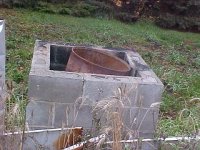
Trying again. I seem to have one of them down to size via a very crude method. This is showing the top with the 50gal liners. Both ends of the barrel are cut out. The blocks (except for the bottom two tiers) are only for appearance, the barrel holds the burning contents more compactly for better combustion.
 

Attachments

  • 529173-Burn Barrel #3.JPG
    529173-Burn Barrel #3.JPG
    23.5 KB · Views: 348

Tractor & Equipment Auctions

2016 FORD F-250 SUPER DUTY (A58214)
2016 FORD F-250...
JCB 3CX 14HFCA BACKHOE (A60429)
JCB 3CX 14HFCA...
iDrive TDS-2010H ProJack M2 Electric Trailer Dolly (A59228)
iDrive TDS-2010H...
206320 (A57192)
206320 (A57192)
2014 International WorkStar 7300 4x4 Altec A55F 55ft. Material Handling Bucket Truck (A60460)
2014 International...
2011 NORAM POWER SYSTEMS 100KW GENERATOR (A58214)
2011 NORAM POWER...
 
Top