Anyone using sketchup?

   / Anyone using sketchup? #1  

brokenknee

Platinum Member
Joined
May 21, 2010
Messages
569
Location
South of Moose Lake MN
I just started using sketchup and have some of the basics down. Now looking for recommendations for useful plugins.
 
   / Anyone using sketchup? #2  
Yes.
We took our house design and modeled it in sketchup to check for views within the house (i.e. are you looking at the toilet from the living room) and to see how the house would look from different angles.

Check this out for already constructed models:
https://3dwarehouse.sketchup.com/index.html

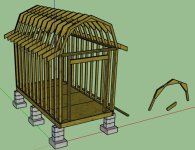
I have a vaulted ceiling design I did, but can't upload any pictures at the moment because of my data link, i'll try to post them later.
 
   / Anyone using sketchup? #3  
What are you using it for?
 
   / Anyone using sketchup? #4  
Here's a couple of pictures from the same file. Sketchup makes it easy to make a 3D model then rotate it and take slices thru it.

Vaulted ceiling view1.jpg
Vaulted ceiling view2.jpg
 
   / Anyone using sketchup?
  • Thread Starter
#5  
I would be mainly be using it for woodworking and construction projects. I am into woodworking and would like it to help design kitchen cabinets for our house. I also need to build a new chicken coop (the wife wants one a little fancier than the square box I built last time, she said give it some character. My nephew also asked me to draw up plans for a deck he is building for his mother to submit to the permit office.

It would be mainly things along those lines for now.
 
   / Anyone using sketchup?
  • Thread Starter
#6  
Yes.
We took our house design and modeled it in sketchup to check for views within the house (i.e. are you looking at the toilet from the living room) and to see how the house would look from different angles.

Check this out for already constructed models:
https://3dwarehouse.sketchup.com/index.html

I have a vaulted ceiling design I did, but can't upload any pictures at the moment because of my data link, i'll try to post them later.

I have looked at the warehouse, but have yet to find and figure an easy way to modify them to suit my needs.

I am looking at plugins such as house builder and some cabinet building software.

Do you know if house builder is a free plug in?
 
   / Anyone using sketchup? #7  
Learn to use components.

For example when making furniture it allows you to make pieces, rather than just a collection of lines and surfaces for the overall thing. Then you can hide and unhide model pieces, or pull out copies or put on layers (depending on your prefered work style) to make and assemble the real ones. Also, once you start playing with components and how to edit them, then the way most of the models in the warehouse are put together will make a lot more sense. They use a lot of components and groups, and once you learn how to edit them, you can do things like throw away the 90% of a warehouse model you don't need for a current project.

Components also let you do repetitive pieces easily, such as studs in a wall or bolts or whatever, while still allowing you to take an individual copy and "make it unique" to edit it for that location.

What I like most about it is that it allows me to get geometry down "on paper" (so to speak) quickly, to check fits and scratchpad ideas and check scales and such. Not every model has to be a full and proper work up, just like every sketch with a real pen doesn't have to be a fully dimensioned drafting, sometimes a napkin sketch is fine.

While I learn best just jumping in, there are a bunch of things on youtube on how to do various things. For example, sketchup doesn't have a mirror command, which annoyed me for the longest time, until I saw a vid where someone made a copy of something and then scaled it by -1 in one direction. Oh hey, instant mirrored part, cool. Several of the woodworking magazines and their online counterparts will sometimes have sketchup articles, or even whole downloadable models.
 
   / Anyone using sketchup? #8  
I use sketchup for every large project, as well as some small ones. I laid out some picture frames quickly for some custom prints my wife ordered. It made cutting and sizing the stock very easy.

I agree with learning to use components...it is a great tool. You will learn the shortcut keys quickly too so you can go from moving an object, to orbiting around, to drawing, etc, very quickly.

Some of the larger projects I planned in sketchup

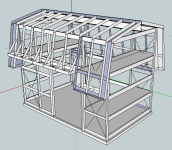
Shed plans:
shed.JPG


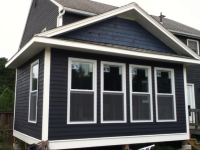
Complete shed:
sheddone.jpg


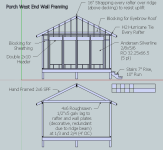
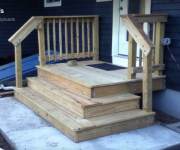
Porch Plans:
porch.JPG

-Joe
 
   / Anyone using sketchup? #9  
For small projects from just a quick sketch to build:
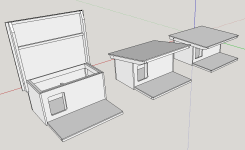
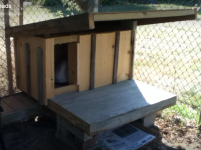
Doghouse Snip 1.PNG Doghouse 1.PNG

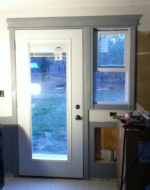
Door Trim Snip 1.PNG Door Trim 1.PNG

...to bigger ones, after countless hours of fussing, including making all the plan sketches for permits:
Porch Deck Snip 1.PNG Porch Deck Snip 2.PNG Deck 1.PNG Porch 1.PNG

Shed Snip 1.PNG Shed 1.PNG Shed 2.PNG
 
   / Anyone using sketchup? #10  
I would be mainly be using it for woodworking and construction projects. I am into woodworking and would like it to help design kitchen cabinets for our house. I also need to build a new chicken coop (the wife wants one a little fancier than the square box I built last time, she said give it some character. My nephew also asked me to draw up plans for a deck he is building for his mother to submit to the permit office.

It would be mainly things along those lines for now.

Their is a big learning curve. The plug-ins, while nice, won’t be your limiter for some time. Get into the program and figure out how to do the basics. Then you can start to customize the layout of the toolbar etc. IE someone who is doing lighting will have it setup totally different than someone who is building cabinets. Once you get all of that figured out then you can start to add plug-ins as need for a specific need or task.
My wife’s architecture firm is all CAD. Each of her drafters has theirs set up different- it just depends on how they like it.
 
   / Anyone using sketchup? #11  
I sure would like to learn some type of cad, but Me & computers........

imgres.jpgmore my speed :laughing:, "wireless" as well.
 
   / Anyone using sketchup?
  • Thread Starter
#12  
Their is a big learning curve. The plug-ins, while nice, won稚 be your limiter for some time. Get into the program and figure out how to do the basics. Then you can start to customize the layout of the toolbar etc. IE someone who is doing lighting will have it setup totally different than someone who is building cabinets. Once you get all of that figured out then you can start to add plug-ins as need for a specific need or task.
My wife痴 architecture firm is all CAD. Each of her drafters has theirs set up different- it just depends on how they like it.
I agree about the learning curve. I think I have about 20+ hours into it now and just getting the basics down. I read somewhere were the guy said he was able to MASTER it in about 40 hours. I guess i am just not that quick of learner. I started with my nephews deck and I learned a lot from that. He has yet to bring it to the permit office so will have to see what if anything I need to change.

The thing about the deck I wish I would have assigned layers to it so I could have printed out the different views. What I did was just copy the drawing and saved it as its own file. While this worked anything that I changed of one file I had to remember to go back to the other file and change it so it matched. Still trying to figure out the layer thing but slowly getting it down.

U-tube is great but you need to watch from more than one channel as others have there own way of doing things so you pick which works the best for you. I connected a second monitor to my laptop and would follow along, pause and rewind as needed (which was a lot). This worked for me. I did get frustrating at times as some times I could just not figure out what I was doing wrong. It usually turned out I was grabbing the component at the wrong location, grabbed the wrong tool or was on the wrong plan. My biggest mistake in the beginning was just clicking on the item without selecting it all.

I do believe this will be a great tool and worth the time to learn. Although frustrating at times, once you get the basics down and are able to see the tip of what it is capable of doing I think it will be time well spent learning it.
 
   / Anyone using sketchup?
  • Thread Starter
#13  
I use sketchup for every large project, as well as some small ones. I laid out some picture frames quickly for some custom prints my wife ordered. It made cutting and sizing the stock very easy.

I agree with learning to use components...it is a great tool. You will learn the shortcut keys quickly too so you can go from moving an object, to orbiting around, to drawing, etc, very quickly.

Some of the larger projects I planned in sketchup

Shed plans:
View attachment 526725


Complete shed:
View attachment 526726


Porch Plans:
View attachment 526724

-Joe


Thanks to both of you for posting your sketches and the finished product. You can really get an idea what it is going to look like from the sketch.

The permit process is what brought me into this software to begin with (for my nephew). When I lived in Clear-water county I put an addition on my house similar to your sketch, no permits required, now from what i understand I will need a permit to put up a chicken coop, go figure.
 
   / Anyone using sketchup? #14  
I have messed with SketchUp free version somewhat and for me the most convenient thing is it's easy to import Google Earth images and draw on top of them
 
   / Anyone using sketchup? #15  
40 hours to master.....the bs meter is pinging off the scale!! Don’t feel bad. It’s going to take some time.
The wife hires folks with at least a few years under their belts and no one comes to the table as a master. They are all learning new things all the time. Her last few assistants have gradually gotten into the program. After a few months of tinkering every week (say 5 hours or so) plus the tutorials they could do the basic red lines (changes to notes etc) and make prints. That’s with other folks in the office to ask questions of as needed. She is on Vectorworks but most CAD programs are similar- including sketchup.
 
   / Anyone using sketchup? #16  
Sketchup is good for woodworking projects and some house design stuff. But it is very lacking when doing machine design solid modeling. I prefer Inventor, Solid Works, Fusion 360, etc etc.
 
   / Anyone using sketchup? #17  
Curious how many of you using it are running free vs paid version? I have only worked a little with the free version. Any real differences in the paid version that would make you suggest paying before learning?
 
   / Anyone using sketchup? #18  
I use the free version and have not felt the need to upgrade yet.

I also am in the middle of learning FreeCAD because it is supposed to be better at converting to CNC. Haven't finished the router, so I don't know how true that is.

For some reason I find Fusion 360 annoying. Haven't used Autocad/autodesk much since about R14.
 
   / Anyone using sketchup?
  • Thread Starter
#19  
Here is PDFs of my first project. I think I must have about 12 to 15 hours into it. This is the first time I ever used it. I would love to "master it" but I know that will never happen. For my uses I don't think I will ever need that level of expertise. It is satisfying to see the project on paper before the actual build. I is also nice to have all measurements and the minor details worked out a head of time.View attachment Sams deck front view Legal paper.pdfView attachment Sams deck load calculations.pdfView attachment Sams deck top view Legal.pdf
 
   / Anyone using sketchup?
  • Thread Starter
#20  
I just realized I forgot to add the floor joist bracing in the plans. Not sure if my nephew brought these in yet to be reviewed by the city but from what I understand they will most likely make me add them to the plan. I know they told him they will not except any plans without the grid. The grid i found in the extension library so it was easy to add once I downloaded the extension.

@prichard, I would not be the one to ask about the free verses paid version. I figure it will be a long time before I learn the free version well enough to advance to the paid version. I think the basic projects that I will be doing the free version will be fine. I have seen this question asked before on other forums and most respond by saying the free version is all they feel they need.
 

Tractor & Equipment Auctions

2020 John Deere 1025R MFWD Compact Tractor (A56438)
2020 John Deere...
2011 DOOSAN G25KW GENERATOR (A58214)
2011 DOOSAN G25KW...
2023 FORD F-150 XL CREW CAB TRUCK (A59823)
2023 FORD F-150 XL...
2022 RAM 2500 HEAVY DUTY (A55745)
2022 RAM 2500...
John Deere S350 (A60462)
John Deere S350...
2016 Ford Transit 250 Passenger Van (A55852)
2016 Ford Transit...
 
Top