IT networking help(Internet) help needed

   / IT networking help(Internet) help needed #1  

Code54

Elite Member
Joined
Aug 20, 2005
Messages
4,408
Location
Putnam Co. West Virginia
Tractor
Kubota MX5100, Kubota BX25D,1957 Farmall Cub Lo-Boy Kubota KX91-3, BCS 853
We have Frontier DSL and have been having horrible internet service since April. We have had a LOT of work done including Frontier replacing the modem/router, all new inside wiring, new cable from the main box to the house box (About 1/2 mile of new cable) and still having issues.
What is weird is the internet sometime works fine, then seconds later it locks up. If you reset the router it starts working again- sometimes for 1 minute sometimes for a few hrs. My speeds test at 6mbps when it is work and other times less than 1mbps. We reset the router at least ten times a night and mostly just give up on it at some point.
It seems that it runs better durning the day than evening. Frontier (people you call on the phone) said they check network traffic and that is not the problem. they have switch the port we are on and that has not changed anything.
Some thought are it is something in the house causing the issue but it used to work 6mbps all the time and then overnight this happened and we didn't change anything or add anything to the house.
I have been checking the network traffic on my laptop and nothing is unusual or using much bandwidth. I also disabled iCloud on all our systems to make sure that was not the cause of the issues.

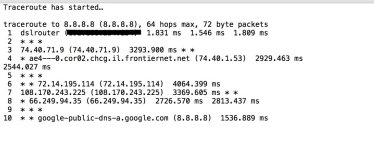
I have done a trace route and get odd result and dont really know how to read them - looks to me like there is a problem after the router but dont know much about what I'm reading. I will post a trace route below if someone can tell me how the heck to read it.
Any help would be appreciated!
 

Attachments

  • traceroute copy.jpg
    traceroute copy.jpg
    135.4 KB · Views: 157
   / IT networking help(Internet) help needed #2  
Is this a wireless (WI-FI) network?

is the modem a dual purpose unit? is it both a modem and a router? does it provide the wireless service or do you have a separate router?

Have you tried connecting a single computer to the modem via an Ethernet cable for an extended period??
 
   / IT networking help(Internet) help needed
  • Thread Starter
#3  
Yes sir- have run it straight to the router with an ethernet cable to take the Wifi out of the equation. Never helped unfortunately.
It is the Frontier modem with the wifi shut off and using the Frontier AIRI mesh network. Also have use it without the mesh network and just the frontier modem with the WIFI and same results.
Also have tried 3 different MAC laptops and my work Windows PC all have the same issues. All the computer run fine on other networks with no issues at all.
THANKS
 
   / IT networking help(Internet) help needed #4  
Yes sir- have run it straight to the router with an ethernet cable to take the Wifi out of the equation. Never helped unfortunately.
It is the Frontier modem with the wifi shut off and using the Frontier AIRI mesh network. Also have use it without the mesh network and just the frontier modem with the WIFI and same results.
Also have tried 3 different MAC laptops and my work Windows PC all have the same issues. All the computer run fine on other networks with no issues at all.
THANKS
Any issues with your voice lines? static etc.?

Sounds like there is no doubt that it's the service provider's issue...either with the local hardware (modem etc.) or the line from the switch...or an issue at the switch...

my experience with local DSL providers is you have to keep pestering them until they eventually send someone that actually knows what they're doing and finally solves the issue...I went through similar issues this year that lasted from around Easter to Labor Day...same type of rural DSL service interruptions and also noisy voice lines...

Good Luck...
 
   / IT networking help(Internet) help needed #5  
Just a thought as I had this happen to me once do you have a cordless phone base near the router/modem if so move it away and see what happens that used to cause some of the same issues you are having when I had a home phone....
 
   / IT networking help(Internet) help needed
  • Thread Starter
#6  
Thanks.
We no longer have phone service and I literally have had them run a brand new line straight from the outside box to the wall jack with no other jacks on the line (I wanted to isolate everything so figured that may eliminate some issues.)
I think it is some where outside the house but finding someone to deal with that is tough. The installer/service guy is GREAT but I really think it is not his problem and more on the providers side.
 
   / IT networking help(Internet) help needed #7  
I had a problem last week in our land line it splits off for the DSL and phone. Had a real bad static and the wifi was cutting in and out we tried to reset it several times. I finally got a hold of the phone company and they sent out a tech it turns out that the splitter from the main line phone and DSL was bad and shorting out inside he changed it and it works fine now just an idea for you to try.
 
   / IT networking help(Internet) help needed #8  
Hard to tell just yet, but I suspect either a provider problem (Frontier?) or a wiring problem.

You said you pulled a half mile of new cable? What kind of cable did you pull-- CAT 5 or CAT 6, any special shielding? That is a ........ long ......... way. CAT 5 segments are not supposed to exceed about 300 ft.

I would isolate everything possible. That might require moving the Frontier modem/router to the very edge of the wire where it enters the building, and then connect it there. (Try to take all the building wire out of the equation.) Then connect just one computer and leave everything else off. I don't think traceroute is going to help you but it's always interesting to see how you are routed to the outside world, and how long it takes.

With wiring minimized and just one computer, I'd test reliability and do periodic speed tests. You can also buy a network cable tester at Home Depot for about $35. You put one part of it on one end of the line, and the other part on the other end. It then checks the network cable for problems.

Your problem also might be in how your DNS server settings are set. Who are you using for DNS? (dynamic name service) This is the service that converts CNN - Breaking News, Latest News and Videos to an internet IP address. If Frontier is providing DNS, they are probably giving you two DNS addresses to use. Make 100% sure those are correct.

Another thing that can wreak havoc is if you have two devices using the same IP address. So if your modem/router is 192.168.1.1 or something like that, NOTHING ELSE can share and use that address or weird things will occur. If you have a "router behind a router" you are asking for trouble-- it is best not to do that. If you have a 2nd router in your system you should reconfigure it to be something other than a router-- a bridge or an access point.

Finally you say wifi is turned off but you are using the Frontier mesh. A mesh network is wireless .... are you sure when you are testing it is using the *wired* connection? I have some PC's that are plugged in and have a wireless adapter-- sometimes it goes one way, other times another. If you have a Windows PC, you can go into Control Panel > Network > Change Adapter Settings and disable the wireless adapter. Once you do that it will force communication through the regular, non-wireless adapter.

OK that's a lot-- just presenting ideas as these are really hard to troubleshoot remotely. I'm really curious about what kind of wire you pulled that is 1/2 mile long.

One more question. When is the last time everything worked great with no problems? And what cabling or equipment has changed since then?
 
Last edited:
   / IT networking help(Internet) help needed #9  
From your traceroute, it looks good inside, but once you leave your router you have huge latency. I would expect better then 100 or so msec. You are seeing multi second for each hop. You are having a problem once you leave your internal network.
 
   / IT networking help(Internet) help needed #10  
You are having a problem once you leave your internal network.

I agree. Anything past his DSL modem slows down. But is that his half mile of wiring, or the provider? Or a config issue?
 
   / IT networking help(Internet) help needed #11  
When you're having the issue (high latency as shown in the image) have you called Frontier tech support and what did they say? They should be able to ping your modem and "see" the latency issues while they are occurring.
 
   / IT networking help(Internet) help needed #12  
From your traceroute, it looks good inside, but once you leave your router you have huge latency. I would expect better then 100 or so msec. You are seeing multi second for each hop. You are having a problem once you leave your internal network.


This. It's them, not you. Good luck getting it fixed.


Frontier bought the phone system in our area and boy do they suck. Our line was on the ground for years. We'd get a guy out to fix it and they'd come up with an excuse to not do it like "that tree is too close, take it down first" or they didn't have the equipment on their truck(!). Finally we got a competent lineman and he did it in half an hour. We're now battling to get the lines to the next house, which are on the ground on on fenceline, back up.

BTW the * * * on line 2 is from a device that does not return ICMP ping packets. It's probably the outbound interface of the router. That's fine. The two *s on line 3 is two of the three ping packets not being returned in time... It's not only slow it's losing packets. Since that's your problem you can test it directly with pings. I don't remember the windows ping command but it is probably similar to the unix one which lets you change packet size or do pings for a fixed amount of time. It can be useful when quantifying a wonky network hop.
 
   / IT networking help(Internet) help needed #13  
I'm not familiar with Frontier. The OP is in VW and you are in Santa Cruz, CA? Are they a landline provider and also DSL?
 
   / IT networking help(Internet) help needed #14  
Frontier has been buying up all the small telco's around the country for about 20 years. Their service is generally terrible everywhere.
Frontier Communications - Wikipedia
 
   / IT networking help(Internet) help needed #15  
Hard to tell just yet, but I suspect either a provider problem (Frontier?) or a wiring problem.

You said you pulled a half mile of new cable? What kind of cable did you pull-- CAT 5 or CAT 6, any special shielding? That is a ........ long ......... way. CAT 5 segments are not supposed to exceed about 300 ft.
...
I THINK the OP meant that the phone company ran a half mile of new wire to the NIB on the house.
Assuming it is a NIB and has a connector for "Data" I think I would connect a short piece of CAT to that and connect it directly to the modem outside the house. Others have already stated that based on the trace the problem is outside the house. Connecting directly to the phone company's box will prove to them that it is their problem, not internal to the house.

Another possibility is to borrow a modem from a neighbor and see if you still have the same problem.
 
   / IT networking help(Internet) help needed #16  
I've been waiting to see if anybody mentioned network congestion. OP says this tends to happen more in the evening which coincidentally is when more people are home, on the web and streaming music and video. That can really muck up the works on lower bandwidth shared node systems like DSL.

If you're up early in the morning, try running a speed test about 4 or 5 AM and see what you get.
 
   / IT networking help(Internet) help needed #17  
I've been waiting to see if anybody mentioned network congestion. OP says this tends to happen more in the evening which coincidentally is when more people are home, on the web and streaming music and video. That can really muck up the works on lower bandwidth shared node systems like DSL.

If you're up early in the morning, try running a speed test about 4 or 5 AM and see what you get.
Good to try but the OP did say:
" Frontier (people you call on the phone) said they check network traffic and that is not the problem."
 
   / IT networking help(Internet) help needed #18  
I would guess noise on one of their segments close to the house. Had a similar problem when road construction started on the main drag to the highway from the subdivision. Was on a segment with five people. Turned out there was an amplifier that was not set up correctly (over boosting). In the evening performance was worse when traffic was higher. Try to get then to check the signal to noise ratio on the last of their segments.
 
   / IT networking help(Internet) help needed #20  
You would expect them to say otherwise?

Well, no not really. Unless they are an honest and transparent company. But if it is traffic, another thing the OP could do is send one family member next door and while both are trying to do basic stuff both should be slow. Of course that ASSUMES the neighbors are not having the same problem.
 

Tractor & Equipment Auctions

2024 MECO M-Y 4-Passenger Electric Car (A59231)
2024 MECO M-Y...
2017 New Holland T4.110 Cab 4WD w/ 655TL Loader – 1,619 hrs – Excellent Condition
2017 New Holland...
2018 Kubota M5-111 (A60462)
2018 Kubota M5-111...
iDrive TDS-2010H ProJack M2 Electric Trailer Dolly (A59228)
iDrive TDS-2010H...
BOSS MT 660 Fuel Trailer - 660 Gallon Mobile Diesel Tank, DOT-Approved (A55315)
BOSS MT 660 Fuel...
2024 CATERPILLAR 305 CR EXCAVATOR (A60429)
2024 CATERPILLAR...
 
Top