Help, scammers attacking my email

   / Help, scammers attacking my email #1  

tallyho8

Super Member
Joined
Aug 1, 2004
Messages
5,256
Location
North of the Gulf of America, west of Westwego
Tractor
Kubota L4400, Kubota ZD326
Yesterday I started getting over 100 emails a day, from mostly Russian and Chinese websites, showing that someone is trying to check into these sites using my email address and saying they lost the password and trying to reset the password. If they happen to get to a site that I am registered on, then they will be able to sign in and change all my info, such as the mailing address, etc.

This is my business email address and would be very costly for me to shut it down and get a new email address which they might just be able to do the same thing to. They are probably running some kind of bot to do their dirty work because a person could not do all of these in one day by themselves. Today I have had about 150 of these emails so far. I do not open or react to these emails.
The local police say there is nothing they can do and that they get so many complaints about this that they are sure that federal authorities are also overwhelmed with this problem. I make sure that any bank accounts I have online require 2nd or 3rd stage verification which makes me feel a little safer but scammers could still order from these web sites using a saved payment option stored there requiring me to close out those credit cards and getting rid of saved payment options on these sites.

Not to mention the large amount of time I have to use daily to go through all of these emails, deleting the spam, to check on my new orders.
I wonder what I should do next?
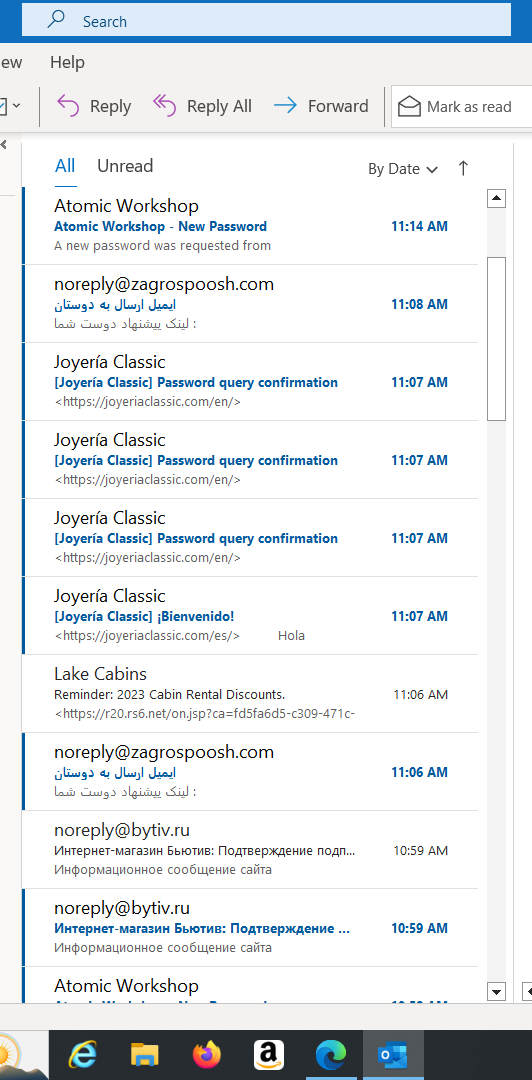
scammers.png
 
   / Help, scammers attacking my email #3  
Change your passwords immediately. Make them complicated.
Set up rules in your inbox to automatically move the spam to your junk mail folder or trash.

2part authentication is really important.
 
   / Help, scammers attacking my email #4  
Any one can spoof an email address it's not hard. Harder is getting the email back to the spoofed account. In you case it look like a kiddie script trying to find a soft target using your address. As long as you (and not them) are getting the verification from the web sites without the "hacker" getting them nothing bad happened. Now those sites that just let reset password or email address without verification are always a problem
 
   / Help, scammers attacking my email #5  
To reset passwords on places using email reset like that they need to be able to read your email so start with changing that password. It could just be someone messing with you sending a ton of reset spam, it could be a legit attack, no real way to know. Changing email password is easy enough to do anyway.

You can switch site logins over to a new email that isn't public and still get business emails there. And make sure your passwords on places you care about are unique. Thats a big attack vector, find a password somewhere then try it everywhere.
 
   / Help, scammers attacking my email #6  
tallyho8 - EXACTLY 14 days ago - I had the same thing happen here. It started with 6 - 10 uninvited emails. Yesterday - 67 emails. Today - ZERO. I NEVER answer them nor open them. Divert directly to JUNK file - then delete. I've had this happen before. After a specified time - your name gets removed from the list because you never respond.

My thought on this. I went somewhere I shouldn't have and clicked on something I should not have. Believe me - in this day and age it does not take much to "join" the uninvited list.
 
   / Help, scammers attacking my email #7  
I use one junk email address for online use, and most everything I receive gets trashed. Up until a few weeks ago I was getting around 50 spam emails per week. After the Comcast breach I changed my passwords, and now I'm getting practically zero spam emails. The"from" headers are all random as you would expect, so I don't think anyone was using my email account.
 
   / Help, scammers attacking my email #8  
The main rule is never click a link in an email unless you are 101% sure it's legit then you might think twice. It's an ever changing environment that becomes more sophisticated by the day. Mail and wire fraud was at one time high on the list for law enforcement agencies, now you can see what they are working on by watching evening news.
 
   / Help, scammers attacking my email #9  
Change your password.
Get a VPN.
Get an anti virus.

Maybe contact scammperpayback and see if they’re interested.
Please explain how ANY of your suggestions gets an email address off a scammers list that is being sold and traded

To the OP - I've been in your position - the only way to "reduce" this email spam is through your hosting email server settings. FYI Grandma isn't the right person to get tech support from.

My suggestions for immediate action:
1. Change your email client settings to view as "text only" and "disable html" and "disable viewing online content" in order to prevent email trackers. Your emails will be UGLY and unreadable at times because spammers/scammers rely on you allowing web content in your emails.
2. Stop using your current email address, it's gone forever now
3. Start using multiple work email addressess WITHOUT your name
example: mike@mybusiness.com is going to get tons of spam because it's a common easy to guess name using something like
m123xyz@mybusiness.com
because it is harder to guess with a dictionary attack. Spammers/scammers are constantly flogging your email server using a dictionary and spam list trying to find live email accounts.
4. NEVER give out your work email address to vendors at stores. If you have to use a work email with a vendor make the name trackable so you can find out who is selling your data or has security issues
example: use homedepot-plus-account-date@mybusiness.com and use forwarders to send to m123xyz@mybusiness.com
5. NEVER give out your work email address to friends and group email lists. Your friends email account will get hacked and your email will become spam fodder.
6. STOP group emails that don't use BCC (blind carbon copy). If you are on a group email list where you see multiple email addresses in a large group you are screwed. More than one person is compromised on that list and everyone on that list is now a good spam target.

There's more you can do I don't want to write a novel right now. PM me if you want/need more suggestions to get you going
 
Last edited:
   / Help, scammers attacking my email #10  
@mikester Great advice!!

The only thing that I would add is if @mikester's suggestions are something that you have difficulties with, hire an IT consultant/coach. It will be money well spent. Don't forget to train your employees as well, if they have work emails.

All the best,

Peter
 
   / Help, scammers attacking my email #12  
It sounds like the OP's problem isn't spam, it's that someone has possibly gotten into their email account. That's a bigger problem than spam (which should be mostly taken care of by the mail provider).

The attacker may have just compromised the email account password or they may have installed malware on your computer and gotten the email password that way.

You can first change the password on the email account and set up two factor auth. If the attacks continue then look to cleaning up your computer of any malware (and resetting the email account password again).

The other possibility is that the attacker doesn't have your email address and they are just firing off password change requests (via a program) to use the auto-reply mails to annoy you.

If they do have your email account password they may try to impersonate you to people in your address book and ask for money or other things of value.

Your passwords should be long random strings generated and managed by a password manager. Lastpass has had security problems for many years and has shown an unwillingness to fix them. I suggest 1password.
 
   / Help, scammers attacking my email #13  
My DSL provider stops about 99% of my junk mail and sends them to me in an email. The email will have anywhere from 1 to 45 in it. I look at them to see if anything is ok, then blacklist the rest with on click.

In the last couple of months I've received three emails from Paypal that look perfectly real(probably AI), but the reason I knew they were a scam is that Paypal never sends me any email like that.
 
   / Help, scammers attacking my email #14  
Your passwords should be long random strings generated and managed by a password manager. Lastpass has had security problems for many years and has shown an unwillingness to fix them. I suggest 1password.
I'm a bit wary of password managers, all eggs in the same basket should their servers get hacked. I just keep mine in a text file on my computer.
 
   / Help, scammers attacking my email #15  
I'm a bit wary of password managers, all eggs in the same basket should their servers get hacked. I just keep mine in a text file on my computer.
The right way to implement a password manager is to encrypt the passwords locally before they are uploaded. If the encryption is strong it won't matter if the server gets hacked. Without the master key the passwords aren't recoverable without spending far more than they're worth. Designing systems like that has been much of my work for the last 25 years and I can tell a good design and implementation from a bad one.

Keeping passwords in a file locally prevents network and server attacks but does not work when attackers get access to your machine. Which is not unknown.

Keeping them on post-its stuck to the monitor is secure against network and server attacks and is even secure against attackers who gain access to your machine. It only fails when the attacker is in the room with the monitor.

Both don't work well if you have more than one device.
 
   / Help, scammers attacking my email #16  
Unless you have accounts at any of those websites sending you password reset emails, I wouldn’t get too excited. You really have no idea of whether or not those password reset emails are being sent from the vendors website unless you check the email header information. More likely, those are phishing attempts, and clicking on the link in the email will take you to a site that is impersonating the legitimate site. If you enter your info there, then they got you. Look at the url in your browser address bar to be certain. Another way is to hover over the link if you’re using a desktop mail client, and it will show you the url provided in the email.

I would suggest that since this is for your business, use a business class filtering system that checks not only incoming email, but also outgoing. If your email account would be compromised and start sending out spam, the filters would catch it and prevent it before it becomes a big problem. Of course this all depends on what provider you use for email.

Without knowing a lot more details, everything any of us post here is pure conjecture. By the way, I’ve made my living in IT the past 40 years, so I have a little experience with this. :)
 

Tractor & Equipment Auctions

Bobcat S740 (A57148)
CHALLENGER MT525B TRACTOR (A59823)
CHALLENGER MT525B...
2013 Nissan Rouge SUV (A59231)
2013 Nissan Rouge...
2011 DRAGON 130BBL VAC TRAILER (A58214)
2011 DRAGON 130BBL...
2018 ARIENS RIDING MOWER (A56859)
2018 ARIENS RIDING...
2023 MORBARK WOOD HOG 3400 XT HORIZONTAL GRINDER (A60429)
2023 MORBARK WOOD...
 
Top
