You are using an out of date browser. It may not display this or other websites correctly.
You should upgrade or use an alternative browser.
You should upgrade or use an alternative browser.
Intellipanel Display Setting
- Thread starter CortezEd
- Start date
- Views: 51523
More options
Who Replied?
/ Intellipanel Display Setting
#1

oosik
Epic Contributor
I can only tell you to look at your OP manual. Yours will explain, in detail, how to change any & all values on the display. Mine came with everything displayed in metric terms - so I got a real lesson in changing the values.

TripleR
Super Star Member
- Joined
- Mar 5, 2009
- Messages
- 18,538
- Location
- Missouri
- Tractor
- Kubota M8540HDC, L5740HSTC, BX2200, BX2660, John Deere 425&1025R, Case, Massey Ferguson, Ford
I can only tell you to look at your OP manual. Yours will explain, in detail, how to change any & all values on the display. Mine came with everything displayed in metric terms - so I got a real lesson in changing the values.
Yeah, it is hard to generalize as my L5740 is a lot different than our M8540 and I believe a bit different than the new L60.

Baby Grand
Elite Member
- Joined
- Nov 12, 2007
- Messages
- 4,663
- Location
- Windsor, CT.
- Tractor
- Kubotas: L3240GST B2320HST B5100D & G5200H
Push the button ... you know you want to ... go ahead ... do it!

PHILIP8N
Veteran Member
On my L5740 I just push the display button and it cycles from km to miles.
That is how mine works to. 1st to come up is mph, next to come up is kph. Just keep pushing display mode switch to cycle thru display options. Did you get a second small manual just for your intellipanel? I did. Philip.
OP

CortezEd
Member
Thanks everyone. I have read the operator's manual numerous times trying to find information - but couldn't find a thing about switching from km/h to m/h. I did find a YouTube video about the Kubota Intellipanel and saw where the person cycled through the various displays by pressing the mode button and the travel speed changed to mph. I'll try it out and expect that will be the solution...
I also wonder why the PTO speed units show as n/min instead of RPM. Apparently they both are the same? 540 n/min = 540 RPM ???
Something to do with Fig Newtons I guess? :licking:
I also wonder why the PTO speed units show as n/min instead of RPM. Apparently they both are the same? 540 n/min = 540 RPM ???
Something to do with Fig Newtons I guess? :licking:


ericdube
Gold Member
Did anyone figure out how to change this? I'm in the same situation as the OP and there's literally nothing in the manual(s) that explains how to change this. Thanks!
Baby Grand
Elite Member
- Joined
- Nov 12, 2007
- Messages
- 4,663
- Location
- Windsor, CT.
- Tractor
- Kubotas: L3240GST B2320HST B5100D & G5200H
Push the button. Keep pushing the button until it displays the information you want.
ericdube
Gold Member
Push the button. Keep pushing the button until it displays the information you want.
When you say "push the button" - do you mean to hold it down? I know you can hold it down to change things like stall guard and auto-ds, auto-rpm, etc., but I couldn't find anything in the menu where you could select mph/kph (I'm sure I'm being clueless, but it wasn't obvious to me where this setting resides in the menu.)
Here's a video of the different things you can select - and when you hold the button down it will let you change that particular setting (based on the context of what you're currently looking at):
Kubota Grand L60 Series Dot Matrix Digital Screen - YouTube
ericdube
Gold Member
I played around with it some more this afternoon, and it's definitely not in any of the normal menus or settings.
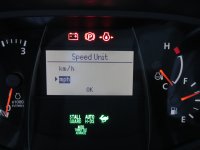
The reason why it's not documented anywhere in the user manual is because the change needs to be done from the diagnostics / service menu. To access the service manual, you need hold the Display Mode button down and then turn the tractor on (but you don't need to start it though) while holding the button in. Once the service menu appears, scroll to option "J" and select it (by holding down the Display Mode button); from there you can either select kph or mph (once selected - hold button and it "OK" will appear at the bottom of the screen.)
I had to do a bit of thinking to figure this out!
The reason why it's not documented anywhere in the user manual is because the change needs to be done from the diagnostics / service menu. To access the service manual, you need hold the Display Mode button down and then turn the tractor on (but you don't need to start it though) while holding the button in. Once the service menu appears, scroll to option "J" and select it (by holding down the Display Mode button); from there you can either select kph or mph (once selected - hold button and it "OK" will appear at the bottom of the screen.)
I had to do a bit of thinking to figure this out!
Attachments

ericdube
Gold Member
I was somewhat surprised to get a call from Kubota this morning. Basically, they said I was half right on the answer and were somewhat surprised to see I found the service menu on my own (I guess it wasn't intended to be easily found! )
Anyway, they said the coefficient of speed also needs to be set to get an accurate account of mph. The factory default coefficient is set for R1 tires and needs to be changed depending on the tire installed. Unfortunately, they didn't have the correct number for the R4 tires, so I'm going to check with my local dealer to see if they could find this information in the service manual. I just wanted to pass this along in case anyone else runs into the same issue.
The speed coefficient is the "B" option in the same menu. It's a 4-digit number you need to set it to.
)Anyway, they said the coefficient of speed also needs to be set to get an accurate account of mph. The factory default coefficient is set for R1 tires and needs to be changed depending on the tire installed. Unfortunately, they didn't have the correct number for the R4 tires, so I'm going to check with my local dealer to see if they could find this information in the service manual. I just wanted to pass this along in case anyone else runs into the same issue.
The speed coefficient is the "B" option in the same menu. It's a 4-digit number you need to set it to.
Last edited:
Baby Grand
Elite Member
- Joined
- Nov 12, 2007
- Messages
- 4,663
- Location
- Windsor, CT.
- Tractor
- Kubotas: L3240GST B2320HST B5100D & G5200H
Sorry about my response - now that I see your photos I understand that our Intelipanels are very different. I guess the 60 series really added a lot to what it can do. On the Lxx40 series you push the button 4 times to scroll thru 4 different displays and that's about all it will do. 1st is total hours, 2nd is mi/hr, 3rd is km/hr and 4th is PTO rev/min.
ericdube
Gold Member
Sorry about my response - now that I see your photos I understand that our Intelipanels are very different. I guess the 60 series really added a lot to what it can do. On the Lxx40 series you push the button 4 times to scroll thru 4 different displays and that's about all it will do. 1st is total hours, 2nd is mi/hr, 3rd is km/hr and 4th is PTO rev/min.
No problem and thanks for responding!

MHarryE
Elite Member
- Joined
- Feb 15, 2009
- Messages
- 2,983
- Location
- Northeastern Minnesota
- Tractor
- Kubota M7-171, M5-111, SVL75-2, RTV900XT & GR2120; CaseIH 1680 combine
I am curious to know why they don't put that information in the manual for the Grand L60 series. My new M135GX has the things you are talking about like setting tire size, Japanese or American units (I don't think they say metric or English), and some others. My dealer really sucks so I don't think I would be able to get any info like that if it wasn't in the book.

PSDStu
Platinum Member
- Joined
- Jul 28, 2004
- Messages
- 793
- Location
- Marianna, FL
- Tractor
- Kubota, M7060 HDC12, L4060 HSTC, RTV 1140
I was somewhat surprised to get a call from Kubota this morning. Basically, they said I was half right on the answer and were somewhat surprised to see I found the service menu on my own (I guess it wasn't intended to be easily found!
Anyway, they said the coefficient of speed also needs to be set to get an accurate account of mph. The factory default coefficient is set for R1 tires and needs to be changed depending on the tire installed. Unfortunately, they didn't have the correct number for the R4 tires, so I'm going to check with my local dealer to see if they could find this information in the service manual. I just wanted to pass this along in case anyone else runs into the same issue.
The speed coefficient is the "B" option in the same menu. It's a 4-digit number you need to set it to.
Keep us posted on what you find out so I can set mine up correctly.
Stu
ericdube
Gold Member
Keep us posted on what you find out so I can set mine up correctly.
I was told 2709 for the larger set of R4's on the L60 Series (I'm guessing for the L3560 the number would be different.) You might want to verify it with your local dealer (they can just look it up in their service manual.)
If anyone knows the numbers for the other tire sizes, it would probably be good if you could reply to the thread with this information to use as a reference in the event someone wants to do a tire swap or verify the number was properly set.
PSDStu
Platinum Member
- Joined
- Jul 28, 2004
- Messages
- 793
- Location
- Marianna, FL
- Tractor
- Kubota, M7060 HDC12, L4060 HSTC, RTV 1140
I was told 2709 for the larger set of R4's on the L60 Series (I'm guessing for the L3560 the number would be different.) You might want to verify it with your local dealer (they can just look it up in their service manual.)
If anyone knows the numbers for the other tire sizes, it would probably be good if you could reply to the thread with this information to use as a reference in the event someone wants to do a tire swap or verify the number was properly set.
Thanks! Looks like 2709 will work for my 4060.
ericdube
Gold Member
Thanks! Looks like 2709 will work for my 4060.
Please let me know what yours was set at. Thanks.
Here are some similar links:

- Replies
- 0
- Views
- 129


