Satellite Internet

/ Satellite Internet #21  
When we moved out of town I REALLY missed my cable. Dial-up was excruciating and I was willing to pay anything to move up, and I did, to Direcway. I would echo a previous comment - it's better than dial-up but that's about it. Most of the time I'm running about 2-3X dial-up and I've been having this major problem with connecting to secure (https) sites. Support is from India and is helpful but can be hard to understand. But they still haven't fixed my problem /forums/images/graemlins/mad.gif
 
/ Satellite Internet #22  
All you guys with DirectWay are really making me feel good about the SkyCasters system I have been using. The system has been up and running for several years with ZERO problems, never made a tech support call since the first day it was installed. My speed issues are nothing like what you guys have, granted mine isn't as fast as the T1 at the office, but it sure sounds a lot better than some of what I am reading here. Now I do pay more per month, not sure the exact amount (its set up on auto pay). I have no clue what their initial equipment costs are, becasue like I wrote earlier, my system is several years old and technology pricing has a habit of changing by the hour. For anyone with a small business, or home office type user, I would recommend digging up SkyCasters as an apparently higher performance (but higher cost) option.
 
/ Satellite Internet #23  
http://www.skycasters.com/broadband-satellite-compare/compare.html

I though my boardband for my 3 pc’s was bad at $42.95 with up to 4MPS download. Am I reading the skycatcher right? It would be $109.99 per month and Up to 1.0 Mbps download for the most equal to broadband (I have now)? I only ask since I want to get out of my broadband but the price, terms and equipment are keeping me here.
 
/ Satellite Internet #24  
Hey, I said it was expensive! But on the upside, it sure seems to be MUCH more reliable and stable than the folks on this thread are saying about their DirectWay systems. Realize also that these are for commercial applications. I know when they installed mine a few years ago it was the first time they ever put one in a house. Skycasters is not a residential provider, they specialize in business solutions, which is why I stated in my previous posting that if you have a small business home office application then it might work well for you. Go back to my first post, I paid $2000 for the equipment. My primary concern was not cost, it was RELIABILITY and Skycasters excels in that area. I wanted a system that never went down, and while I will see my speed drop during storms, I've only lost the signal for brief periods during the heaviest of storms. I work a lot from my home, it is critical to me to have a modestly high speed connection that is rock solid.
 
/ Satellite Internet #25  
Bob... I'm curious about the latency for Skycasters. The latency for satellite systems is usually horrendous even though the raw throughput speed is quite impressive. Try this IP address and ping it. You would actually be closer to this IP address than I am and SHOULD have a lower ping time. 216.105.167.65

You will probably see the very first ping packet of the bunch will be really high while the connection is established.

Here is a set typical of wireless ethernet... definitely not available in all areas (high 74, low 73). My ISP uses 802.11b equipment that uses a proprietary encryption scheme, so its impossible to buy standard off the shelf Linksys or DLink, or even high end stuff like Cisco 802.11b equipment and have it connect to them. Their equipment supports standard WEP or WPA encryption, but they don't use it for exactly that reason. They use the proprietary scheme to limit who can connect to their network even better.

Reply from 216.105.167.65: bytes=32 time=74ms TTL=48
Reply from 216.105.167.65: bytes=32 time=73ms TTL=48
 
/ Satellite Internet #26  
Robert . . . I sell candy to children for a living, when you talk to me about technology you have to talk s-l-o-w and LOUD because I have a working knoweldge but not a technical knoweldge. I have 4 programmers who talk about things like "pinging" but I don't really know what you are talking about. I do know that there is a latency issue with Skycasters, they said if I wanted to video conference then I would have up deal with some delays and increase my monthly service package, and they didn't recommend video conferencing on their system. I wasn't interested in it so it has not been an issue for me anyway. What I have found with my system is it works all the time, it is pretty fast, and it works all the time. As working all the time is my main issue, I have been completely satisified with it. The speed is plenty fast at home. I do get a bit frustrated with some websites (American Airlines in particular) because their site is so darn slow that, when combined with anything other than a T1 connection, I just get frustrated. But I will also admit that at my regular office, where I have a T1, the darn American Airlines site is STILL way too slow for my liking. I've now gotten to the point where I just call them to talk to a human, which they want to avoid and is the purpose for their website but since the darn thing is so slow that it is PITA to use they get to hear my lovely voice.
 
/ Satellite Internet #27  
Here is the laymans description of ping:

Remember back to when you were a kid. Imagine you were off in your mind thinking about Buck Rogers. While you are tuning everything out your daddy is trying to warn you about running around playing cowboys and indians while he is on the tractor, that it is dangerous and not to do it. He realizes you aren't hearing a word he is saying, so he plucks you on the back of the ear really hard. From your dads point of view, the measure of time from his finger painfully contacting your ear to your dad hearing you scream OUCH is the ping time... very likely in milliseconds. /forums/images/graemlins/grin.gif /forums/images/graemlins/laugh.gif /forums/images/graemlins/cool.gif

*Edit: I take requests for more laymans descriptions - heheheheh
 
/ Satellite Internet #28  
Robert,

If your 802.11b system has latency averaging 73-74ms, then the system referenced in my post above must be exponentially better, if it can deliver what it promises:

<font color="blue"> "The Canopy Advantage platform now offers up to 14 Mbps throughput in multipoint networks with only 5-7 milliseconds of latency." </font>
 
/ Satellite Internet #29  
I know what pinging IS, but I typed "ping 216.105.167.65" in my address box and nothing happened...

Before you think I'm really that dumb, what I'm trying to say is that 99 out of 100 people I know have absolutely no idea how to "ping" something. "How to in 25 words or less" is more important than a layman's guide, even though your explanation was cute. /forums/images/graemlins/grin.gif
 
/ Satellite Internet #30  
That 5-7 millisecond latency that they quote would be measured from two network nodes on the same wireless network.

The 74 millisecond latency that I posted is from my home network in NC, to a server located in upstate NY. 5-7 millisecond latency for that particular connection would be nearly impossible even if there was a direct fiber optic connection between those 2 locations.

Typically you gain a minimum 5-7 milliseconds, usually more, from EACH and EVERY router that the information passes through. In may case there are 15 routers between my home and that ip address.
 
/ Satellite Internet #31  
I love getting technical... didn't figure anyone wanted it though. /forums/images/graemlins/grin.gif

Ping is universal standard diagnostic command for TCP/IP networks. Any computer system regardless of vendor has a ping command. Whether it is PC-Windows, PC-Linux, PC-Unix, MAC-Linux(OS-X), mainframes, midrange (iSeries, RS6000, etc).... all have a Ping command.

It entails getting to a command prompt, however that is done for each system, and issuing the command, usually in the following format...
PING, a space, and then the IP address or hostname. Some systems like Unix or Linux automatically ping forever until stopped. Windows pings 4 times unless "switches" (special sub-commands
for ping) are given to make it ping endlessly.

Edit: I just noticed you said 25 words or less so here goes. (Windows XP/2000 specific)

Start/Run type CMD then hit enter or click OK
In the black box type PING 216.105.167.65 and hit enter
 
/ Satellite Internet #32  
Don,

I found a website where you can "Ping":
http://network-tools.com/

Just select Ping on the left and put in the address in the box and then Submit.

Here's my latency using a shared T1 in Dallas:

Ping 216.105.167.65
[www.bluesnews.com]

Round trip time to 216.105.167.65: 58 ms
Round trip time to 216.105.167.65: 59 ms
Round trip time to 216.105.167.65: 58 ms

Average time over 10 pings: 58.7 ms
 
/ Satellite Internet #33  
Robert,

Thanks for that clarification. What's your point to point latency? It looks like mine is 1ms (at most) on the initial hop, if my interpretation of the Trace is correct:

TraceRoute to 216.105.167.65 [www.bluesnews.com]

Hop (ms) (ms) (ms) IP Address Host name
1 1 1 0 66.98.244.1 gphou-66-98-244-1.ev1.net
2 0 0 0 66.98.241.4 gphou-66-98-241-4.ev1.net
3 1 1 1 129.250.10.105 ge-0-1-0-50.r00.hstntx01.us.bb.verio.net
4 12 11 12 129.250.5.42 p16-1-1-1.r21.dllstx09.us.bb.verio.net
5 11 12 11 129.250.9.38 p16-0.att.dllstx09.us.bb.verio.net
6 10 11 11 12.123.17.82 tbr1-p012101.dlstx.ip.att.net
7 45 50 45 12.122.2.90 tbr2-cl1.attga.ip.att.net
8 45 45 45 12.122.9.157 tbr1-p012501.attga.ip.att.net
9 45 45 45 12.122.10.69 tbr2-cl1.wswdc.ip.att.net
10 61 57 57 12.122.10.53 tbr2-cl1.n54ny.ip.att.net
11 56 57 56 12.122.11.18 gbr1-p70.n54ny.ip.att.net
12 56 57 56 12.123.1.129 gar1-p360.n54ny.ip.att.net
13 57 57 57 12.122.255.162 mdf1-gsr12-2-pos-7-0.nyc3.attens.net
14 59 59 59 63.240.64.110 mdf1-bi8k-1-eth2-2.nyc3.attens.net
15 59 60 60 63.240.74.122 -
16 59 59 58 216.105.167.65 www.bluesnews.com

Trace complete
 
/ Satellite Internet #34  
Bill.. point to point latency is exactly what ping measures. That value changes depending on which two points are involved.

For example the ping numbers that you posted were the ping values from the SERVER to that IP address. The server ran the ping, not your actual PC. So the point to point measured are www.network-tools.com to www.bluesnews.com.

If you were to open a command prompt and type the command I posted above, it would be ping values from your actual PC to www.bluesnews.com. This would give you the point to point latency.

Tracert (Trace route command) actually is PING on steroids. Behind the scenes it pings each router for each hop between you and a remote address. So those 1110 values you see are 4 pings to the very first router encountered (1ms or less each time). Keep in mind, it appears you are running those commands from the network tools website. So the values you are getting are from one website to another. Not from your PC to a website.

So, given that, I'll answer your question with another question.. .from my house to which other point would you like me to ping, because the values will change greatly depending on where that other point is physically located.
 
/ Satellite Internet #35  
</font><font color="blue" class="small">( point to point latency is exactly what ping measures. That value changes depending on which two points are involved.)</font>

It will also change depending the the route packets take from your ISP to the destination. Some network clouds have much less latency than others. If you look at the DNS names for the router IP addresses you can most of the time determine the path the packets take.

I wrote a program that uses the TraceRoute functionality to determine the paths from a PC to a destination. Here is a printout for TBN.

Tracing Route to tractorbynet.com [66.216.78.243]

Hop #1 1ms 192.168.1.1
Hop #2 21ms 69.21.248.1 wltonhbas01-lo0.network.tds.net
Hop #3 37ms 69.128.250.157 nycmnyhed01-a1-0-1110033.network.tds.net
Hop #4 36ms 64.50.237.132 nycmnycor02-gi2-1-224.network.tds.net
Hop #5 38ms 198.32.118.36 NYCL-PEER-03.twtelecom.net
Hop #6 37ms 66.192.240.197 core-01-so-1-0-0-0.nycl.twtelecom.net
Hop #7 60ms 66.192.255.23 core-02-so-0-0-0-0.atln.twtelecom.net
Hop #8 92ms 66.192.246.21 dist-02-so-1-0-0-0.snan.twtelecom.net
Hop #9 93ms 66.192.246.141 hagg-01-ge-1-3-0-508.snan.twtelecom.net
Hop #10 90ms 64.132.228.26
Hop #11 91ms 64.39.2.33 vl130.core1.sat.rackspace.com
Hop #12 91ms 64.39.2.82 vl905.aggr5.sat2.rackspace.com
Hop #13 91ms 66.216.78.243 tractorbynet.com

You can see that my path to TBN goes thru NYC to Atlanta to San Antonio. I get different latency values depending on where I run the trace and usually when I run it more than once on the same PC.
 
/ Satellite Internet #36  
<font color="blue"> from my house to which other point would you like me to ping (?)</font>
The initial hop from your house to the ISP. Wouldn't that correspond to the 5-7ms latency that Motorola is bragging about?

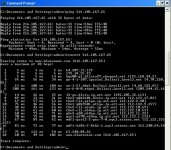
Thanks again for the education. I opened a command prompt and did a Ping and a Tracert, and got an average latency of 52ms and 18 hops to bluesnews.com (see attachment).
 

Attachments

  • 632365-ping.jpg
    632365-ping.jpg
    94.4 KB · Views: 136
/ Satellite Internet #37  
That true wireless (not satellite) is pretty good and compares very closely with wireless ethernet. In fact I would not be surprised if the Motorola service is just another proprietary offshoot of 802.11b.

I'm getting 5-12ms on my first hop ping (5 low - 12 high) when I hooked my computer straight to the network and bypassed my firewall.

With the firewall (a Sonicwall firewall/router) in the loop, it brought it up to 15-23ms for the first hop. The hardware firewall is truly my first hop from my PC but that is a wired connection and would skew the results (It would be 0-1ms).
 
/ Satellite Internet
  • Thread Starter
#38  
BillG,
Thanks for the link to Partnership wireless. They're checking to see if I'll have coverage with the old or new towers. I had a guy from Speednet come out and he couldn't see the tower he needed.
 
/ Satellite Internet #39  
Here's another "sortof" vote for Starband. We had it at our company location, speed averaged 5-600 down and 128 up, which was respectable. We had 5 computers hooked to it (the maximum) and when all were on at once it slowed down somewhat, but not to dialup speeds. If I was the only one online it worked pretty well. We did have "issues" from time to time, usuallly due to weather, but not often. Cost was $595 install and $70/mo.
 
/ Satellite Internet #40  
gsganzer,

If you have room don't forget about the tower option I mentioned, it may get you direct line of site to alternate towers. If you have quite a few people in you're particular area that are in the same dilemma as you, and you have room for a tower, then as a plum for them to hook you up, allow them to distribute to your community off of your tower that you put up.
 

Marketplace Items

2025 SDLANCH SDLC2020 High End Carport (A60352)
2025 SDLANCH...
2022 John Deere Z930M (A57148)
2022 John Deere...
2 1/2 ft x 2 1/2 ft Metal Cage (A61166)
2 1/2 ft x 2 1/2...
1990 INTERNATIONAL 3800 DAY CAB DUMP TRUCK (A58214)
1990 INTERNATIONAL...
2005 Komatsu PC 200 LC (A60462)
2005 Komatsu PC...
2019 GENIE GS-1930 ELECTRIC SCISSOR LIFT (A62129)
2019 GENIE GS-1930...
 
Top