Starlink

   / Starlink #3,321  
Try putting the Mesh Router closer to the Starlink router. I think it should work better if you get it's signal percentage higher. Typically with WiFi, the lower the signal strength, the slower the speed.

I am curios why you bought one if you didn't have a problem to begin with?
We like to sit on a small deck in the edge of the woods, probably about 55 yards from where I've got the mesh router. The SL router is another 36 or so feet beyond that but thru a couple of walls. We got OK signal strength while sitting on the deck.

I figured putting a mesh between us would give us great signal strength on the deck. It has but the mesh says it is only getting 40% signal from the SL router.
 
   / Starlink #3,322  
Having both routers on the same height would help some, as there are fewer obstructions.

Have you considered moving the Starlink router closer to the center of the cabin, and the mesh router closer to a window toward your deck?

I would focus less on what the WiFi strength is, and more on whether there is enough signal for your devices to do what you want them to do.

Mesh networks are easy, but wired networks will almost always out perform them. (E.g. get the $20 ethernet adapter, and an outside WiFi access point that you can point toward your deck...)

All the best, Peter
 
   / Starlink #3,323  
Having both routers on the same height would help some, as there are fewer obstructions.

Have you considered moving the Starlink router closer to the center of the cabin, and the mesh router closer to a window toward your deck?

I would focus less on what the WiFi strength is, and more on whether there is enough signal for your devices to do what you want them to do.

Mesh networks are easy, but wired networks will almost always out perform them. (E.g. get the $20 ethernet adapter, and an outside WiFi access point that you can point toward your deck...)

All the best, Peter
Thanks for all the help. You have me on the right track.

Regardless of the solution, I still think the Starlink router connection to the Starlink mesh should have more range. What it does have is...pitiful.
 
   / Starlink #3,324  
Understood. However, I expected a bit more range. The Starlink is installed in a small cabin with a loft. I added a garage to the cabin. The Starlink router is upstairs on the South End of the building. I put the mesh on the North end of the 1st floor. Besides the vertical, I expect they are about 30' apart. Total distance might be 36'. The wall and ceiling between them is standard construction. Should I expect to have to put a mesh closer than every 36'? Perhaps I should return the SL and go with another system.
That distance isn't really 'too much'. However, a lot depends on any interference between the two nodes. i.e. If you have metal walls or some type of electrical equipment between them, etc. In my house, which is a basically a two level 'ranch' style setup, I have the master TP-Link Deco node by my Starlink gear on one end of the house, another about 30-ish feet away on the lower level, and then a third another 15-20 feet further on the other end of the house back on the main level. And that mesh system did WONDERS to give me solid wi-fi signal and throughput throughout the house. Our house is just simple stick built with drywall, so no real interference materials.

Are there any other electrical/electronic devices near either node?
 
   / Starlink #3,325  
That distance isn't really 'too much'. However, a lot depends on any interference between the two nodes. i.e. If you have metal walls or some type of electrical equipment between them, etc. In my house, which is a basically a two level 'ranch' style setup, I have the master TP-Link Deco node by my Starlink gear on one end of the house, another about 30-ish feet away on the lower level, and then a third another 15-20 feet further on the other end of the house back on the main level. And that mesh system did WONDERS to give me solid wi-fi signal and throughput throughout the house. Our house is just simple stick built with drywall, so no real interference materials.

Are there any other electrical/electronic devices near either node?
Nope, no other electrical/electronic devices near either node. My house is also simple stick built with drywall. I may return the Starlink and go with another mesh. Or, just may decide it is not worth the effort. Thanks, to all, for the help.
 
   / Starlink #3,326  
I too am a bit disappointed with the SL mesh. Likely too high expectations. Tried in two scenarios.

First, at the main house I have need to internet out to my tractor/utility shed to monitor my off grid PV system. In the past, I’ve used a combination of Apple Airport, then replaced with 1st generation Eero, which while weak was reliable. Distance and my concrete SIP walls too much a challenge for SL. Recently upgraded to Eero Pro 6E and have 4 bar signal.

Second scenario, I have SL RV at the cottage with primary SL on the 2nd floor. Poor coverage down stairs and outside the Hardie panel walls. Tried the SL mesh router downstairs and saw limited improvement. Replaced with 2 of my 1st gen eeros ( 1 up /1 down) with excellent coverage.

At this point I haven’t put either system in Bypass mode but intend to. Keeping my extra SL router as a spare.
 
   / Starlink #3,327  
I have what seems to be another SL router failure.

My SL router (CA property) stopped working. All network system components were plugged in and powered up, but internet connectivity stopped. I verified the light on the bottom of the SL router was lit.

Cycled power on the SL router, and waited. After a short time my internet connectivity was back. No other changes. It worked about 10-20 mins, then failed again in the exact same way.

Cycled power again, it came back on line, and failed again. Repeated this a 3rd time and it did it again.

Just by chance I had my SL "RV" system with me. I swapped in the "RV" router and it came back online with no additional failures. Been stable for 12+ hours now.

One other interesting observation. I confirmed my snow melt is set to "auto." But it was 31F this morning and the dish was not heating. This is the same dish that acquired about 3" of snow on it previously. So I'm considering going into "ON" mode for snow melt, at least until Spring.
 
   / Starlink #3,328  
I have what seems to be another SL router failure.

My SL router (CA property) stopped working. All network system components were plugged in and powered up, but internet connectivity stopped. I verified the light on the bottom of the SL router was lit.

Cycled power on the SL router, and waited. After a short time my internet connectivity was back. No other changes. It worked about 10-20 mins, then failed again in the exact same way.

Cycled power again, it came back on line, and failed again. Repeated this a 3rd time and it did it again.

Just by chance I had my SL "RV" system with me. I swapped in the "RV" router and it came back online with no additional failures. Been stable for 12+ hours now.

One other interesting observation. I confirmed my snow melt is set to "auto." But it was 31F this morning and the dish was not heating. This is the same dish that acquired about 3" of snow on it previously. So I'm considering going into "ON" mode for snow melt, at least until Spring.
Sorry to hear about the failure, but I am really glad to hear that the swap worked. Did you need to do a factory reset on the RV one, or is it operating as an RV router, or...? Is your router on a surge suppressor?

Does anyone know for sure if the ice melt kicks in when a) it is below 32F and there is signal attenuation? There are reports on other forums that suggest it is the case, plus the fact that Starlink offers an always on mode makes me think there is some algorithm behind "Auto".

All the best,

Peter
 
   / Starlink #3,329  
Did you need to do a factory reset on the RV one, or is it operating as an RV router, or...? Is your router on a surge suppressor?
I had to change the RV router to use bypass mode. No changes other than that.

The SL router, 3rd party router, and NAS are on battery backup and conditioned power.

I found reports where the seating on the connector at the antenna has worked its way to be a little loose over time. I was able to re-seat mine back in about 1/16 of an inch. I know it was tight when I installed it so it has move a very small amount. Not sure that's an issue but it seems to have caused others grief.
 
   / Starlink #3,330  
It's that time of year and we've had our recent comparatively mild cold hits compared to other parts of the U.S. We are near the Columbia Gorge. I've had the heater completely shut off since day one (1.5 years ago). We are off grid and make all of our power at this time of year - it's generator season. I have no desire to run the heater just because the temperature gets to and below the freezing range. I am sure that I set it up originally with the local laptop.

But our signal got flakey with some freezing rain recently and I went to turn on the heater from our local network. The StarLink router access had the heater dimmed out with a note that I had to do it with the mobile app?!? Seems I had done everything locally when I set it up without the mobile app. We have no cell signal so all of our IP/Cell goes through StarLink. And I don't install apps I don't need or use, esp when we have no cell signal. So how do I manage aspects of the local configuration unless I jump in the rig and drive an hour to find a cell data connection? And then back. Duh?

It was the marketing niche of StarLink to provide a decent connection to remote areas. But then there is this BOHICA? Why the heck can't the local configuration be adjusted locally?
 
   / Starlink #3,331  
JRH02- The Starlnk phone app should connect with the starlink router via wifi, cell signal not needed.
 
   / Starlink #3,332  
I’d certainly like to know more about the ‘auto heat’ algorithm as well as what are the limits to the function.

My internet connection went down a couple of weeks back when we had a couple of feet of snow and a week of below freezing temperatures. Haven’t been able to get over to check antenna but I suspect it is covered by snow and ice,
 
   / Starlink #3,333  
I built a steel building 80ft from my starlink router. Had good signal on slab before building went up and now have no signal in building. (Not surprised)

What are my options to get it going in there?
 
   / Starlink #3,334  
The Starlnk phone app should connect with the starlink router via wifi, cell signal not needed.
I was standing by my RV while in Oregon, using my SL RV unit. Packing up getting ready to go.

I was connected from my phone to the SL RV wifi signal. I gave the command to stow the dish. But it didn't stow it. Unknown to me at the time, it instead stowed the dish at my home location 600 miles away. So I'm not sure whether you are correct about it using the wifi signal.
 
   / Starlink #3,335  
I was standing by my RV while in Oregon, using my SL RV unit. Packing up getting ready to go.

I was connected from my phone to the SL RV wifi signal. I gave the command to stow the dish. But it didn't stow it. Unknown to me at the time, it instead stowed the dish at my home location 600 miles away. So I'm not sure whether you are correct about it using the wifi signal.
That is a reported issue. I bet you setup your home SL system on your phone first and then later setup your RV SL system. Others have reported the same issue.
 
   / Starlink #3,336  
I built a steel building 80ft from my starlink router. Had good signal on slab before building went up and now have no signal in building. (Not surprised)

What are my options to get it going in there?
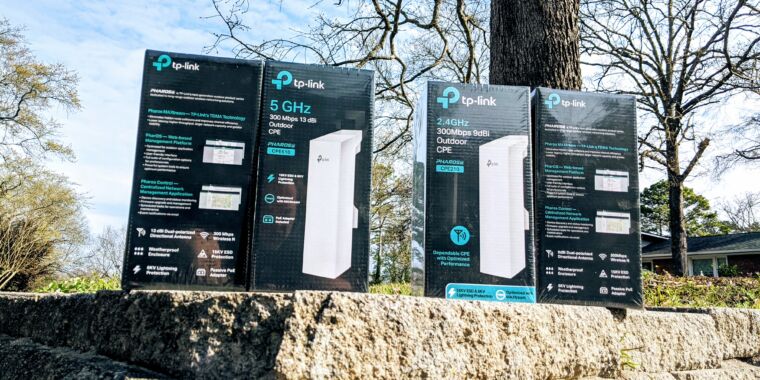
You can use something a point to point WiFi to bridge the signal from the house to the steel building, but you need the starlink ethernet adaptor to do it. Here is an article about it. You can put the transmitter in your house, but the receiver must be outside the steel building.
 
   / Starlink #3,337  
Well crud, i misplaced my SL router, at least i hope it's misplaced. I play with my network from time to time and thought i'd put router back in and see what it reported.
 
   / Starlink #3,338  
I bet you setup your home SL system on your phone first and then later setup your RV SL system.
I still don't know for sure what happened.

Although it is intuitive that you think you should be controlling the SL system you are locally connected to, that doesn't necesarily happen. After thinking about it, I *think* the SL app determines which login you are currently using, then searches out to control the SL system that account originally set up. Not necessarily the one 10 feet away that you are connected to. At least that's what it seemed to do to me.

I now have 3 SL systems, and am confounded on how to reliably control them. So I click things and push buttons until I get a decent result ... :)
 
   / Starlink #3,339  
I just got the same email. Based on the disappointing performance of my Starlink system so far, I may have to rethink this. I'm within the 30 day period so I can get a full refund if I choose to.
What did you ultimately decide?
 
   / Starlink #3,340  
What did you ultimately decide?
I decided to keep Starlink. I'm not sure why but the performance greatly improved. I'm now getting 150 - 200 down / 15 - 25 up on a regular basis. The speeds slow a bit during heavy rain / snow but I can live with that. Service interruptions have been short and relatively infrequent. Overall, I'm happy with the service.

There was also a price increase on my wireless internet so the $110/mo. is a bit easier to take.
 

Tractor & Equipment Auctions

Commercial Lawn Mower 652R (A56859)
Commercial Lawn...
KBH 25 TON TENDER (A56438)
KBH 25 TON TENDER...
Volvo ECR235CL (A53317)
Volvo ECR235CL...
2016 KOMATSU PC360LC-11 EXCAVATOR (A58214)
2016 KOMATSU...
Kubota KXO40-4 (A53317)
Kubota KXO40-4...
RAKE ATTACHMENT FOR MINI EXCAVATOR (A58214)
RAKE ATTACHMENT...
 
Top