Editor Not Functioning ??

   / Editor Not Functioning ?? #1  

kozak

Platinum Member
Joined
Feb 1, 2004
Messages
639
Location
Forest, Ontario Canada
Tractor
New Holland TC35D c/w FEL, ACCO Allis 1614
For some reason this sites editor when I post replies is not working for me. Cannot insert links, use smilies, use underline, etc, etc.

Can someone please look into this for me.

Thanks,

Vic
 
   / Editor Not Functioning ?? #2  
kozak said:
For some reason this sites editor when I post replies is not working for me. Cannot insert links, use smilies, use underline, etc, etc.

Can someone please look into this for me.

Thanks,

Vic

:confused: :confused: Using the advanced mode works fine right now for me ??? Maybe it was a temporary prob Vic.
 
   / Editor Not Functioning ??
  • Thread Starter
#3  
MadDogDriver,

Editor was working when TBN made their last major update to the site. For about at least a month now has not been functioning. Tried again in this post.....no go.

Vic
 
   / Editor Not Functioning ?? #4  
Vic,

I guess I'm not understanding the editor mode completely, sorry. I can switch the editor modes, but I'm not sure what is missing. I can change fonts/sizes/colors. The Bold, Italics, and Underlined functions seem to work.
The Align modes seem to work as well (centered).
and left aligned too.???

You're much more experienced with TBN than I, so I'm curious as to what else should we be getting. I know that I had to go into my control panel and edit miscellaneous options and select the "Enhanced Interface to get Full WhatYouSeeIsWhatYouGet Editing". Is is possible that some of us can use this editing and not others?
I know that for whatever reason, I cannot login to the photo section eventhough I'm obviously already logged in to TBN.

Thanks for the comeback. What part of the editor mode am I missing?
 
   / Editor Not Functioning ?? #5  
kozak said:
For some reason this sites editor when I post replies is not working for me. Cannot insert links, use smilies, use underline, etc, etc.

Can someone please look into this for me.

Thanks,

Vic

MDD is probably right.

You need to click on My Home

Then scroll down to Control Panel and click on Edit Options under Settings and Options.

At the bottom you will see Miscellaneous Options. Choose Enhanced Interface-Full WYSIWYG Editing. Don't forget to click Save Changes.

You should be good to go.
 
   / Editor Not Functioning ?? #6  
Tough to say, exactly. It sounds like a javascript or activex issue. You could try adding "tractorbynet.com" to the "Trusted Sites" section. That is, if you trust us. ;)

We haven't changed anything, so it's likely it could be some sort of script blocking going on.

-Ibrahim
 
   / Editor Not Functioning ??
  • Thread Starter
#7  
MadDogDriver said:
Vic,


Thanks for the comeback. What part of the editor mode am I missing?​


That's exactly the stuff I cannot do. The only part of the editor you are missing are the smilies. (Unfortunately I cannot add a large smiley after that last sentence so had to type it out......or....... :)

Now this is not entirely true. I can add smilies the rudimentary way :mad: !!
I have to use the "type in" special codes to do this versus selecting Smiles off icons that I can see on the right of my post reply message screen. I do have enhanced interface option selected. I tried disabling & selecting enhanced option again to no avail.

Just through this post I disabled blocking of pop-ups but did not make a difference.

Most peculiar as I have not made any changes (that I know of) prior to this feature becoming unavailable. :confused: :confused:

Thanks All for trying to help. I guess I will keep playing with it. Maybe I will get lucky. ;)

Vic​
 
   / Editor Not Functioning ?? #8  
I think Ibrahim's diagnosis of a scripting or activex problem is probably on target, Vic. :eek:

If you're in enhanced interface you should be getting WYSIWYG while typing a message and when selecting the "Switch Editor Mode" icon in the upper right corner you'll then see the script instead of WYSIWYG. :D

Ibrahim's the code expert and I'll defer to him as to what your options are now.
 
   / Editor Not Functioning ?? #9  
One other thing you could do is clear out your cookies. For the most part when I have problems that is the first thing I do and for the most part it works unless it is something stupid that I clicked on and didn't know I did it:eek:
 
   / Editor Not Functioning ?? #10  
I haven't been able to for a while either. Thanks MadDogDriver.:) :) :) :D :D :p :p :cool: ;) :rolleyes: :confused: :eek: :) :eek: I'm getting goofy now.
 
   / Editor Not Functioning ??
  • Thread Starter
#11  
thcri said:
One other thing you could do is clear out your cookies. For the most part when I have problems that is the first thing I do and for the most part it works unless it is something stupid that I clicked on and didn't know I did it:eek:

MURPH,
Holy-Ring-Moly !!

Your a GENIUS. :D Was trying everything with no luck. Took the pop-up blocker off & disabled all my "Add Ons" under "Tools / Manage Add On's" but still no go. Tried what you suggested & Budda - Boom - Budda - Bing....IT WORKED !! :)

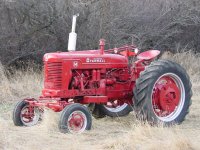
Your the BEST.....so this pic is for you.

Thanks Again,

Vic
 

Attachments

  • Incredible.jpg
    Incredible.jpg
    85 KB · Views: 120
   / Editor Not Functioning ?? #12  
kozak said:
Your the BEST.....so this pic is for you.

Thanks Again,

Vic


Glad it worked out. Thanks for the pic, I love old iron.

Here's one back to you.


murph
 

Attachments

  • DSC04167.JPG
    DSC04167.JPG
    131.2 KB · Views: 111
   / Editor Not Functioning ?? #13  
Sweet Murph!

That old M reminds me of my youth. We had all RED until GREEN took over.

Vic & Murph,

Good job on thinking about cookies. I've noticed that TBN generates thousands of them. I've installed IE Privacy Keeper on all of our PCs. It will not only clear cookies, but virtually all history of what/where you're doing. I'm not PARANOID (much), but I really don't care for the way unscrupulous people can pry into things they have no business knowing about IMO. Check out the link: IE Privacy Keeper OBTW, I am not suggesting that TBN in any way is unscrupulous, I just know that it's too easy for someone who doesn't have my best intentions can take advantage of cookies, etc.
 
Last edited:
   / Editor Not Functioning ?? #14  
Maddogdriver and Vic,


I want you guys to look real close at that tractor!! Tell me something different about it??

murph
 
   / Editor Not Functioning ?? #15  
WF / extra fuel filter?

Soundguy
 
   / Editor Not Functioning ?? #16  
It looks like you have an extra filter hanging with some wires coming out of the bottom of it and a gauge just above it. ???? This is like playing with those pictures at the end of LIFE magazines. What's different between them. In my case, I'm about 40+ yrs since I've played on an M.

Looks like this was one of the Ms with the All-Lift Hydraulic options as well.
 
Last edited:
   / Editor Not Functioning ?? #17  
The majority of the M's ran on what???
 
   / Editor Not Functioning ?? #18  
Gasoline........but there were some MDs made that ran on diesel, but their decal was MD not M. I think it was the diesel version of the Super M, which this one looks like. So what is the smaller filter below the gauge?
 
Last edited:
   / Editor Not Functioning ?? #19  
MadDogDriver said:
Gasoline........but there were some MDs made that ran on diesel.


Bingo,, It is Gas/Diesel. You started it up on gas until you got the cylinders hot and then switched to diesel. That baby is up for auction this summer. It is my Father in Laws and he is retiring.

murph
 
   / Editor Not Functioning ?? #20  
Wow....BIG SMILE. The old cobwebs haven't completely shut down the brain cells. Those are pretty rare aren't they? Also, why is the decal just M? Is that the diesel tank below the gas tank?
 

Tractor & Equipment Auctions

2001 Subaru Outback AWD SUV (A59231)
2001 Subaru...
HYDRAULIC THUMB CLAMP FOR MINI EXCAVATOR (A58214)
HYDRAULIC THUMB...
New Holland WorkMaster 37 (A53317)
New Holland...
17102 (A56859)
17102 (A56859)
2011 KENWORTH T370 (INOPERABLE) (A58214)
2011 KENWORTH T370...
2008 DOOSAN G25 GENERATOR (A58216)
2008 DOOSAN G25...
 
Top