Forum Update - Test it out

   / Forum Update - Test it out #41  
I never have them. :confused3:

You don't know what you're missing. Here's my experience, using an iPad:

Click on any thread of interest and start reading the first post.

Suddenly, all the print shrinks momentarily and then restores itself almost long enough to find your original reading position. Just as you resume reading, ToyotaGirl pops up, blocking what you were about to read.

After a painful delay, ToyotaGirl retreats to the bottom of the page, only blocking the bottom few posts.

When you use the touch screen to scroll down, ToyotaGirl tramples the new area you intended to read, and eventually settles to the bottom again, waiting for you to scroll down again so she can repeat her dance.

Oh, good- There's a "close" button on ToyotaGirl's ad. You click it but your fat finger is a little off from what appears to be only an 1/8 inch square area. The Toyota ad starts loading. Dang! -you close ToyotaGirl's ad and the display reverts to TBN- WITH TOYOTAGIRL'S POPUP WAITING FOR YOU AGAIN!

Dispatching ToyotaGirl for the thousandth time, I resume the thread. Oh! An interesting thumbnail picture. I click on it, study it, and return to the thread. And there's ToyotalGirl! She must be thinking "jmc has dismissed me thousands of time every month but this time, he's going to buy a Toyota!" No way, not ever.
 
   / Forum Update - Test it out #42  
No problem with a PC and windows 8. Didn't try phone or ipad. I would like to see the bold subject font size increased. It blends in with the line under the post.
 
   / Forum Update - Test it out #43  
For those on tablets where you cant see stuff like " new posts", etc. Touch the 3 white bars at the top of the page to the right of Tractorbynet. Touch it again to close the window.
 
   / Forum Update - Test it out #44  
I never have them either and I don't run any pop up blockers. Sometimes its not TBN that does these things.

TBN has a long history of not tolerating things that don't suit them.
 
   / Forum Update - Test it out #45  
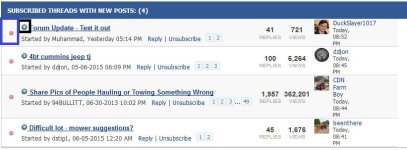
On a phone/tablet, can the miniature "click here to open to the last unread post" function be made larger?
As an example, the old mobile skin has a large finger friendly button to click to open the thread in a new tab (the area inside the black box below):
attachment.php

Can that be put where the blue box is in the screenshot below? That would give a much larger target for a finger vs the little icon (in the black box below):
attachment.php


Aaron Z
 

Attachments

  • Link to thread.png
    Link to thread.png
    30.7 KB · Views: 309
  • Subscribed.JPG
    Subscribed.JPG
    81.2 KB · Views: 303
   / Forum Update - Test it out #46  
I find I cant 'spread my fingers' to enlarge or shrink my tablet screen any more.
 
   / Forum Update - Test it out #48  
HA........HA........HA. Good one.
 
   / Forum Update - Test it out
  • Thread Starter
#49  
Thanks for the feedback. Keep in mind that the reason we're giving you a chance to preview the new design is so we can work out bugs and make improvements before deploying the design. Last time we changed the design, we had a lot of little issues and scrambled to make changes after going live. This time we'll try to address all of the changes before going live. We're in no rush really, but once the bugs are worked out I think the new design will be a major improvement, mainly in the speed department.

To address some of the specific questions and issues that have arisen:

1. My Home is back.

2. The menus are different depending on whether you're viewing on a desktop or a mobile device. Also, the design changes based on screen size to give you the best experience regardless of what size monitor you have or what type of device you're using.

On mobile devices, the menus are condensed into a drop-down box, accessible by clicking on the three bars highlighted in this image:
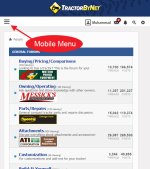
Mobile-Menu.jpg

Right now the options in that menu don't match up exactly with the options you get on a desktop, but they will before we go live.

3. We are considering leaving the current mobile theme as the default theme for mobile devices, since it is very easy to use, albeit limited in functionality (no photo uploads, for one). You would still be able to go back to the full site to utilize all features.

We are also looking at adding the tapatalk app option to TBN, in addition to our TBN mobile app. This, combined with the option of using the new theme should give you a bunch of options on mobile platforms. The reality is that mobile devices will never fully replicate the functionality of a desktop computer, and forums with lots of features are particularly problematic when it comes to making everything work. In an ideal world, we would probably have a much better mobile app, but until we cross that bridge we're going with a multi-headed approach.

4. As for pop-ups on mobile devices... this feedback came in when you were still looking at the old design, I think. Are you seeing ads blocking parts of the page on the new design?

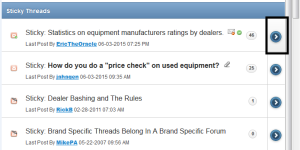
5. Regarding where you are taken when clicking on a thread title, I'll explain. Back in 2000, we upgraded our forum and chose to jump to the first unread post inside of a thread when you click on a thread title. That navigation option has become obsolete as most forums have the option to jump to the first unread post in a thread by clicking on a link directly beside the thread title (blue arrow). Clicking on the title will then take you to page 1, regardless of how many pages the thread has, or whether or not there are any unread messages in the thread. This option gives you the choice to go to the first unread message, or to page 1.

On TBN, we have people who like it both ways. Some people have been asking us to change our linking method for thread titles for years, while others are hooked and that's the first thing they will notice when we change it.

My preference is to change to the new method, which is used by most other forums online. We've also adopted this method on other forums we run, and have yet to receive any complaints. Once you get used to it, it's better.

Please keep the comments coming. :thumbsup:
 
   / Forum Update - Test it out #50  
I prefer the old method where clicking on the title of the thread went to first unread. I found it a very unique feature that TBN had. Count me in with the ones who prefer the old way. Its not a "getting used to it" thing for me because all the other sites I go to do it the new way, the old way here was 10x more convenient.

What about adding some shading to differentiate each thread? Right now it is a "wall of white". I think this was a concern last time there was an update.

How about more characters for PMs? I regularly find myself going over the 5000 and having to send several PMs to the same person.

Any opinion on locking old, inactive threads?
 
   / Forum Update - Test it out #51  
I don't like mobile sites. You mentioned the mobile version will have the menu condensed. Is there going to be an option to view it like I would on a desktop.

My tbn time is split. Bout half on a desktop and half on a smartphone. I don't like two different sites.

And count me as one who likes to jump to the first unread post. Always works on my desktop, but not always on my phone.
 
   / Forum Update - Test it out #52  
I don't like mobile sites. You mentioned the mobile version will have the menu condensed. Is there going to be an option to view it like I would on a desktop.
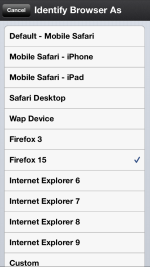
While a workaround, there are several mobile device browsers that let you identify them as a desktop browser. Atomic Web, Perfect Web, and iCabMobile are three of them. Here's the Atomic Web browser emulation settings page.

IMG_0701.PNG
 
Last edited:
   / Forum Update - Test it out #53  
While a workaround, there are several mobile device browsers that let you identify them as a desktop browser. Atomic Web, Perfect Web, and iCabMobile are three of them.

Firefox for Android allows you to ask for a desktop site as well.

Aaron Z
 
   / Forum Update - Test it out #54  
I hate it when web people get bored and feel they need to change everything just for change. Nothing is faster or better, it just sucks. And don't get me wrong, I'm not adverse to change but this update is a huge step backwards.

And what is extra aggravating is now I don't have the option of viewing this in the old format. Whenever I log on I get thrown into this new mess and clearing my cache and restarting does nothing. I used to get on TBN because it was fun and informative but now it's a mess and just ticks me off.

I was going to log off but I can't find that feature.
 
   / Forum Update - Test it out #55  
Any opinion on locking old, inactive threads?

My opinion is that locking old and inactive threads would be a terrible idea. There are many times where a thread would be bumped after years of inactivity and I have found it either very interesting or very helpful. Not always of course, but I see no value in locking them out, that is the whole point of saving them in the system forever, so they can continue to be useful down the road.

A good option might be something like what the forestry forum does, which is have a pop up "reminder" that states something like "this thread hasn't been updated in 2 years, are you sure you want to post here or consider starting a new thread". That way there is a warning to those who didn't realize they were posting in an old thread.

I agree with you that the older way of having the thread automatically being you back to the post you left off at was the cats ***.
 
   / Forum Update - Test it out #56  
When looking at the list of "New Posts" or "Today's Posts", the far right column used to show which forum the post is contained in, as well as being a link to that forum. Is that something that can be retained in the new format? Having the forum name helps me decide whether I want to open the post or move on.
 
   / Forum Update - Test it out #57  
And what is extra aggravating is now I don't have the option of viewing this in the old format. Whenever I log on I get thrown into this new mess and clearing my cache and restarting does nothing. I used to get on TBN because it was fun and informative but now it's a mess and just ticks me off.
Go back to the first post in this thread and you will find a link to go back to the old style. I have switched back and forth a half dozen times without any drama.

Aaron Z
 
   / Forum Update - Test it out #58  
I too prefer having the first unread post come up when I click on the title. It's a lot easier to click anywhere on the title than it is to click on one little blue arrow to the left of the title.
 
   / Forum Update - Test it out #59  
I never have them either and I don't run any pop up blockers. Sometimes its not TBN that does these things.

I agree.

An odd situation I occasionally have is when replying I have to type verrrrryyyyyy slowly. If I go faster than one letter every couple seconds it will skip them and only enter every 4th or 5th letter. I usually hit the "back" arrow and start over with the reply and it is okay then. I figure that's something going on in my computer, not TBN.
 
   / Forum Update - Test it out #60  
No photo upload on the mobile version is a pain for me. 100% of my tractor related photos are on my iPhone so it will be a pain to constantly switch versions when I want to post.
 

Tractor & Equipment Auctions

2008 New Holland B110 MFWD Loader Backhoe (A57024)
2008 New Holland...
1968 Oliver Model 1850 2WD Tractor (A56438)
1968 Oliver Model...
Massey Fergusson 4710 (A60462)
Massey Fergusson...
Dual Tailwheel Rhino 284 7ft Cutter 2.5in cut capacity (A56438)
Dual Tailwheel...
JOHN DEERE ROW MARKERS - SET OF STACK FOLD 12 ROW 30 INCH ROW MARKERS (A55315)
JOHN DEERE ROW...
Case SV280B (A60462)
 
Top