Home Security Camera question

   / Home Security Camera question #1  

EddieWalker

Epic Contributor
Joined
May 26, 2003
Messages
27,586
Location
Tyler, Texas
Tractor
Several, all used and abused.
While I have my walls and attic open and easy to get to, I want to add cables for security cameras. One will be inside to watch the whelping area, which is motivation for this project, but then I also want another camera to watch outside the side of the house in that area. Distance for the longest run is 97 feet if I went in a straight line. With all things considered, I'm well over 100 feet, but well under 150 feet. Once the sheetrock is installed, there wont be a good way to run these cables, so I need to do it now, long before I buy a security system. Of course, once we start having puppies, that will probably change.

Based on all the reviews that I've read, I do not want to go wireless.

It's super easy to run the cables right now.

The cost of the cables is very cheap.

https://www.amazon.com/WildHD-Secur...ateway&sprefix=home+security+,aps,256&sr=8-26

Before I buy these, I wanted to make sure that this is what I should buy. I haven't bought a system, but I want to make sure that when I do, I have the right cables. Does this make sense?

Are these good cables for what I need, or do I need to look for something specific?
 
   / Home Security Camera question #2  
It all depends on the system/cameras. If you go with an analog camera then the bnc cables with power are what you need. If you go with an ip camera than you would need CAT 5/6 cables. IP cameras can be powered 2 ways. Local power direct to the camera or PoE (Power over Ethernet). PoE systems would need either a PoE capable Ethernet Switch or PoE Injectors.

Decide on your type of system first.
 
   / Home Security Camera question #3  
Yes, but those are BNC cables. They work with current systems, typically up to 1080p resolution, 2.0 megapixel camera, some higher. 1080p is good for basic area monitoring, not so great for a license plate off a moving vehicle 75' away...so depends what you want. They are the lesser expensive DVRs and cameras.

Alternatively, newer ones with higher definition use PoE (power over ethernet) so you'd want network cables for those. Not sure if Cat5e or Cat6 are used with those - mine are BNC. Those are typically 2160p (4K) and 6-8megapixel cameras.

Cables aren't expensive so could run both and then just either later on....I'd probably do the PoE if starting over.

Mine are Amcrest brand from Amazon, 150' lengths, and seem to be holding up well inside attic & exposed outside.
 
   / Home Security Camera question #4  
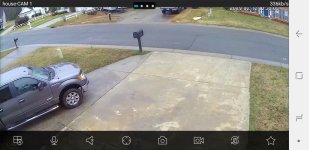
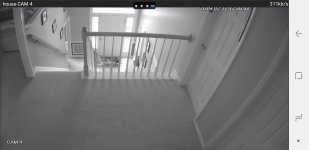
These are off my phone app, but typical for what to expect for 1080p camera. Note the interior one, it's in night mode with no interior house lighting & overcast day outside - without color night vision, you'll be B&W a lot indoors without a lot of light. But in case you're trying to decide on image quality needed a basic system (not junk, not top of the line) does this on BNC cables.
Screenshot_20190212-123809_Amcrest View Pro.jpg
Screenshot_20190212-123659_Amcrest View Pro.jpg

2.0 MP cameras, 3.6mm lens - a little narrower field of view than a 2.8mm lens.
 
   / Home Security Camera question
  • Thread Starter
#5  
Thank you, I didn't know about POE. That sounds like the better way to go.
 
   / Home Security Camera question #7  
CMV...nice resolution. I have been wanting a 4 camera system and it seems they are getting much better.....
 
   / Home Security Camera question #8  
It seems nice....until something happens. Getting a useable ID, someone has to be pretty close to the camera. A car on the street in 1st pic, will get color, make, model pretty well in daytime - possibly fair description of driver depending on sun angle. Probably not a good plate ID. At night....not a useful picture really. My camera placement sucks (that one is to watch our cars in driveway, but a different one covers street), but you get the idea.

Pitfall of a novice and DIY install...again if doing over, I'd put a lot more thought into camera placement, aiming, etc.

But that's what mine is - 4 camera. More would be nice I guess, but 4 is sufficient. I would like 2 higher resolution cameras, narrower field of vision, color night vision, mounted lower to really cover front & back entry very well. what I have would be fine everywhere else. For an inexpensive "everything you need is in the box" system, it's good for what it is, install was easy to figure out, and everything - including phone app for remote viewing - "just worked" out of the box. Overall I like it, but some things I'll do different/better next time.
 
   / Home Security Camera question #9  
I have Blue Iris and IP cameras, they work great!
Even have a tiny cheapie in my mailbox.
 
   / Home Security Camera question #10  
   / Home Security Camera question #11  
You really want to run network cables (Cat 5/6) instead of COAX/BNC. And I would suggest two per location. Easier to add something else, or you'll have a spare. Cables are inexpensive enough to do that.
 
   / Home Security Camera question #12  
If I go POE, would this be all that I needed to install or do I need anther cable for power, or something else?

You only NEED one, but again, I suggest two.

You will also need a POE injector though. That might be a separate device, or a POE enabled switch/router.
 
   / Home Security Camera question #13  
You only NEED one, but again, I suggest two.

You will also need a POE injector though. That might be a separate device, or a POE enabled switch/router.

Not if using a "boxed" system - the DVR should do that for you/include all that is needed.
 
   / Home Security Camera question #14  
Thanks CMV, the quality of those pictures looks pretty good.

If I go POE, would this be all that I needed to install or do I need anther cable for power, or something else?

https://www.amazon.com/Amcrest-Ethe...ith+power&qid=1549993791&s=electronics&sr=1-5

You can also just buy Cat 5 wire in bulk and run that instead of buying premade cables. Its pretty easy to put the connectors on yourself once you buy the tool to do it. I bought some premade cables for my system but cut the ends off every one of them to make them the correct length at my recorder. Depending on how you are fishing them through your building you might find cutting off one end makes it much easier to fish the wires too. I suggest you a crimp tool anyway so you can cut the cables to length at your camera DVR too since it makes a much cleaner install.
Here is the tool I bought to do my cables, the kit was only about $15 when I got it. There are many similar kits on Amazon.
https://www.amazon.com/gp/product/B018YIM56G/ref=oh_aui_search_asin_title?ie=UTF8&psc=1&pldnSite=1

I have a LaView system and am very happy with it. I have had the system about 3 years. It is a POE system with a DVR. You can add up to 4 hard drives to some of the DVR's and they can be set to loop record so you never run out of space. Here is the link to what I got. I bought it with 8 cameras but it is expandable up to 16. I have 12 right now and a 15TB of hard drives installed. They have many different camera options for add on cameras as well. LaView also has great customer service so if you are self-installing they will answer any questions you have along the way.
https://www.amazon.com/gp/product/B00KXB6E9C/ref=oh_aui_search_asin_title?ie=UTF8&th=1&pldnSite=1
 
   / Home Security Camera question #15  
You can do a better system if you build it yourself, go ahead and run your cables and in the meanwhile go to (Ip cam talk) where there is a wealth of information.
 
   / Home Security Camera question #16  
You will also need a POE injector though. That might be a separate device, or a POE enabled switch/router.

Pretty sure most DVR security camera systems do POE through the DVR. My LaView system does. You can go up to 320' on POE before you need a signal booster too. If you go that far then run two cables so you can power the booster when you hit 320'.

Adding a second cable is also a good idea if you might want to add accessories later on like an infrared illuminator. The camera will give some IR illumination but I got a couple of these IR illumiators and they make a huge difference in how far the cameras can see at night and they also eliminate some shadows when they are working with the camera IR.
https://www.amazon.com/gp/product/B003ZX1M88/ref=oh_aui_search_asin_title?ie=UTF8&psc=1&pldnSite=1
 
   / Home Security Camera question #18  
Would this be the best cable? I would rather pay a few bucks more for the best option then cut any corners.

https://www.amazon.com/Cable-Matter...+poe&qid=1549996071&s=electronics&sr=1-3&th=1

You probably don't need Cat 6. You can read about the difference between Cat 5 and Cat 6 but I can tell you this, it is a lot harder to put your own connectors on Cat 6 because the wire has a tighter twist and the 4 pairs of wires in it have a plastic piece that separates each pair like a plus sign if you are looking at the end of the cut wire. I can't see any difference in the image quality of the camera on the Cat 6 wire vs all of the others on Cat 5.
 
   / Home Security Camera question
  • Thread Starter
#19  
Thank you. That helps. Since I only need two cables right now, do you feel that it's worth spending $12 more per cable for Cat 6 over Cat 5? Or $24 more for both cables if I go with Cat 6?
 
   / Home Security Camera question #20  
Thank you. That helps. Since I only need two cables right now, do you feel that it's worth spending $12 more per cable for Cat 6 over Cat 5? Or $24 more for both cables if I go with Cat 6?

Here's an article with all you ever need to know about Cat 5 vs Cat 6...LOL.
Cat5 vs Cat6 Cables: What are the Differences? – FireFold Blog

Personally, I would just stick with Cat 5. You will likely never see a difference in performance that made you say you were glad you spent the extra $12 per cable on the Cat 6.
 

Tractor & Equipment Auctions

2025 Kivel 42in Forks and Frame Mini Skid Steer Attachment (A59228)
2025 Kivel 42in...
2009 MULTIQUIP 25KW GENERATOR (A58214)
2009 MULTIQUIP...
500 BBL FRAC TANK (A58214)
500 BBL FRAC TANK...
UNUSED FUTURE 350 HYD BREAKER HAMMER (A52706)
UNUSED FUTURE 350...
2021 JOHN DEERE 6145R TRACTOR (A59823)
2021 JOHN DEERE...
2021 XCMG CV123PDU ROLLER (A60429)
2021 XCMG CV123PDU...
 
Top