Starlink

   / Starlink #4,021  
For us, I have found that the auto heater is often a little slow on melting things, so I have made a mental note to be proactive at getting it on before the snow/sleet starts.

We are also dealing with some intermittent latency /slowdown that I haven't been able to find/fix. We did lose the Starlink to internet link (I.e. Dishy OK, Satellite Ok, ground station not OK) for about thirty seconds yesterday, which seems to have been a one off.

All the best,

Peter
I tracked my intermittent latency issue down to an incompletely seated Ethernet cable elsewhere in my network. Sigh.

I had to do a power off / power on today on the power, and when the Starlink router powered up initially, it could not find the dish. A second power cycle fixed it. Anyone else seen this behavior?

All the best,

Peter
 
   / Starlink #4,022  
I have not seen that but starlink has updated their unit 3 times in the last 30 days. One of these increased performance to as high as 200 down/30 up.

regards,

R
 
   / Starlink #4,023  
Occasionally, for no apparent reason, my Starlink router drops some, but not all, connected devices. The devices affected are never the same. Rebooting the router solves the problem.

The issue started happening about 3 months ago. Anyone else notice this?
 
   / Starlink #4,024  
Yes, it drives me nuts and we don't use their router. I have not had the time to look into the issue. I have run a ping for extended periods and get drop offs some longer than others. What is interesting is when it does this it doesn't roll over to our back up ISP. So it doesn't drop completely? Yet we unplug Star link's modem it will roll over every time. Used to just do it with bad weather........ so i don't know if they run into bad weather up there or what the deal is........ one of these days when i have enough patience I'll dig into it.
 
   / Starlink #4,025  
There have been a number of firmware updates over the last few months, which may be part of it. However, our service has actually improved, as earlier we were seeing lots of 1-5 or 10 second gaps in service with the nebulous "Network issue" error. Those have gone down to 0.5-1s gaps, and average ping times have gone while bandwidth seems to have gone up.

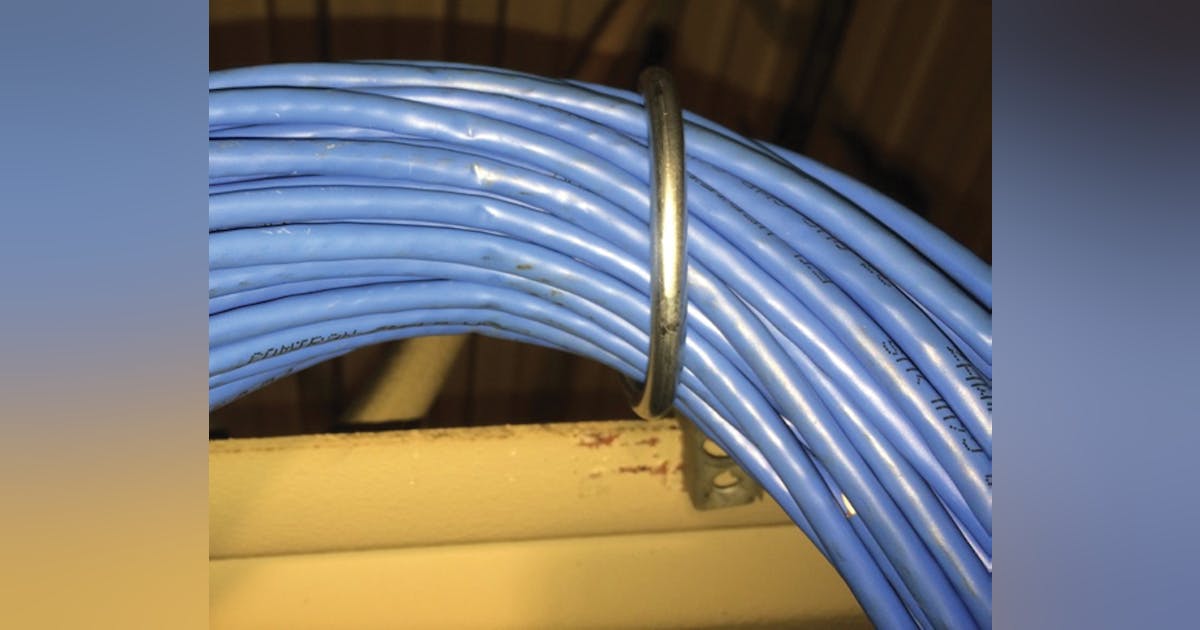
One thing that I would check for are failing or failed Ethernet cables, and make sure that the Starlink cables have not worked loose or corroded. An Ethernet cable can have its capacity permanently impaired by tightly bending it just once. (Tighter than a 1" radius, i.e. a greater than 2" diameter bend for stranded, a 2" radius, 4" diameter for solid wire. Starlink cablesand staples/hooks/edges are notorious for causing issues; using plastic ties, or plastic preformed cable mounts is better practice in my view.)

More here on issues generated with poor supports, like hooks or staples;

This person says that for high performance cables it can go up to 10X the radius.

Bottom line, don't kink or bend the cables tightly, and be gentle when pulling the cables.

All the best,

Peter
 
Last edited:
   / Starlink #4,026  
Cable and especially Fiber isn't forgiving...
 
   / Starlink #4,027  
Agree on the cables being fragile. I messed up the Starlink cable pulling it through the wall and had to order another. Didn't take much to cause it to not be able to connect to the antenna.
 
   / Starlink #4,028  
When I first got my gen1 dish system it was March so I put the dish in the yard and ran the cable through a window because my roof had snow on it. Was having sporadic connections until I realized that by closing the window (fairly lightly) on the cable it was pinching it. As soon as I opened the window slightly more the connection issues cleared up. No permanent damage. The gen1 system is still going strong 3+ years later.
 
   / Starlink #4,029  
Has anyone else using Starlink having issues with using their link?
I'm just getting their logo when I try to go to their site.
Not showing status, network or speed test.
Haven't changed settings or anything on my side.

Regards to all,

R
 
   / Starlink #4,030  
Has anyone else using Starlink having issues with using their link?
I'm just getting their logo when I try to go to their site.
Not showing status, network or speed test.
Haven't changed settings or anything on my side.

What are you trying to access? The actual Starlink website or the web interface for the dish? Are you using a phone or a computer and web browser?
 
   / Starlink #4,031  
Web interface for dishy. Using desktop computer.
I cannot get to the router either. (192.168...)
 
   / Starlink #4,032  
I just got through on the phone app. Thanks for reminding me.

R
 
   / Starlink #4,033  
I just got through on the phone app. Thanks for reminding me.

R
FWIW: I think that Starlink is really set up for app access, tablet, or phone, but preferably phone.

All the best,

Peter
 
   / Starlink #4,034  
Web interface for dishy. Using desktop computer.
I cannot get to the router either. (192.168...)
They must have made some changes. I can't really access my web interface from my laptop anymore. The phone app still works though
 
   / Starlink #4,035  
I was used to access via desktop computer and when it didn't work I checked all network and security settings to see what had changed.

Thanks ponytug for the reminder.

regards,

R
 
   / Starlink #4,036  
I was used to access via desktop computer and when it didn't work I checked all network and security settings to see what had changed.

Thanks ponytug for the reminder.

regards,

R
You are welcome!

I used to do it that way, too, but it seemed to me as if each release of the router firmware had less and less support. I finally gave in.

All the best,

Peter
 
   / Starlink #4,037  
Huh, I never really noticed they got rid of the embedded page in the router. I guess they assume if you have Starlink, you have a device that can run the app. It probably does save them some headache with browser/version compatibility.
 
   / Starlink #4,038  
I'm replacing my roof soon and was going to order the non-penetrating roof mount from the Starlink site, but when I click on the shopping tab it goes to a blank page. I have tried this a couple of times. Is Starlink not selling accessories through its website now? I see that Amazon and other online retailers are selling what looks to be the newer Starlink non-penetrating roof mount, but is it the same?

SOLVED: After signing in I went to My Cart and from there selected shop and then the items for order appeared. Strange.
 
Last edited:
   / Starlink #4,039  
An TBNers StarLink RV customers out west around MT, ID, WY areas? Interested in coverage and speeds.....please tell all. Thanks!
 
   / Starlink #4,040  
Nice to see an improvement in Starlink.

I went to put one of my SL systems into bypass mode, and it said something like: "The account your are logged into does not match your Starlink router." Woo hoo!

Last time such a conflict happened, I was in Oregon on an RV trip. I tried to command my portable SL system to stow. But when I tried, the portable SL did nothing. Unknown to me, instead, my SL system 600 miles away in NV stowed itself. Aaahhhh ....

Glad to see they have put a double check on their system. Not needed unless you manage more than one SL but I am sure plenty of people do.
 

Tractor & Equipment Auctions

378721 (A54865)
378721 (A54865)
2012 DIAMOND C  40FT GOOSENECK TRAILER (A58214)
2012 DIAMOND C...
1981 LINK BELT HSP 8028 (A58216)
1981 LINK BELT HSP...
SD Launch SDLB25 (A53317)
SD Launch SDLB25...
2012 Dodge Avenger Sedan (A59231)
2012 Dodge Avenger...
Deere 35P (A53317)
Deere 35P (A53317)
 
Top