Camera Security Systems???

   / Camera Security Systems??? #81  
Unfortunately a lot of that high end stuff is quite proprietary. I just put in some cameras (Hikvision) that provide 1080P over coax, but they only work on the new Hikvision Recorder. It was an Evil plan. One of two outside cameras had failed and when I replaced it with 1080P suddenly the customer didn't like the old cameras anymore and requested I replace them all.
I would not consider Axis proprietary, in the commercial market they focus on cameras for other manufacturers head end systems. The number of commercial manufacturers that keep up to date on Axis camera compatibility indicates they are about as non proprietary as you can get. The thought is that the money is in the cameras at the commercial level where a customers system might have thousands of cameras but only one recording software enterprise running on cloud with clients.

Those Hikvison cameras you mention that only work on Hikvision recorders are proprietary.
 
   / Camera Security Systems??? #82  
Any router will support PoE, it's all in the switch/pass-through that injects power into the final cable. I use the US-8-60W here Ubiquiti Networks - UniFi(R) Switch 8 that gives me 4 PoE ports. Two of them run my two access points and the third runs some other hardware that I have.

PoE is the way to go IMO. Brings power and data right to the camera which is hard to beat for simplicity.
Well I don't see the dedicated PoE in and pass through ports as shown on the Ubiquiti switch. I would like to get it right the second time! :D. I hate it when I have to sort through and troubleshoot... kind of like the starter/soleniod/safety switch run around with cars and tractors. :confused2:
 
   / Camera Security Systems??? #83  
Well I don't see the dedicated PoE in and pass through ports as shown on the Ubiquiti switch. I would like to get it right the second time! :D. I hate it when I have to sort through and troubleshoot... kind of like the starter/soleniod/safety switch run around with cars and tractors. :confused2:

The Ubiquiti switch I selected does not pass through POE, it injects it. That switch has to be plugged into 110V. I may have missed it, but I didn't see that there's not power (only a POE run) available at the 2nd location. If that's the case, you need something like this:

Ubiquiti Networks - UniFi(R) Switch 8
(The 60W version)

For the switch that I selected the first time, yes, you plug that into 110V, and then you plug your router into that switch (any port). Then you take a bank of ports (say 4-16) and set them all to POE on (24v passive) which is what most cameras require. Some of the cameras have the 802 standard for POE, if that's the case, then you set the ports for auto (the cameras will ask the switch, "Hey man, give me power" and then the switch will turn on automatically). With 2 locations, it usually winds up looking like this:


Internet - Router - Switch 1 - Nano (POE port) -----(wireless link)---- Nano (POE port) - Switch 2 - Camera1, Camera2, Camera3

You, of course, can also have cameras connected to switch 1, and you can put wireless APs on either switch 1 or switch 2 (or both). The recorder is typically connected to switch 1, but, again, that doesn't matter, it could be either.
 
   / Camera Security Systems??? #84  
Not sure if anyone else posted on the Ring system. We have it. Our door bell is battery powered version had to charge it once since July. The other cameras are plug in (for power) and wireless signal. The picture is great, install was very easy and they work great. It costs 100 a year for as many cameras as you want to store on their cloud server.
 
   / Camera Security Systems??? #85  
Just remember guys when you are adding POE Switches behind routers to keep an eye on your static IP configurations for the routers and switches. A conflict there can send your system into chaos. Probably better to go with a Layer 3 POE switch and skip the router if possible.
 
   / Camera Security Systems??? #86  
We have the Ring in the country and Blink in town. We got the original Ring doorbell and the battery eventually died, mostly from us checking Live view too frequently. We since got the doorbell 2 and a nifty solar charger it mounts on and a higher def image. Added a wired spotlight cam as well. Overall I think the Ring system beats the Blink, but both systems do a job.
 
   / Camera Security Systems??? #87  
Just remember guys when you are adding POE Switches behind routers to keep an eye on your static IP configurations for the routers and switches. A conflict there can send your system into chaos. Probably better to go with a Layer 3 POE switch and skip the router if possible.
Okay, you had to throw that wrench into the works. What do you mean? Put the switch after the modem and in front of the router? I'm lost more than ever.

Currently I have a cable modem feeding a Linksys Wifi Router that I also hard wire to an 8 port Netgear switch w/PoE. Doing some research on that, it appears to be a Layer 2 switch. I was figuring I just needed to get a bigger switch or add another in series.

Did a little reading on Layer 2 vs. Layer 3
How Useful Is a Layer 3 Switch for Network Routing?
 
   / Camera Security Systems??? #88  
Okay, you had to throw that wrench into the works. What do you mean? Put the switch after the modem and in front of the router? I'm lost more than ever.

Currently I have a cable modem feeding a Linksys Wifi Router that I also hard wire to an 8 port Netgear switch w/PoE. Doing some research on that, it appears to be a Layer 2 switch. I was figuring I just needed to get a bigger switch or add another in series.

Did a little reading on Layer 2 vs. Layer 3
How Useful Is a Layer 3 Switch for Network Routing?

I am not a network guy but as far as I know a layer3 switch puts the router functionality in the switch. I have some pretty savvy guys working for me and I do not hear router. Just hear managed switches, layer 3, etc. But be advised, you can easily get into thousands of dollars at the commercial level with these upper switches. That was not where the thread intended to go is my bet.
 
   / Camera Security Systems??? #89  
Okay, you had to throw that wrench into the works. What do you mean? Put the switch after the modem and in front of the router? I'm lost more than ever.

Currently I have a cable modem feeding a Linksys Wifi Router that I also hard wire to an 8 port Netgear switch w/PoE. Doing some research on that, it appears to be a Layer 2 switch. I was figuring I just needed to get a bigger switch or add another in series.

Did a little reading on Layer 2 vs. Layer 3
How Useful Is a Layer 3 Switch for Network Routing?

I think in your configuration I would put wireless access points connected to the switch and skip the wifi router. A layer 3 switch does routing so no router needed.
 
   / Camera Security Systems??? #90  
A L3 switch is VERY useful. I use them every day and the world we all take for granted wouldn't exist today if not for them! This message is probably passing through 5+ L3 switches to get to you. ;) However, that said, there's almost NO reason to have an L3 switch in any kind of moderate size home configuration. The use for them is if you want to run multiple VLANs and have high speed routing between them. Let me just cut to the chase, you don't want to do that 99% of the time (the 1% where you might is when you should hire someone like me). ;) Use the switches as L2 devices and, if you really need to, expand the private subnet your using internally to get more IP addresses. I use a /24 at home, it lets me have ~250 devices connected at one time. But there's a whole class A you can use, 10.X.X.X. Use a /8, 255.0.0.0 and you'll be able to have millions of devices connected on single subnet. Now, if you have millions of devices to connect, again, you should probably hire me to come help you out (and no, we won't use 10/8 as our range, we'll use L3 switches and routers).

Keep it simple. Let the router hand out IPs, make sure the range is big enough to support all your devices and run a single flat (non-routed) network at home unless you have a really, really good reason not to. I have a server farm in my basement running VMware; 100's of VMs that I spin up for testing and work, dozens of devices in my house that use the network, about 5 full time servers running.. I don't need L3 switching. I could make a case for it, there have been times it would have been nice, but, honestly, it's not enough benefit for me to introduce the additional complexity.

Big, flat network. Router hands out the IPs. Switches move packets. AP's provide access (and aren't routers). That's the easiest and, IMHO, most reliable way to build a home network.
 
   / Camera Security Systems??? #91  
A L3 switch is VERY useful. I use them every day and the world we all take for granted wouldn't exist today if not for them! This message is probably passing through 5+ L3 switches to get to you. ;) However, that said, there's almost NO reason to have an L3 switch in any kind of moderate size home configuration. The use for them is if you want to run multiple VLANs and have high speed routing between them. Let me just cut to the chase, you don't want to do that 99% of the time (the 1% where you might is when you should hire someone like me). ;) Use the switches as L2 devices and, if you really need to, expand the private subnet your using internally to get more IP addresses. I use a /24 at home, it lets me have ~250 devices connected at one time. But there's a whole class A you can use, 10.X.X.X. Use a /8, 255.0.0.0 and you'll be able to have millions of devices connected on single subnet. Now, if you have millions of devices to connect, again, you should probably hire me to come help you out (and no, we won't use 10/8 as our range, we'll use L3 switches and routers).

Keep it simple. Let the router hand out IPs, make sure the range is big enough to support all your devices and run a single flat (non-routed) network at home unless you have a really, really good reason not to. I have a server farm in my basement running VMware; 100's of VMs that I spin up for testing and work, dozens of devices in my house that use the network, about 5 full time servers running.. I don't need L3 switching. I could make a case for it, there have been times it would have been nice, but, honestly, it's not enough benefit for me to introduce the additional complexity.

Big, flat network. Router hands out the IPs. Switches move packets. AP's provide access (and aren't routers). That's the easiest and, IMHO, most reliable way to build a home network.
Okay OT, you are saying stay with my current system and add a switch downstream from my Wifi router that has enough ports to handle all my hardwired ethernet stuff, right? Whether it be computers, QNAP NAS, Cameras, Smart TV, etc.?

My confusion then is the surveillance software... I just load that on any machine on the network whether it be ethernet connected or wifi?
 
   / Camera Security Systems???
  • Thread Starter
#92  
Don't worry about thread drift. All is good. To expand my education I need to learn about all levels. Before I commit to any purchase I'll be posting my decision here for discussion. :)
 
   / Camera Security Systems??? #93  
Okay OT, you are saying stay with my current system and add a switch downstream from my Wifi router that has enough ports to handle all my hardwired ethernet stuff, right? Whether it be computers, QNAP NAS, Cameras, Smart TV, etc.?

My confusion then is the surveillance software... I just load that on any machine on the network whether it be ethernet connected or wifi?

It matters where the cables run. I run a short jumper from the modem/router to an 8 port switch. Some devices are close enough that the runs go to that switch. Other are farther away, so rather than making 5 or 6 long cable runs, I use one to feed another 8 port switch, then connect the more remote devices to it. Any PC can view any camera using IE or one of the software packages that came with the cameras. An NAS/DVR storage or recording/playback device can be connected anywhere on the network. Same with a POE injector if you want to feed one camera.

One thing I do is use different colored cables so I can keep things a little better organized. All cameras are on purple cables. A gate/door controller is on a red cable. PCs are on either blue or grey cables. The feeders between switches are on either white or orange. At the patch panel, Gigabit capable ports are on green jumper/patch cords while lower speed devices are on blue.

'Ethernet' and 'WiFi' are the same thing, one is wired, the other is wireless, but that connect between the same types of devices and perform the same functions.

They would not work for cameras or recording/playback devices that use BNC (Coax) connectors.
 
   / Camera Security Systems??? #94  
add a switch downstream from my Wifi router that has enough ports to handle all my hardwired ethernet stuff, right?

surveillance software... I just load that on any machine on the network whether it be ethernet connected or wifi?

To the first sentence, yes.

Second sentence-- the surveillance software package requires a lot of throughput. Don't install it on a PC or machine using a wireless connection. Put it on or in something with a wired connection.

Couple of other things: you can occasionally get a "refurb" model of the Synology NAS systems. I bought one a while back for $50-- It's a DS112j. Very low end for them, but I put a $50 hard drive in it, downloaded Surveillance Station software for free, and for $100 I had an IP based NVR system for a remote property. I also use it as a hard drive for picture storage.

Milestone Systems is one of the premiere providers of NVR software. About a year ago I discovered they have a "free" trial system, which I believe lasts for a year. It is more complex to set up and administer compared to Synology NAS, but if you want ... the best ... that is one software product to look at.
 
   / Camera Security Systems??? #95  
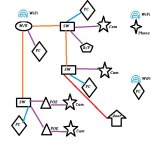
This is roughly what mine looks like, as best I could do in a few minutes with MS Paint:

Network.jpg
 
   / Camera Security Systems??? #96  
Looks pretty straightforward .. what is R/P?
 
   / Camera Security Systems??? #97  
You got great advice already, but, yes, that's exactly what you do. And as someone else mentioned, make sure the computer that's running the DVR software has a hardline, cameras generate a lot of traffic and it can overwhelm a wifi link if you have 5-10 cameras all trying to record at once to a DVR that's connected WiFi. Gigabit to the computer running the DVR and you'll be fine.

The way I've done it, I have 2 switches in my house, one is a 48 port gigabit for all my computers, the other is a 16 port POE switch for the cameras and APs. It's cheaper that way, a 48 port non POE and a 16 port POE is cheaper (or was for me) than a single 48 port POE and gives me 64 ports instead of 48. Then, over in my barn, I have another 16 port POE switch for all the cameras out there; that also powers the remote side of the wireless link. With any modern enterprise grade gear, you can just connect 2 switches together with a short cable run, no problem, and extend the capacity (note, there are implications of this that I won't get into because you won't run into them in a home network, but there are reasons that huge switches exist, connecting 2 switches together does have limitations, it's just that you almost certainly will never see them in practice in any home network).
 
   / Camera Security Systems??? #99  
Any router will support PoE, it's all in the switch/pass-through that injects power into the final cable. I use the US-8-60W here Ubiquiti Networks - UniFi(R) Switch 8 that gives me 4 PoE ports. Two of them run my two access points and the third runs some other hardware that I have.

PoE is the way to go IMO. Brings power and data right to the camera which is hard to beat for simplicity.

But as far as I can tell you still have to run network cable.

I've run powerline networks with success through my house.
I've about 6 floodlights outside that "monitor" the house (installed by the previous owner) and are on the same electrical box.
Like I asked before
<snip>
I have not looked yet but are there any decent cams I can screw into my floodlight bases and get powerline networking?

I've looked now but the best I've found is a reference to a Logitech system in 2013. Video surveillance over power lines: yes, it's possible | ZDNet
 
   / Camera Security Systems??? #100  
I think this has gotten way too complicated for the average do it your selfer. The biggest thing that is getting left out is managing all of these devices and the configuration that goes along with it. This stuff is not plug an play, you have to know what you are doing to configure a network properly so you don't get IP address conflicts. Most devices ship from the factory with a 192.168.0.1 management address and then starts handing out DHCP at .2 If you leave all these devices at default and plug them all in nothing is going to work.
 

Tractor & Equipment Auctions

2008 Dynapac CA150D (A60462)
2008 Dynapac...
Bigfoot Plastic Baler (A57148)
Bigfoot Plastic...
2020 KOMATSU HM400-5 OFF ROAD DUMP TRUCK (A60429)
2020 KOMATSU...
2008 CATERPILLAR 320DL EXCAVATOR (A60429)
2008 CATERPILLAR...
24in pin on excavator tooth bucket (A56438)
24in pin on...
1997 FREIGHTLINER WESTERN STAR DUMP TRUCK (A60430)
1997 FREIGHTLINER...
 
Top